Skip to content
InovagioInovagio

How it works · how AI is deployed in your department Ten steps from your first decision to live work you can defend.

When Inovagio deploys AI in your department, the AI does the work and your people approve only what a rule needs.

We’ll spend 30 minutes with you on one of your workflows, and you don’t need to share any data.

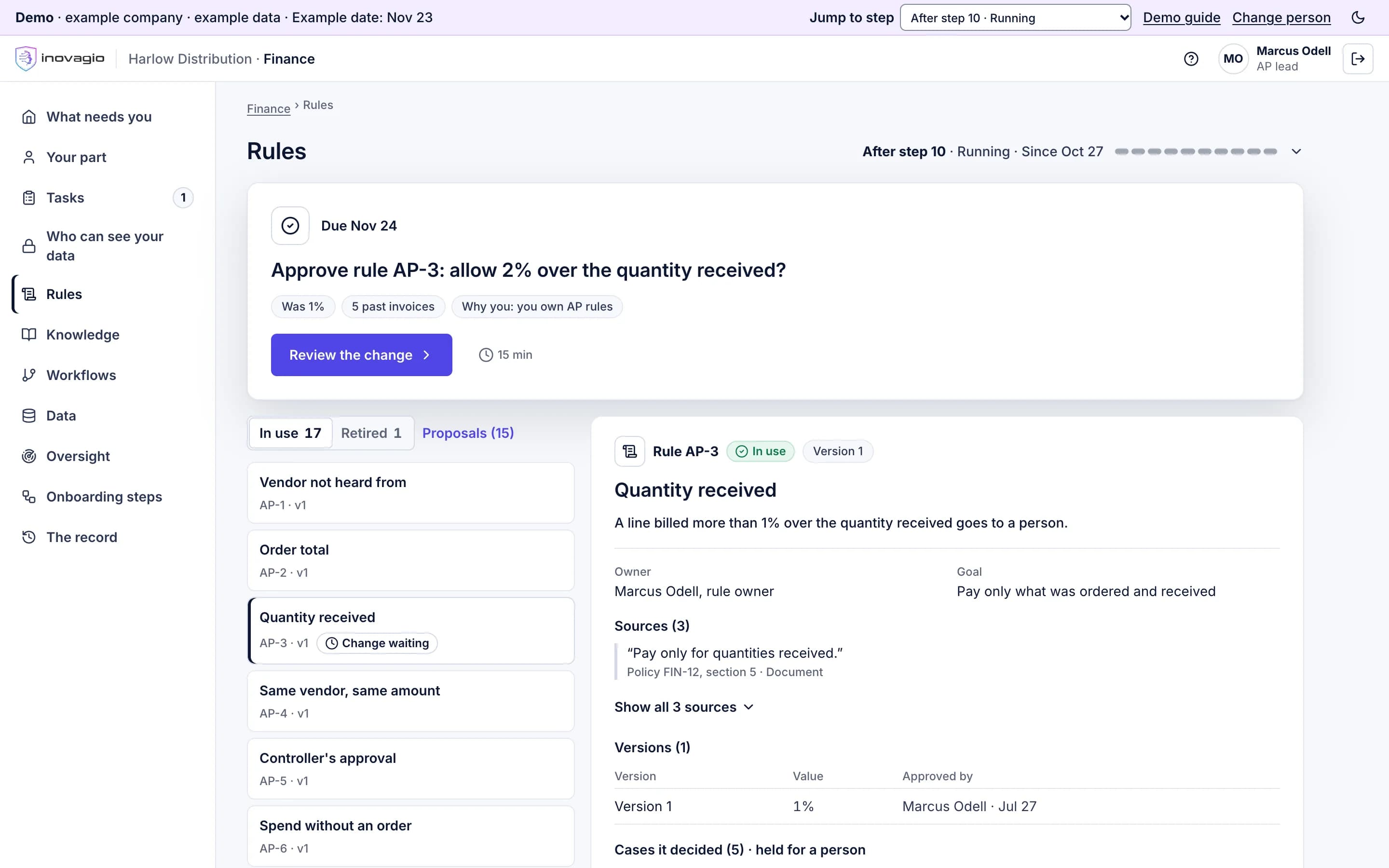
The Inovagio App’s rules for Harlow Distribution’s accounts payable, an example company: the AP lead is asked to approve a change to rule AP-3, allowing 2% over the quantity received instead of 1%; beside the rules in use, rule AP-3, Quantity received, with its owner, its goal, the policy it was quoted from and its versions.

How AI is deployed in your department, step by step.

The AI does as much of the work as it can. Our agents interview your people, and the AI maps your systems, checks your data, drafts the rules and tests them. Your people approve what only they can, and only where a rule needs them. Where the AI can’t do a part, such as building a connector we don’t have yet, our engineers help. You approve each of them by name, for named steps, until a set date.

Nothing works on live cases until it has passed a test on your past cases, been signed off by your experts, checked by someone who did not build it, and run beside your team in shadow mode. Each kind of case goes live only when it clears your bar. Every step is recorded in your account, and your sponsor can stop after any step. You don’t assemble products: each step brings the parts it needs, named on the step.

  1. Prepare

    Your account, a charter with a target and a way to stop, and sign-in where every Virtual Employee starts with no access.

  2. Learn

    Your systems mapped and connected read-only, your data checked and protected, and your people’s know-how written down in their words.

  3. Build

    Every rule with its source, its examples and its effect, in one version.

  4. Prove

    Tested on cases locked away first, signed off and checked, then run in shadow mode beside your team.

  5. Run

    Each kind of case goes live when it clears your bar, and every change is tested again.

People step in only where a rule needs them. Nothing works on live cases until it has been tested, signed off, checked and run beside your team.

Every step, shown on one workflow: vendor invoices.

What each step removes, who does what, what it touches and the check that closes it. Our engineers appear only where they help.

Shown on Harlow Distribution’s vendor invoices. Example company · example data · screens from the Inovagio demo.

  1. Step 0 · Account

    Open your account

    RemovesThe open-ended vendor login.

    Your account opens where you choose to run it, once the order and the data processing terms are recorded. Your administrator approves each of our people by name, for named steps, until a set date, and can end their access at any time.
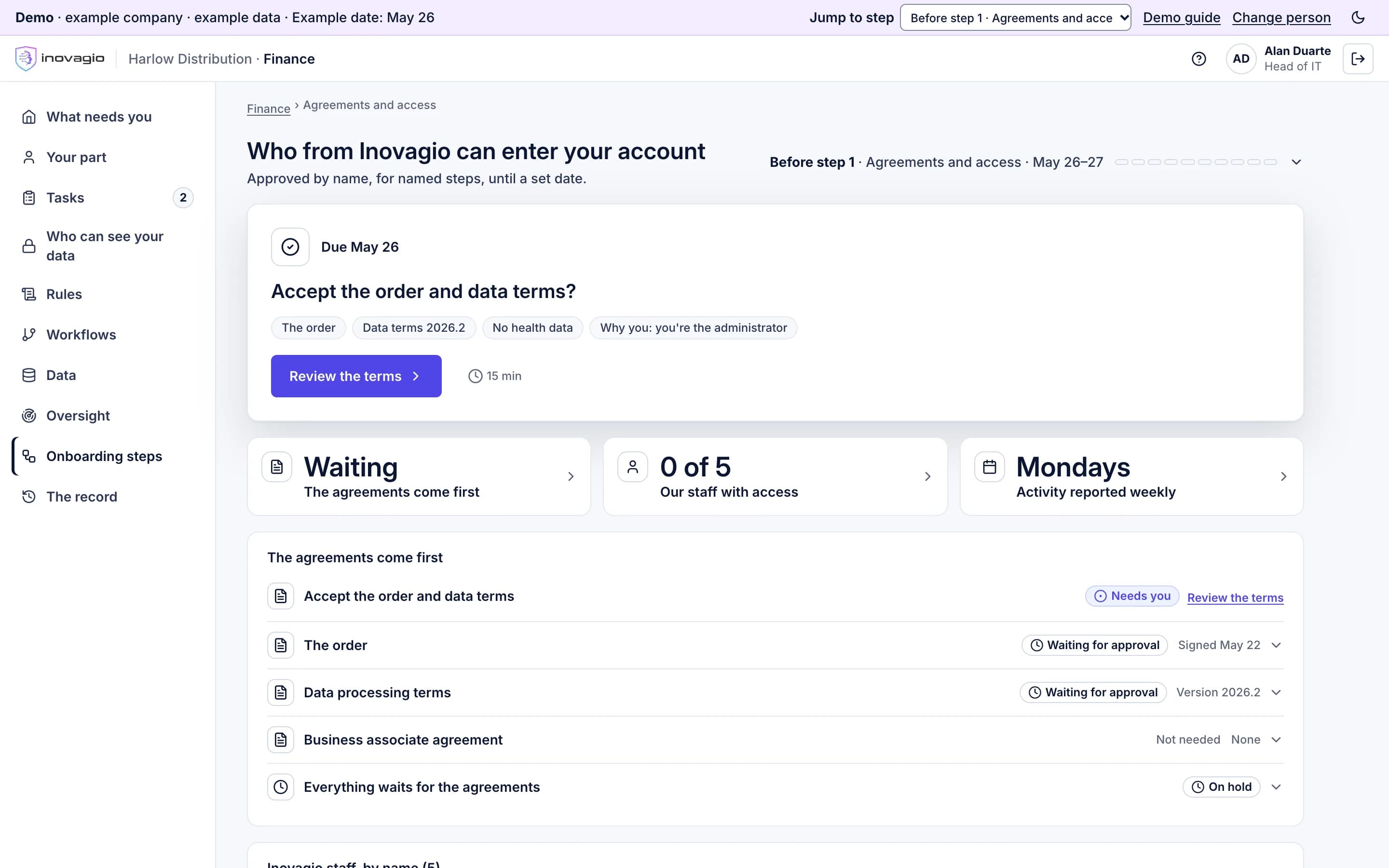
    Who from Inovagio can enter your account, before step 1 in the Inovagio App for Harlow Distribution, an example company: the head of IT, the administrator, is asked to accept the order and data terms; beside it, the agreements come first, none of the five Inovagio staff has access yet, and activity is reported every Monday; below, the agreements, with everything else waiting for them.
    Who does what, and how it closes
    The AI
    The platform opens your account from the signed order, where you chose to run it, sets up the department’s area in Build mode and invites your administrator.
    Your people
    Your administrator signs in with a passkey, accepts the agreements and approves our access: each person, their steps, an end date. Where you host it, your infrastructure team supplies the servers, network and certificates.
    Our people help
    Two of our operators open the account, each checking the other.
    What it touches
    None of your business records.
    Closes when
    The agreements are recorded, your administrator has signed in, and our access is approved before anyone from Inovagio, or the AI acting for us, works in your account.

    Products at work
  2. Step 1 · Charter

    Choose the work and sign the charter

    RemovesThe project with no finish line.

    The work is chosen using a published score, and your sponsor signs a target measured against today, a pass mark, a cost cap and a stop rule. Your legal, security, privacy and vendor-risk reviewers start at the same time, and your team hears about it before anyone is interviewed.

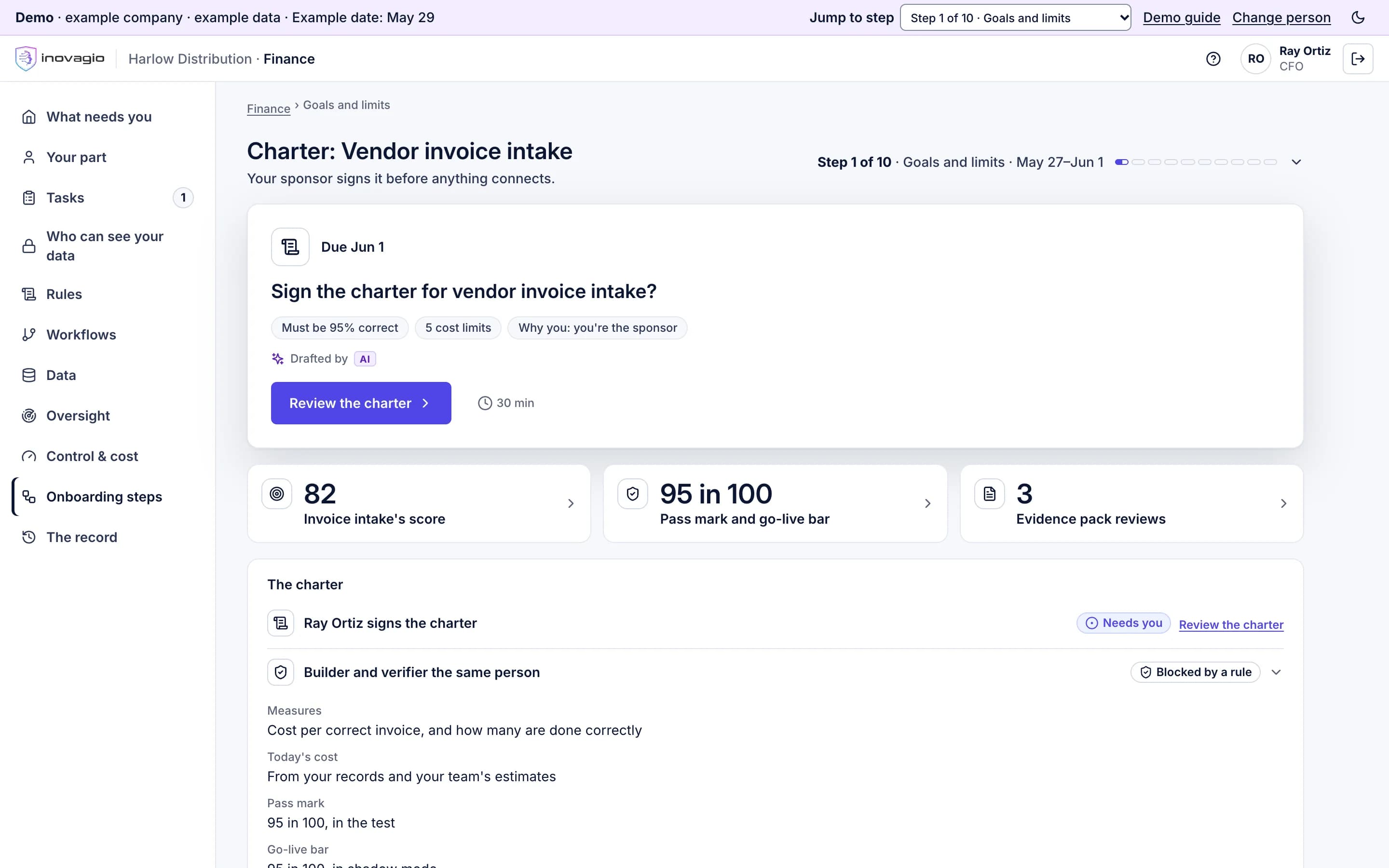
    Charter for vendor invoice intake, step 1 in the Inovagio App for Harlow Distribution, an example company: the CFO is asked to sign the charter (must be 95% correct, 5 cost limits); beside it, the workflow’s score of 82, the pass mark and go-live bar of 95 in 100, and 3 reviews of the evidence pack; below, the charter, where builder and verifier being the same person is blocked by a rule.
    Who does what, and how it closes
    The AI
    Scores the candidate workflows, then drafts the charter: measures against today, the pass mark, the go-live bar, the stop rule, cost caps and each person’s hours against a weekly cap. It drafts your reviewers’ evidence pack from the platform’s own records.
    Your people
    Your sponsor picks the workflow, sets the targets and signs. Legal, security, privacy and vendor risk review in parallel. Your team is told before any interview.
    What it touches
    None of your records.
    Closes when
    Every target is a number, every role has a backup, nobody both builds and verifies, everyone is within their weekly cap, the sponsor has signed and the team has been told.

    Products at work

  3. Step 2 · Set up

    Set up sign-in and access

    RemovesAI on a shared or borrowed login.

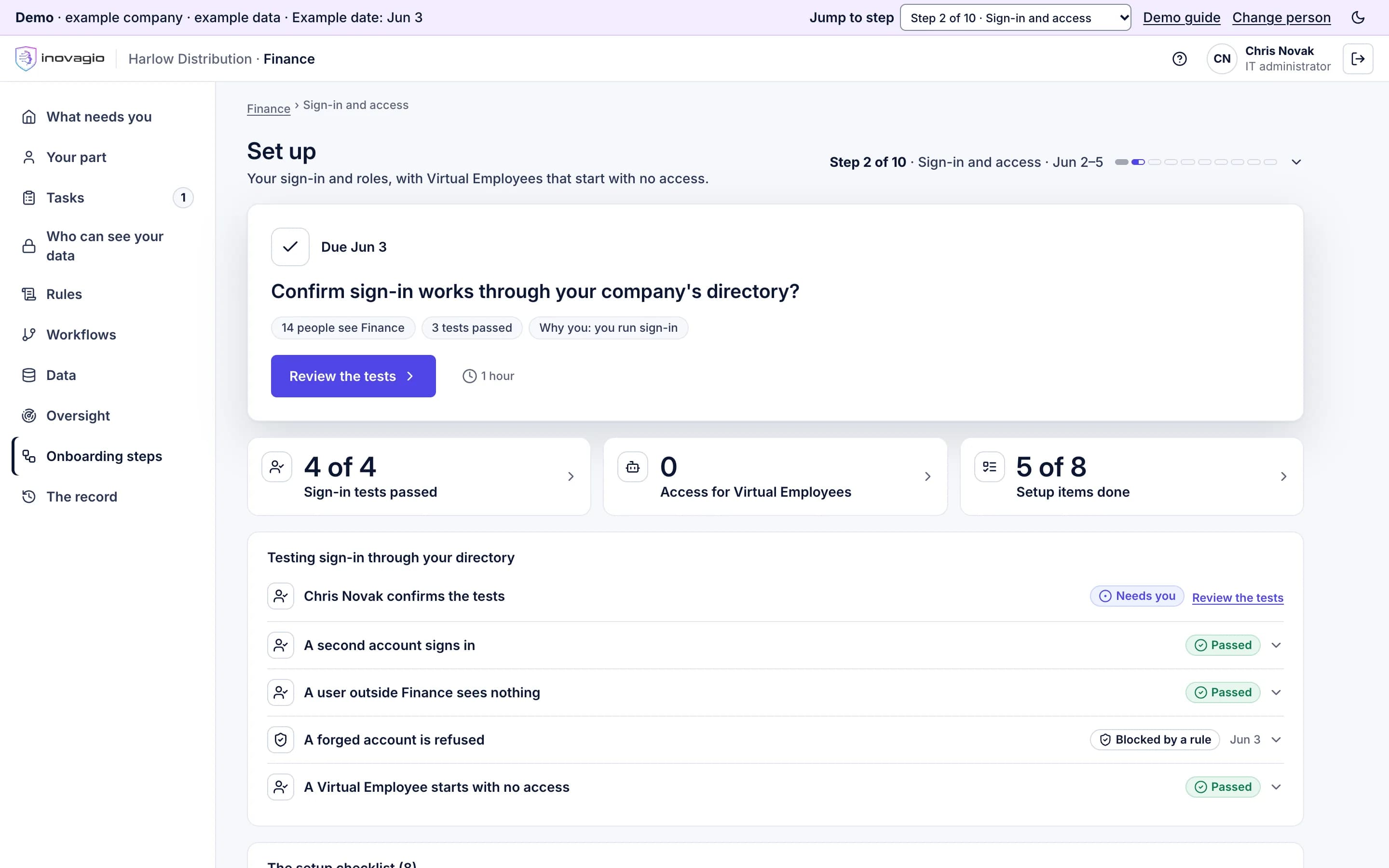
    Your people sign in with your company account. Every Virtual Employee gets its own identity that starts with no access, and tests prove someone outside the department sees nothing.

    Set up, step 2 in the Inovagio App for Harlow Distribution, an example company: the IT administrator is asked to confirm sign-in works through the company’s directory; beside it, 4 of 4 sign-in tests passed, no access for Virtual Employees, and 5 of 8 set-up items done; below, the tests: a second account signs in, a user outside Finance sees nothing, a forged account is refused.
    Who does what, and how it closes
    The AI
    Runs a set-up checklist filled in from the charter: your company sign-in and directory, roles, one identity per Virtual Employee, record retention and legal hold, extra locks for sensitive data, budgets. Then it runs the identity tests.
    Your people
    IT connects and tests sign-in. Privacy approves retention, legal hold and the extra locks.
    What it touches
    Your directory, for sign-in. No business records.
    Closes when
    A second account signs in, someone outside the department sees nothing, a forged account is refused, and no Virtual Employee holds any access.

    Products at work

  4. Step 3 · Map

    Map the work and connect, read-only

    RemovesThe surprise integration project.

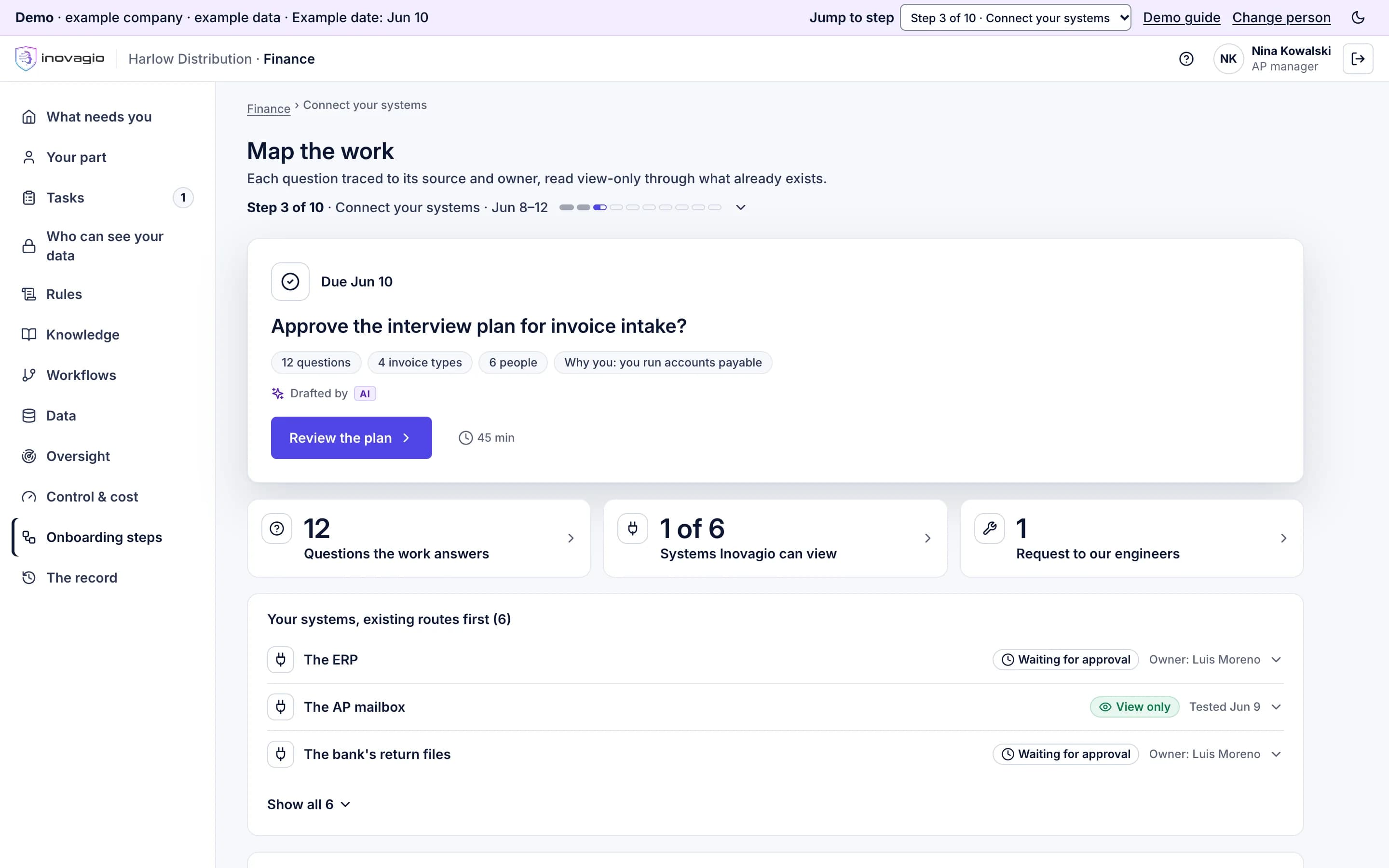
    We connect to each system the way it already allows, read-only and approved by its owner, reusing what exists first. Anything that needs building gets a named engineer and a date, or you choose to start without it.

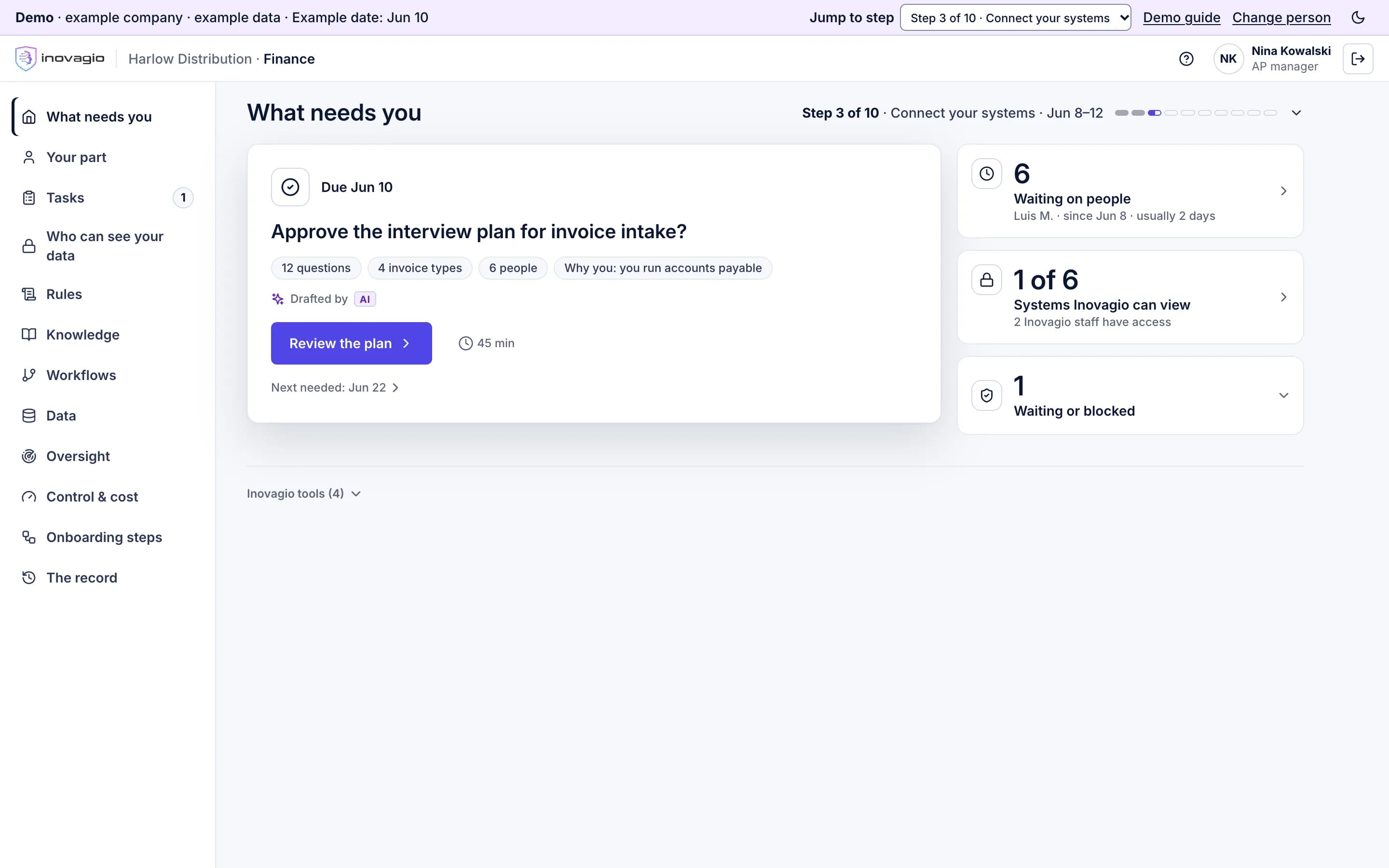
    Map the work, step 3 in the Inovagio App for Harlow Distribution, an example company: the AP manager is asked to approve the interview plan for invoice intake (12 questions, 4 invoice types, 6 people); beside it, 12 questions the work answers, 1 of 6 systems Inovagio can view, and 1 request to Inovagio’s engineers; below, the systems, existing routes first, each with its owner’s approval or its view-only test.
    Who does what, and how it closes
    The AI
    Proposes the questions the workflow must answer, the kinds of case, who to interview and the systems, with an owner for each source. For each source it takes the first route that already exists and tests the read-only connection.
    Your people
    The department head approves the plan. Each system’s owner approves read-only access, and security approves any AI connection a vendor publishes. The sponsor chooses to wait for a source or start without it.
    Our people help
    The engineer your charter names, ours or yours, builds any new connector, or a small connector inside your network.
    What it touches
    A read-only connection test for each system.
    Closes when
    Every question traces to a source with an owner, every source in scope has approved read-only access and a passing test, and every source left out has a reason and the sponsor’s choice.

    Products at work

  5. Step 4 · Data

    Check, protect and prove the data

    RemovesThe data surprise after go-live.

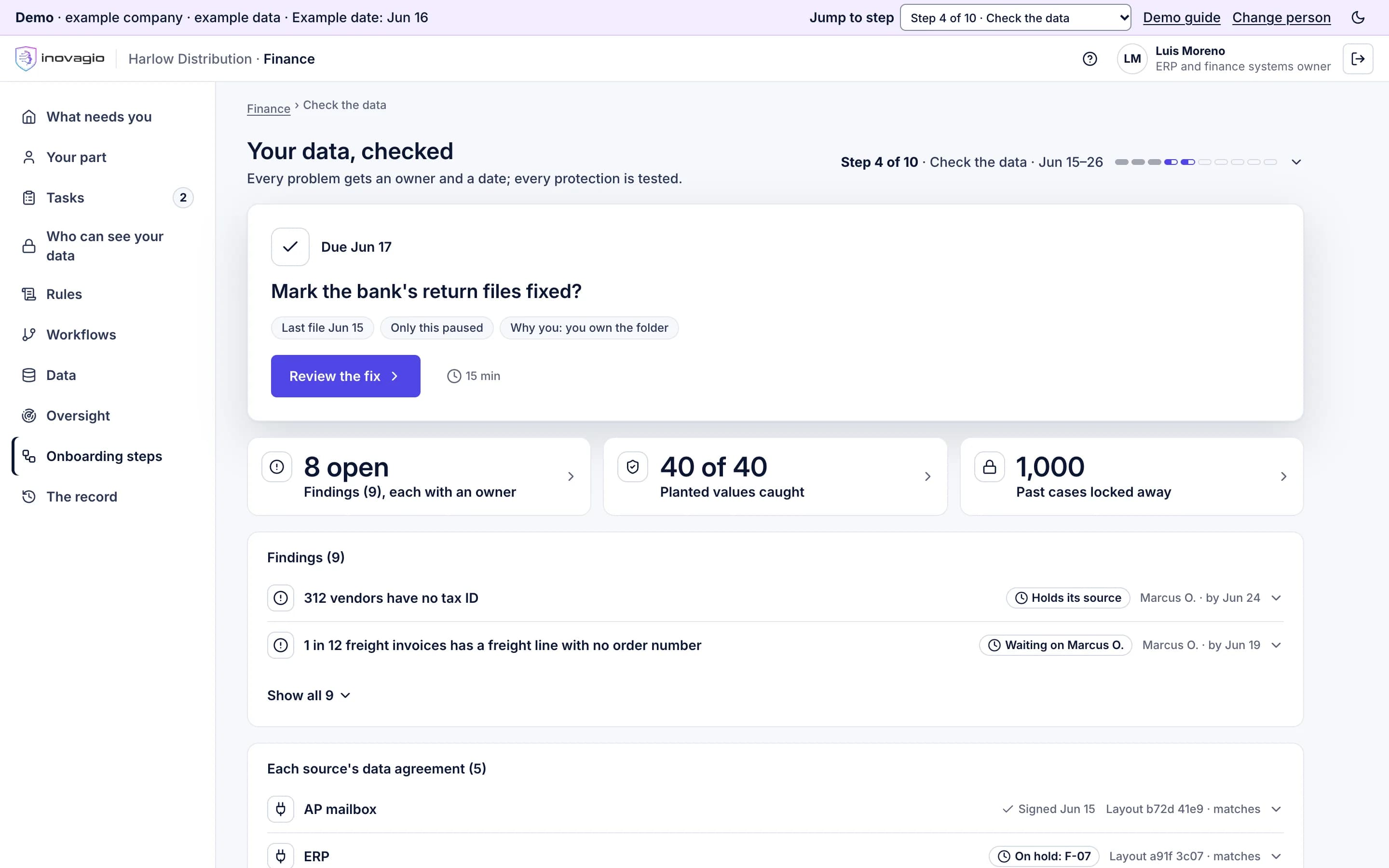
    Each problem found in your data gets an owner and a date, and the ones that block the work are fixed at the source by its owner. Each kind of sensitive data gets its protections, proven with planted test values, before the data is used.

    Your data, checked, step 4 in the Inovagio App for Harlow Distribution, an example company: the ERP owner is asked to mark the bank’s return files fixed; beside it, 8 of 9 findings open, each owned, 40 of 40 planted test values caught, and 1,000 past cases locked away; below, findings such as 312 vendors with no tax ID, holding its source, each with an owner and a date.
    Who does what, and how it closes
    The AI
    First locks away past cases for the test, before any model reads the data. Then it checks the fields that matter, finds duplicates and gaps, scans for sensitive data and lists every finding in plain words, with its fix.
    Your people
    Data owners accept each finding with an owner and a date, and fix it at the source. Privacy and security approve the protections. Each source’s owner signs its data agreement.
    What it touches
    Your records, read in place inside your account. The test copy, with names and identifiers replaced, stays in your account.
    Closes when
    Nothing blocking is open, the protections are approved and proven with planted test values, every source’s agreement matches the live system, and tests prove who can’t see what.

    Products at work
  6. Step 5 · Learn

    Learn from your people

    RemovesKnow-how that lives in a few people’s heads.

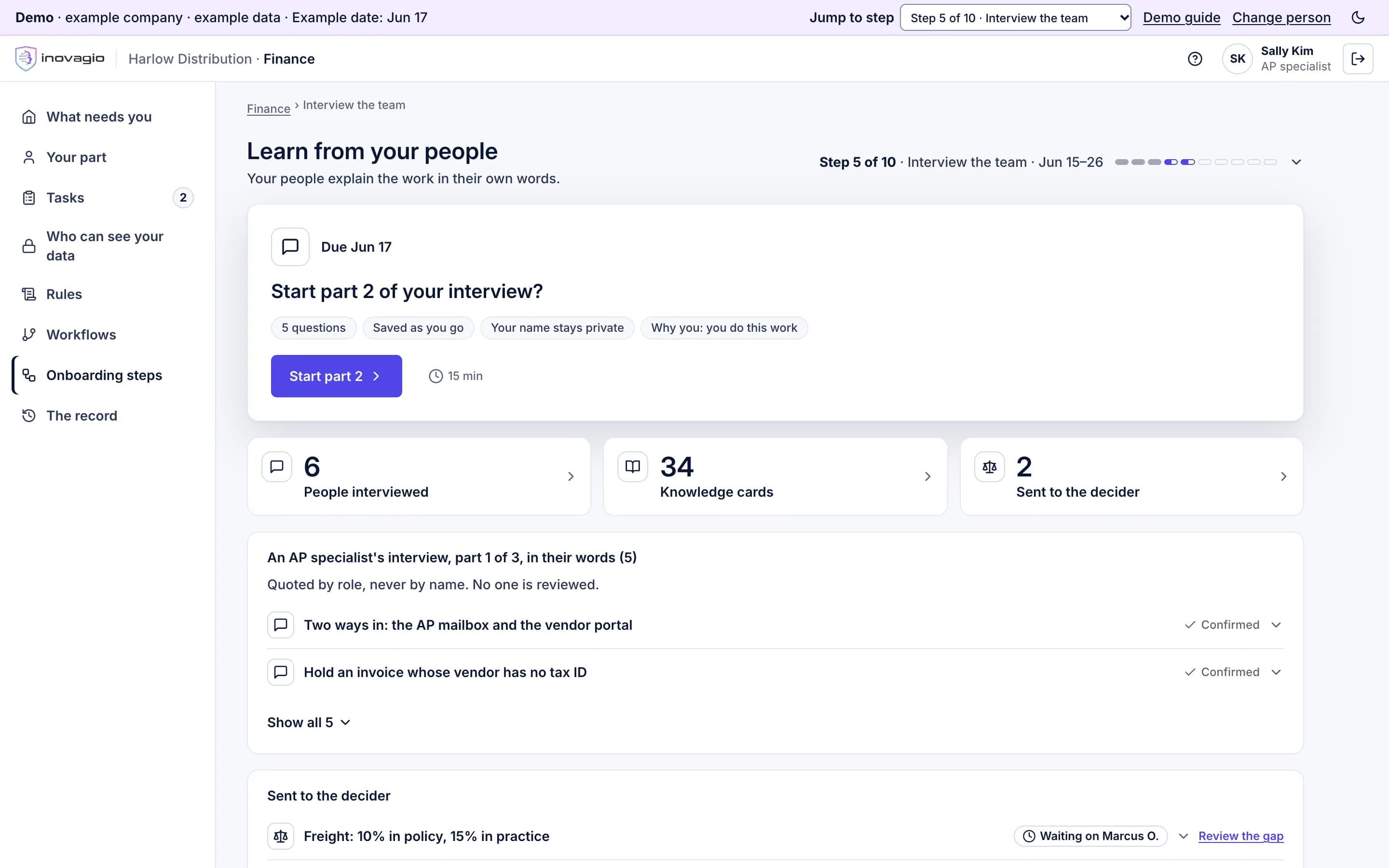
    Our agents interview your people at every level, write down what they say in their own words, and send each gap between policy and practice to the person who decides it, reported as a practice, never under the speaker’s name.

    Learn from your people, step 5 in the Inovagio App for Harlow Distribution, an example company: an AP specialist is asked to start part 2 of her interview (5 questions, saved as she goes, her name kept private); beside it, 6 people interviewed, 34 knowledge cards and 2 items sent to the person who decides them; below, her interview in her words, quoted by role, never by name, each answer confirmed by the speaker.
    Who does what, and how it closes
    The AI
    Interviews each level in parts of 15 minutes or less, then builds the knowledge layer from your documents, records and the interviews: your terms, your categories and how your records connect. Each card shows how much supports it.
    Your people
    Each person answers and confirms their own words. The person who decides settles each gap. The people who look after your terms decide each card, and two people approve any merge of payee records.
    Our people help
    While the AI is new to your kind of work, our knowledge engineer checks its proposals.
    What it touches
    Interviews, your documents, and records outside the locked test cases, with fields the work doesn’t need masked.
    Closes when
    Every decision point has a statement from someone who does the work and a decided rule, or an open item with the person who decides it.

    Products at work

  7. Step 6 · Build

    Build the release

    RemovesThe black box.

    Every rule shows the words it came from, its example cases and what it would have changed on your past work. Every decision has a rule or a route to a person, and everything that runs is pinned into one version with one fingerprint.

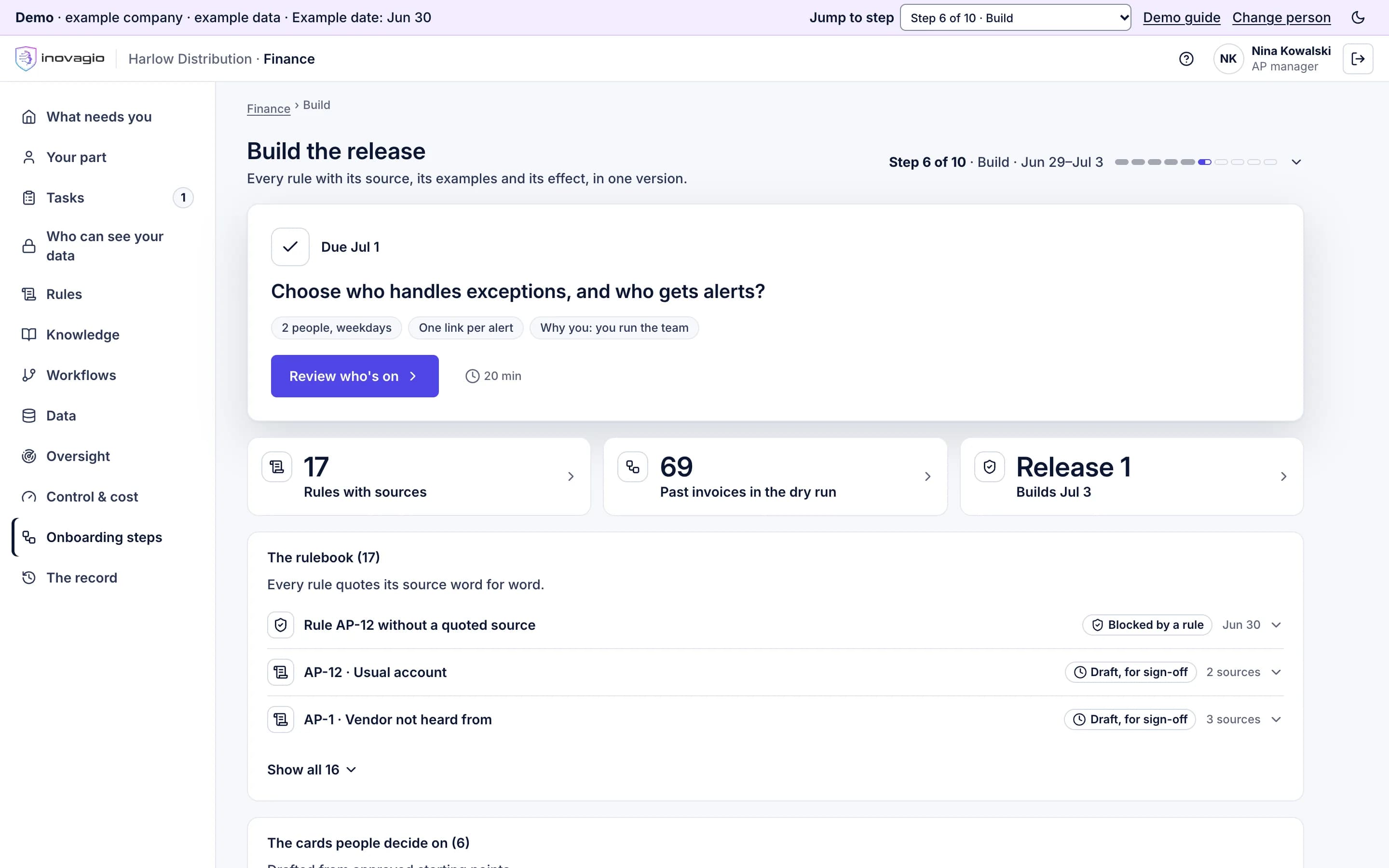
    Build the release, step 6 in the Inovagio App for Harlow Distribution, an example company: the AP manager is asked to choose who handles exceptions and who gets alerts; beside it, 17 rules each with its source, 69 past invoices in the dry run, and release 1; below, the rulebook, where a rule whose quote is not found word for word is blocked.
    Who does what, and how it closes
    The AI
    Drafts the workflow from the decided rules, shows each rule with its quoted source, its example cases and its effect on past work, sets up the four queues and pins everything into one release.
    Your people
    The builder your charter names edits what the AI couldn’t. The department head names who works each queue and who is told.
    Our people help
    Where your charter names our team as the builder.
    What it touches
    Past records outside the locked test cases, for each rule’s preview. Nothing new is connected.
    Closes when
    Every decision has a rule or a route to a person, every rule has an owner and a quote found word for word in its source, and every payment waits for a person.

    Products at work

  8. Step 7 · Test

    Test it, try to break it, fix it

    Removes“Trust us.”

    It is tested on your past cases, locked away before it was built, then attacked on purpose. Any kind of case that misses your pass mark stays with your people, and each failure becomes a rule someone has to decide.

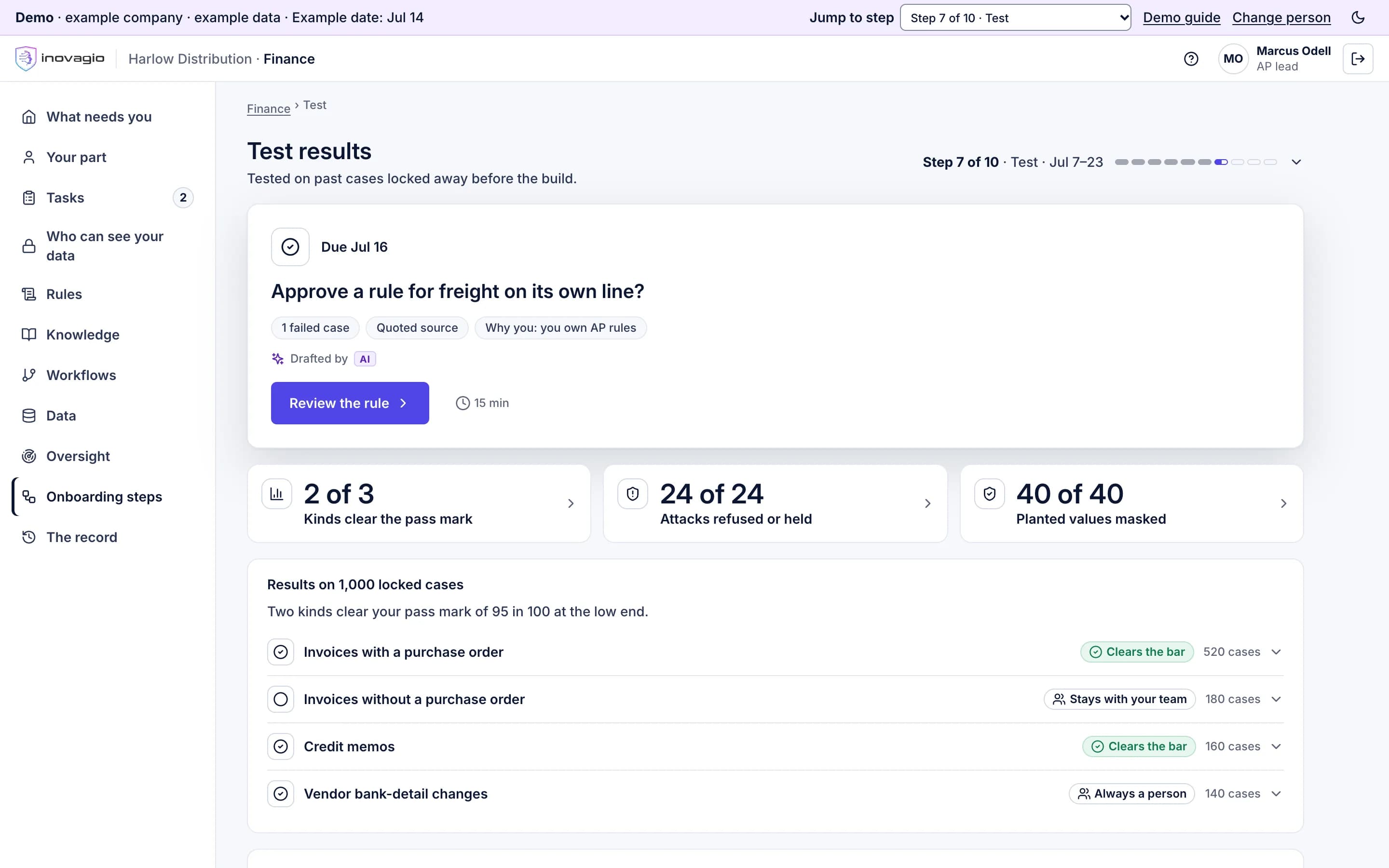
    Test results, step 7 in the Inovagio App for Harlow Distribution, an example company: the AP lead is asked to approve a rule for freight on its own line after one failed case; beside it, 2 of 3 kinds of case clear the pass mark, 24 of 24 attacks refused or held, and 40 of 40 planted values masked; below, results by kind of case on 1,000 locked cases: invoices with a purchase order clear the bar, and invoices without one stay with the team.
    Who does what, and how it closes
    The AI
    Runs the test set built from your locked past cases, per kind of case, and the attack tests: instructions hidden in documents and email, attempts to pull data out, tools used for the wrong job. Each failure goes to a rule owner.
    Your people
    Your experts decide the sampled answers. Each rule’s owner decides each new rule.
    Our people help
    Our security lead tries to break the first department of each new kind of workflow by hand.
    What it touches
    The locked test cases.
    Closes when
    For each kind of case, the cautious end of the range meets the pass mark on enough cases, with no errors that would pay or approve wrongly, and every attack is refused or contained.

    Products at work

  9. Step 8 · Sign off

    Sign off and verify

    Removes“Who approved this?”

    Each rule is decided on its own by its owner, and nobody approves their own change. Someone who did not build it checks the work, and your sponsor signs the exact version that will run.

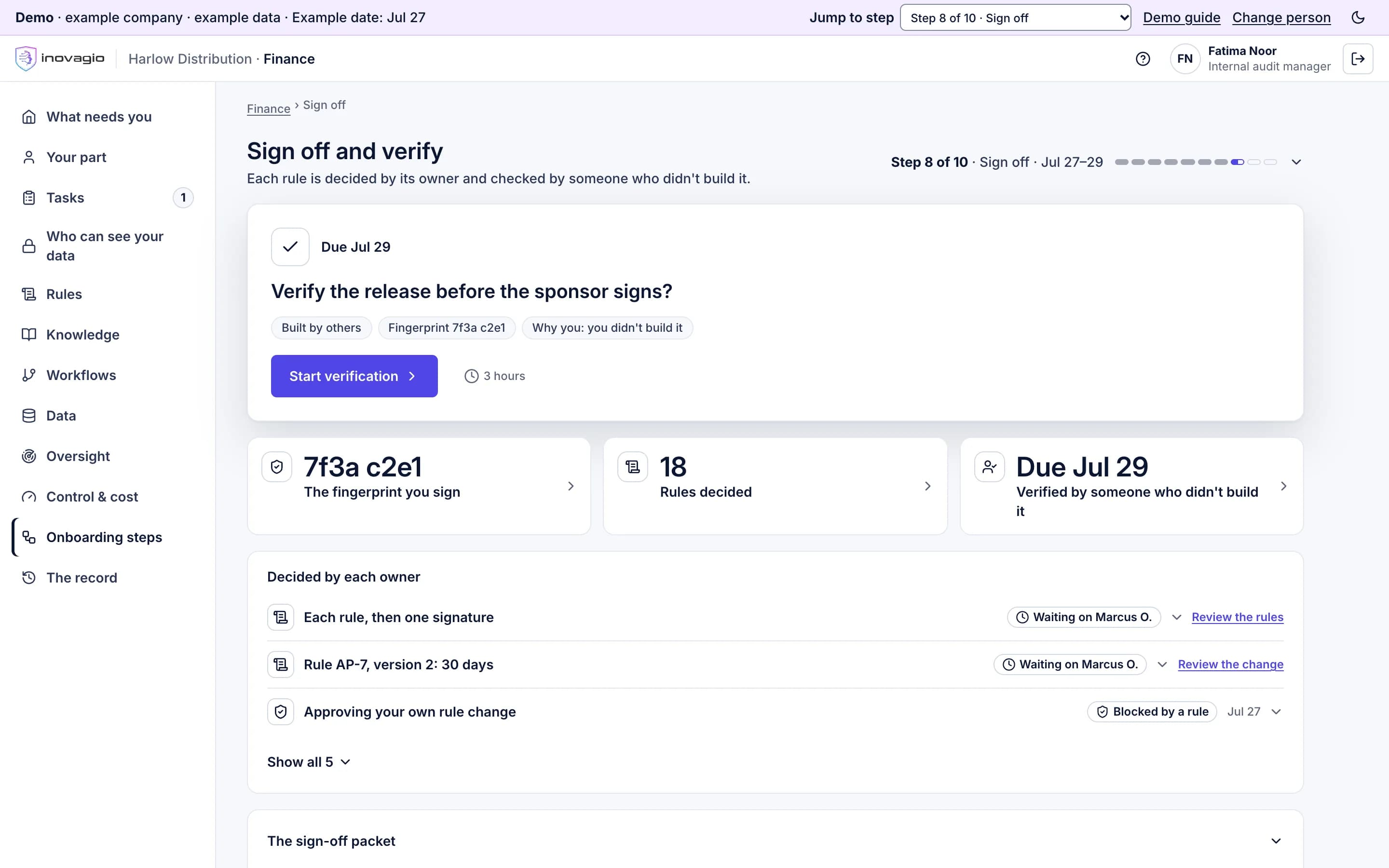
    Sign off and verify, step 8 in the Inovagio App for Harlow Distribution, an example company: the internal audit manager, who did not build it, is asked to verify the release before the sponsor signs; beside it, the fingerprint the sponsor signs, 18 rules each decided by its owner, and her check due July 29; below, each owner’s decisions, and approving your own rule change blocked by a rule.
    Who does what, and how it closes
    The AI
    Assembles one sign-off packet for the release’s fingerprint: every rule with its sources, the test and attack results, each protection shown met, and the incident plan. It checks every approval in code.
    Your people
    Rule owners decide each rule, never their own, then sign once. Someone who did not build it replays a sample and confirms the fingerprint. Then the sponsor signs the checked release.
    What it touches
    Test results and replays.
    Closes when
    Every approval comes from different people and none from a change’s author, and the fingerprint the sponsor signed is the one that was checked.

    Products at work

  10. Step 9 · Shadow

    Run in shadow mode and prepare the team

    RemovesThe leap of faith from test to live.

    On live work its drafts stay hidden until your reviewer decides, so your team works as usual with no double entry. A kind of case goes live only when its results clear the bar you set, and the people who will handle exceptions are trained first.

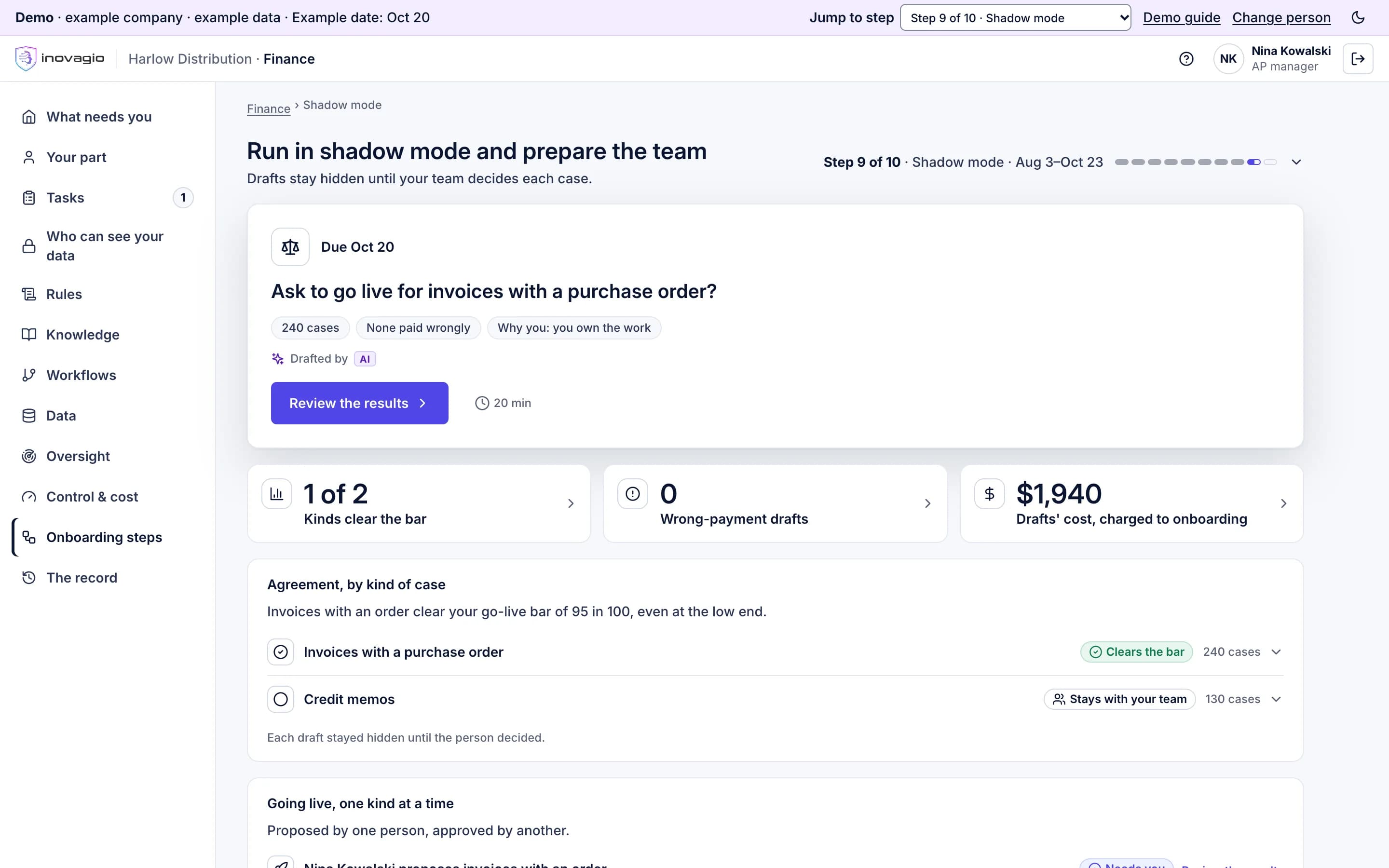
    Run in shadow mode and prepare the team, step 9 in the Inovagio App for Harlow Distribution, an example company: the AP manager’s task is to ask to go live for invoices with a purchase order (240 cases, none paid wrongly); beside it, 1 of 2 kinds of case clear the go-live bar, no draft that would have paid wrongly, and what the drafts cost the onboarding; below, agreement by kind of case: invoices with a purchase order clear the go-live bar of 95 in 100 even at the low end, credit memos stay with the team, and each draft stayed hidden until a person decided.
    Who does what, and how it closes
    The AI
    Runs the signed release on live work, read-only, each draft hidden until your reviewer has decided. It measures agreement per kind of case and counts any draft that would have paid or approved wrongly on its own.
    Your people
    Your team works as usual. A senior expert decides sampled disagreements without seeing who decided. Reviewers are trained, and going live is proposed by one person and approved by another.
    What it touches
    Live work, read-only. Your team’s decisions, read from the system they already use.
    Closes when
    For each kind of case, the cautious end of the range clears the go-live bar on enough cases, the incident drill is done and the reviewers are trained. The rest stay with your people.

    Products at work

  11. Step 10 · Live

    Go live, one kind of case at a time

    RemovesThe big-bang switch.

    Kinds of case go live one at a time, spot-checked first. Write access is granted one action at a time and expires, moving money always needs a person, and our engineer is on call through the support window.

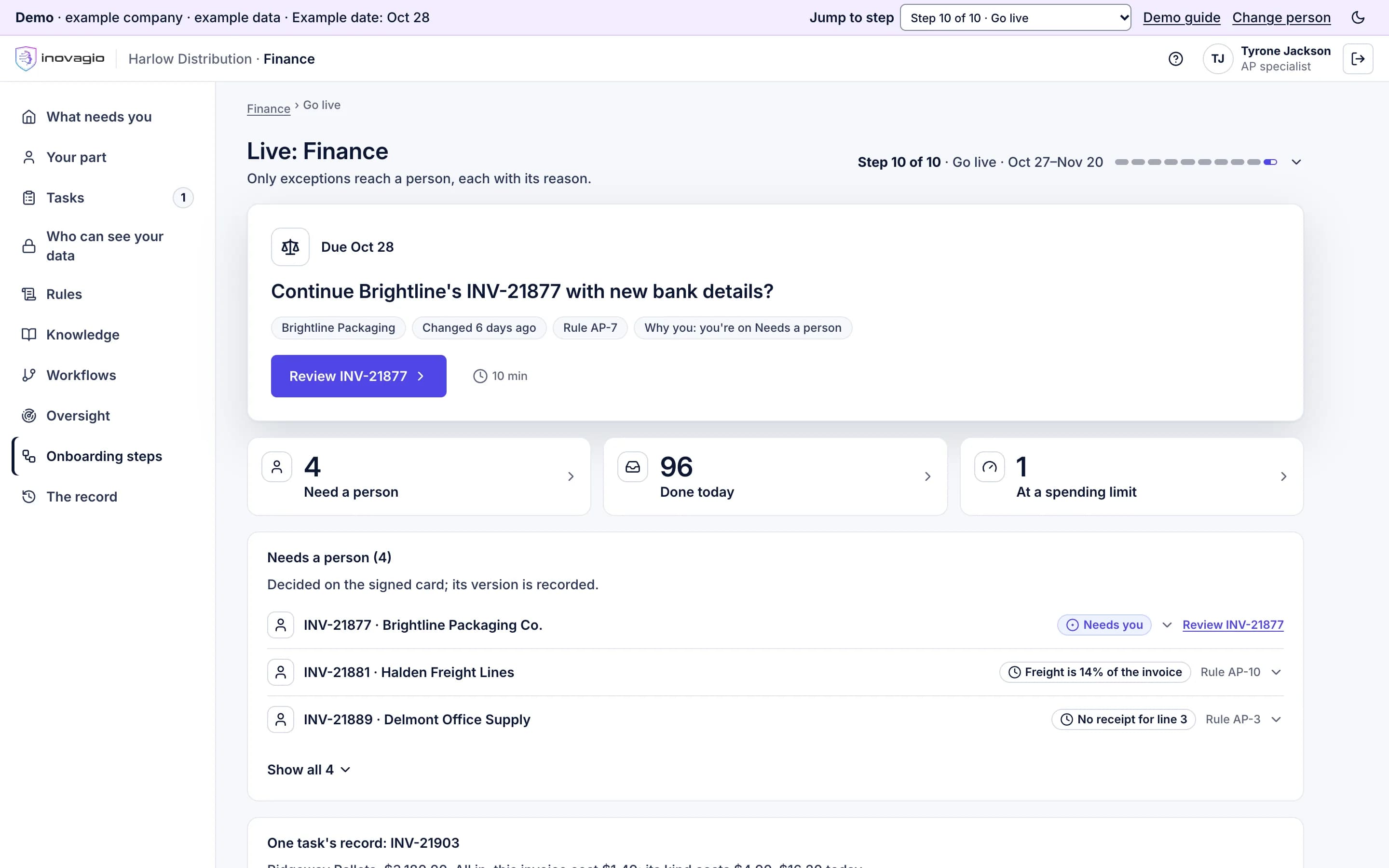
    Live: Finance, step 10 in the Inovagio App for Harlow Distribution, an example company: an AP specialist is asked whether to continue an invoice whose vendor’s bank details changed six days ago, under rule AP-7; beside it, 4 items needing a person, each with its reason, 96 done today, each with its record, and 1 task waiting at a spending limit; below, Needs a person, each item with the rule that held it.
    Who does what, and how it closes
    The AI
    Switches each approved kind of case to live, with spot checks first. Each write permission covers one action, limited and set to expire, and releasing money stays locked to a person.
    Your people
    Reviewers work what reaches Needs a person, each item with its reason. The sponsor confirms when the support window closes.
    Our people help
    Our on-call engineer, through the support window.
    What it touches
    Live work, inside the permissions granted one action at a time.
    Closes when
    No open incident, every kind of case within its go-live bounds, and the version running is the one signed and checked.

    Products at work

  12. After go-live · Operate

    Operate: watch, re-test, decide

    RemovesSilent drift, and spend nobody can justify.

    Every change, from a rule to a model upgrade, is tested again, signed and checked before it reaches live work, and can be rolled back. At each review your forum sees the measures against today and decides to continue, expand or retire.

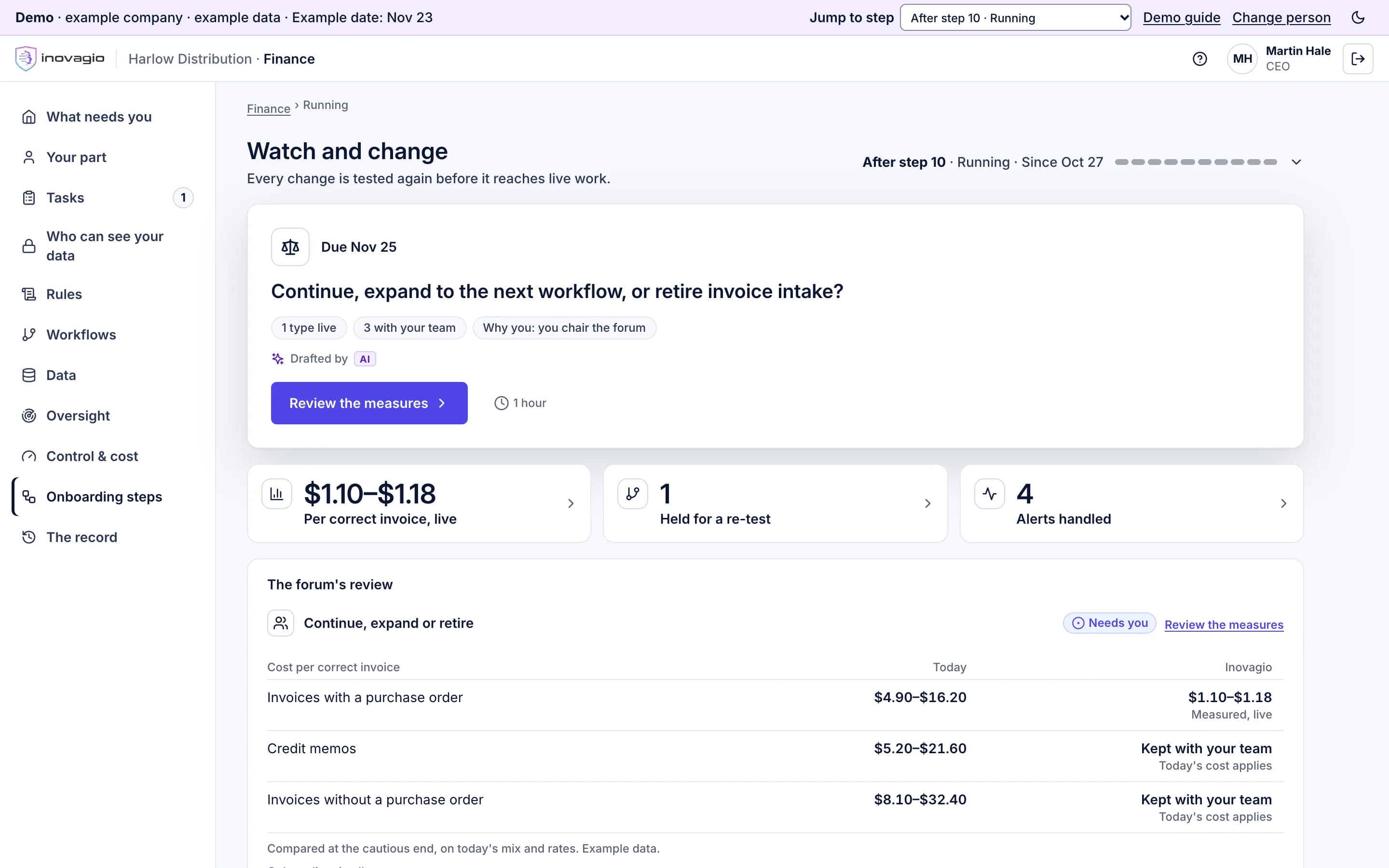
    Watch and change, after go-live in the Inovagio App for Harlow Distribution, an example company: the CEO is asked whether to continue, expand to the next workflow or retire invoice intake; beside it, the measured cost per correct invoice, 1 change held for its re-test, and 4 alerts, each handled; below, the forum’s review of each kind of case against what the work costs today, counted the same way.
    Who does what, and how it closes
    The AI
    Turns every change into a new release that is tested before it reaches live work, runs a weekly set of known cases, checks freshness and drift, and holds cost against its caps.
    Your people
    Rule owners approve changes and data owners confirm their sources again. At each review your forum decides to continue, expand to the next workflow, or retire it.
    What it touches
    Live work, and a weekly set of known cases.
    Closes when
    Each change is tested again, signed and checked before it is live. Each review’s decision is recorded with its evidence.

    Products at work

  13. Every step

    Every step is on the record, in your account.

    Every step, task, approval and connection leaves a record in your account: who acted, under which rule, on what, and what happened. Inovagio receives only status fields: the step, its state and dates, whether each check passed, and counts.

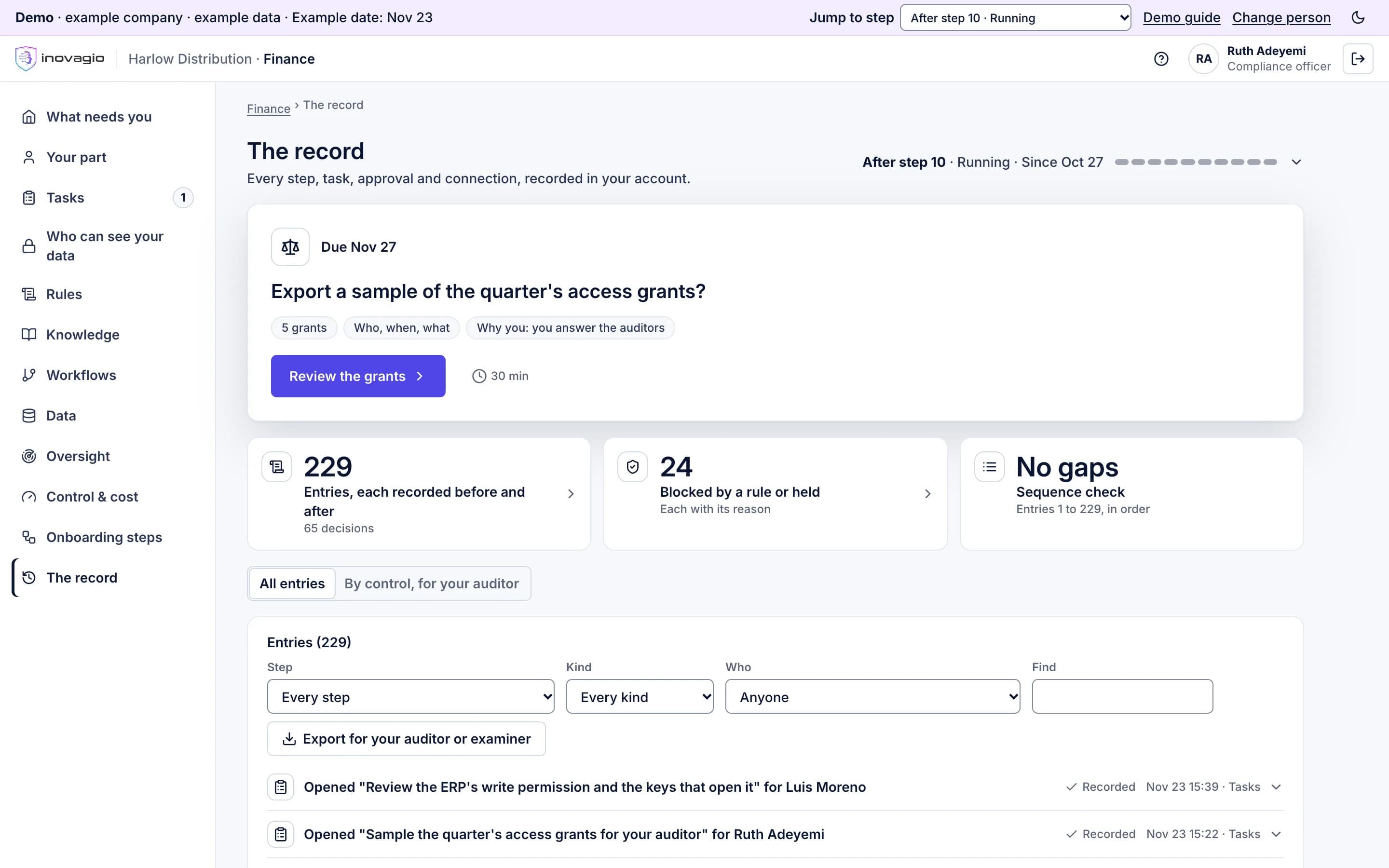
    The record in the Inovagio App for Harlow Distribution, an example company: the compliance officer is asked to export a sample of the quarter’s access grants for the auditors; beside it, 229 entries, each recorded before and after, 24 blocked by a rule or held, each with its reason, and no gaps in the sequence; below, every entry, filterable by step, kind and person, with an export for your auditor or examiner.
Who from Inovagio can enter your account, before step 1 in the Inovagio App for Harlow Distribution, an example company: the head of IT, the administrator, is asked to accept the order and data terms; beside it, the agreements come first, none of the five Inovagio staff has access yet, and activity is reported every Monday; below, the agreements, with everything else waiting for them.

The Inovagio App. Step 0: the agreements first, then each Inovagio person approved by name, for named steps, until a set date.

One account, five run modes, one kind of case at a time.

Your records stay in your account. The department and each kind of case move through these modes, and each move is a recorded approval.

  1. Build

    Rules and the workflow are drafted and previewed on past work. Nothing touches live work.

  2. Test

    Run on your past cases, locked away before it was built, then attacked on purpose.

  3. Shadow

    Run on live work with every draft hidden until your reviewer decides. Your team works as usual.

  4. Live with spot checks

    A kind of case that cleared the go-live bar does the work, and people check a sample your rules set.

  5. Live

    Only exceptions and approvals your rules require reach a person, each with its reason.

No separate copy of your business

A separate sandbox is used only to build connectors against a vendor’s own test system and generated data.

The test copy stays yours

With names and identifiers replaced, it is still your data: it stays in your account, in a restricted area, and never reaches a sandbox or Inovagio.

One release, one fingerprint

The workflow, rules, data agreements, model versions and policy are pinned into one release. Any change makes a new release that is tested again.

Four queues, and only exceptions reach a person.

Step 6 sets the queues up and names who works each one. The queues, the rules and the record live in one place.

  1. 1

    Incoming

    Requests arrive from email, another department or a system, and the department’s Virtual Employee picks them up.

  2. 2

    Ready to work

    Each request is checked against the team’s, the department’s and the company’s goals, or sent back with the reason.

  3. 3

    Done

    Work finished inside your approved rules, every step recorded, with the spot checks your rules set.

  4. Or

    Needs a person

    A check failed, a rule is missing or a rule says a person decides. The named person gets one task with the reason and the evidence.

A vendor invoice, from the inbox to the ledger.

The invoice arrives. A Virtual Employee reads it, matches it to the purchase order and the receipt, and applies your rules. Here the vendor’s bank details changed by email, so the task waits for the person your rules name, with the reason on the card.

  • The record keeps the inputs, the rules and their versions, and every check.
  • It names who decided, the model and its version, and the task’s cost.
  • Replay shows the task again, step by step, from what was recorded.
See invoices in finance operations
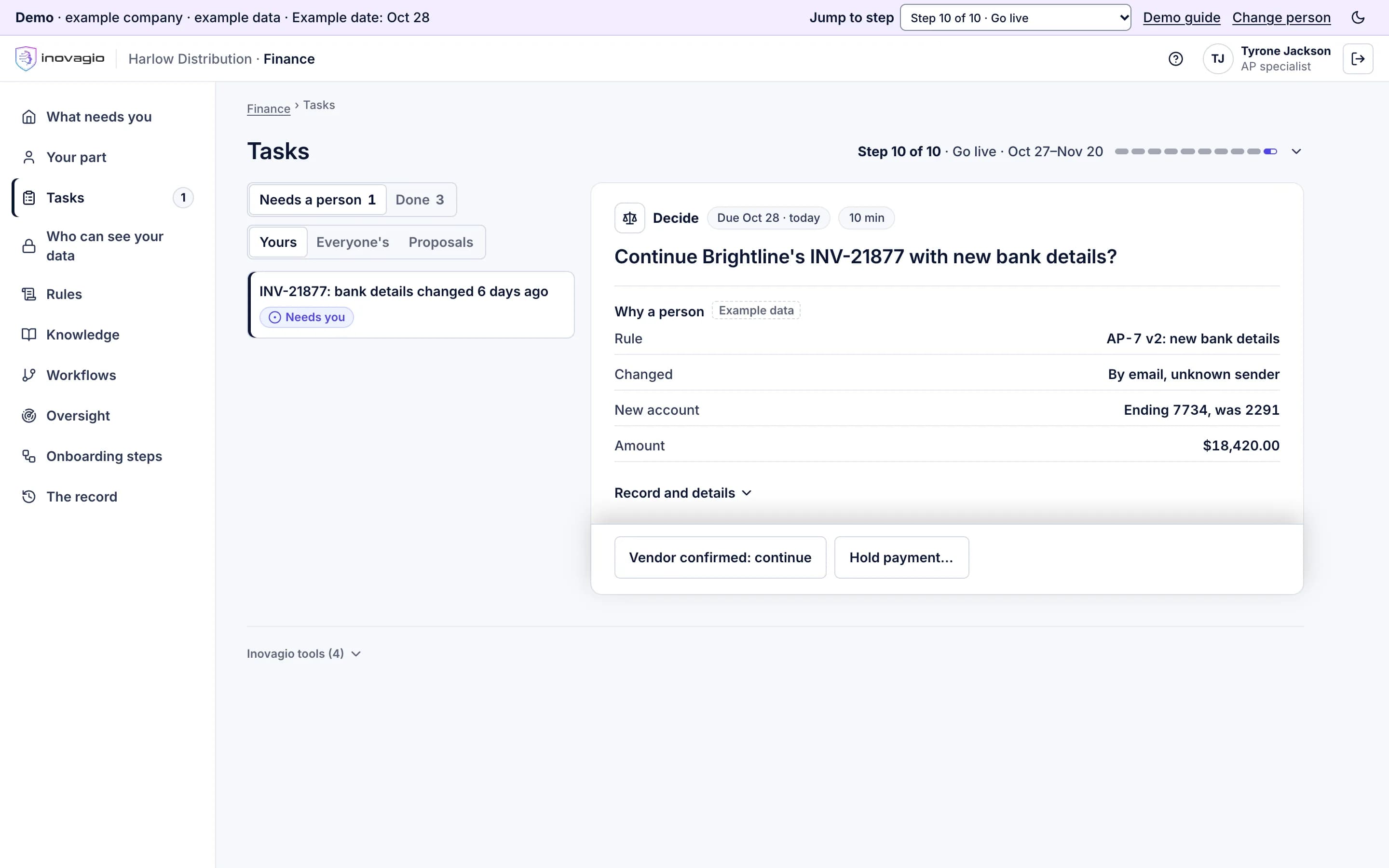
A task in the Inovagio App for Harlow Distribution, an example company: an AP specialist is asked whether to continue Brightline’s invoice INV-21877 with new bank details; the card shows why a person decides (rule AP-7, version 2: the bank details changed by email from an unknown sender), the new account and the amount, and two decisions: continue once the vendor confirms, or hold the payment.

An invoice held for a person: the rule that held it, the evidence and the decision on one card.

A task it can’t finish points to a missing rule.

  1. The task stops

    It moves to Needs a person with the reason, the evidence and the rule it tried to apply.

  2. The right person is told

    One task, with the failed case and the question, goes to the person your rules name.

  3. The answer becomes a rule

    It is drafted as a new or changed rule, and the rule’s owner decides it. Nobody approves their own change.

  4. Tested again before it runs

    The change makes a new release, re-run on the test set and every past failure, signed and checked, with rollback.

  5. Every worker uses it

    Once it is live, every Virtual Employee on that work follows the new version of the rule.

Your measures, counted the same way as today.

Your charter sets two or three measures, each against today’s baseline, and these two are always among them. Each is reported per kind of case, never per person.

Cost per correct task

The AI, the platform’s share and your people’s minutes at your rates, divided by the tasks done correctly. Today’s process is counted the same way, from your records and your team’s estimates. No one is timed.

Share of tasks done correctly

Correct means it matches your records or your reviewer’s decision. It is measured on every task a person reviews and on audited samples of the rest.

One workflow, then the next.

  1. Briefing · a 30-minute call
  2. Prepare · steps 0 to 2
  3. Working session · five days, in your account
  4. Connect, build and prove · steps 3 to 8
  5. Shadow mode · beside your team
  6. Run · your team, ours or both
The four ways to buy, on Pricing

Your AI implementation plan: who does what, and when.

We run the same workflow inside your account, whichever way you work with us. The AI does as much of the work as it can, and our engineers help only where it can’t.

  • Two of our people open your account, each checking the other, and our engineers build any connector our catalog doesn’t have.
  • They check the AI’s work for your first departments, try to break the first release of each new kind of workflow, and stay on call through go-live.
  • Your administrator approves each of them by name, for named steps, until a set date, and can end their access at any time. Both are recorded.
Who can see your data, on Trust
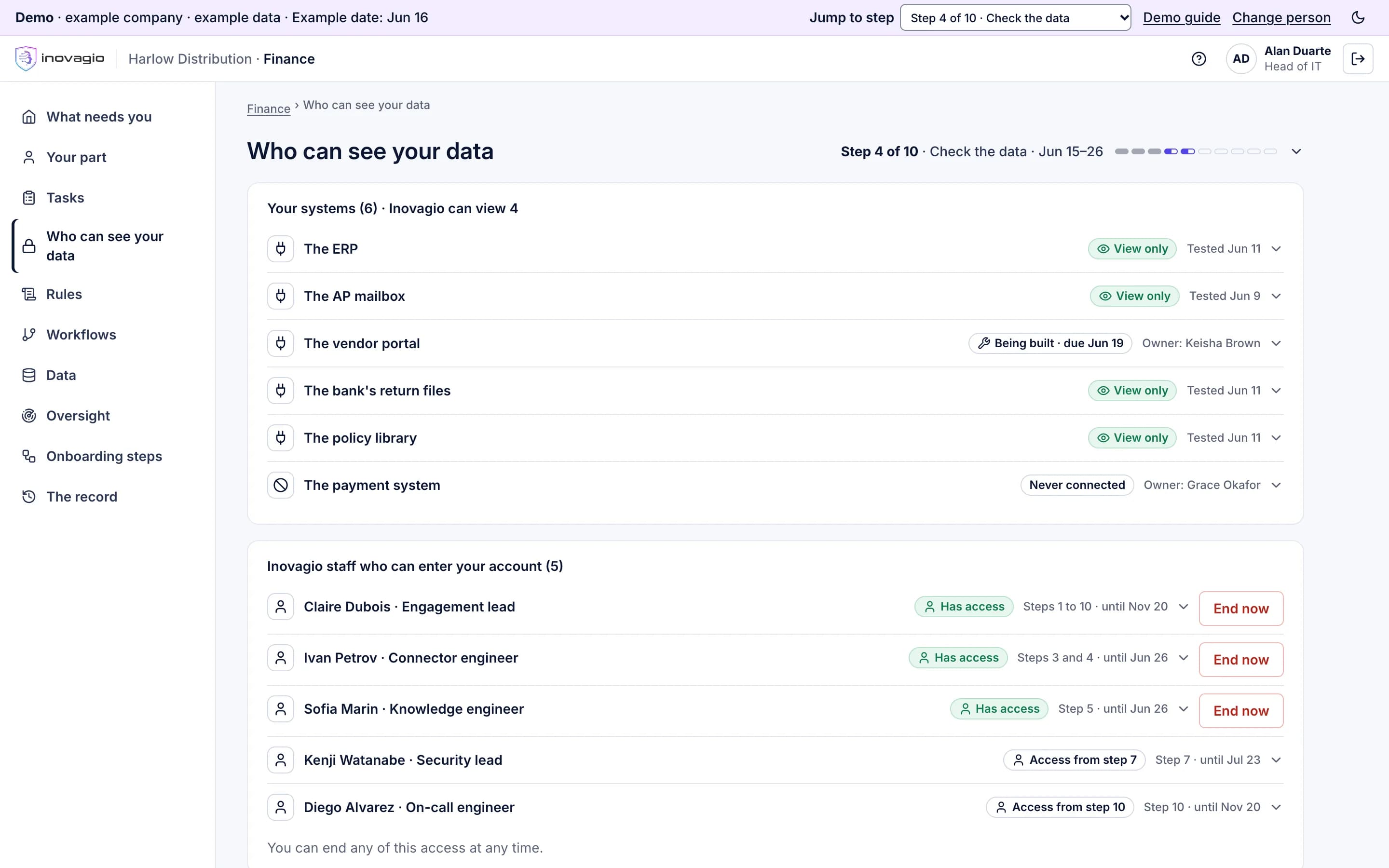
Who can see your data, at step 4 in the Inovagio App for Harlow Distribution, an example company: the six systems, four of them view only, the vendor portal’s connector being built and the payment system never connected; then the five Inovagio people who can enter the account, each with their steps and the date their access ends, three with access now and an End now button, two from a later step.

Who can see your data: every system's access, and every Inovagio person with their steps and end date.

What each person is asked, and at which step.

Every ask is one task with its evidence, sent only where a rule needs a person. Before the charter is signed, each person sees their asks and their hours against a weekly cap, and every role has a backup.

  1. Your sponsor

    Picks the workflow, signs the charter and the checked release, and chairs each review.

  2. The department head

    Approves the kinds of case and who is interviewed, names who works each queue, and proposes each go-live.

  3. The people who do the work

    Answer interviews in parts of 15 minutes or less, work as usual in shadow mode, then handle what reaches Needs a person.

  4. Rule owners

    Decide each rule and each new one, never their own, and approve every change after go-live.

  1. Data and system owners

    Approve read-only access, fix each finding at the source, and sign the data agreement.

  2. Your administrator and IT

    Approve each of our people by name, connect and test sign-in, and install any small connector inside your network.

  3. Legal, security, privacy and vendor risk

    Review the evidence pack in parallel, then approve retention, the extra locks and the protections.

  4. Someone who built none of it

    Replays a sample, repeats some attacks and confirms the release’s fingerprint, then checks later changes.

Your team is told, and any works council or union consulted, before the first interview. An interview is never a performance review, and results are measured per kind of case, never per person.

If an ask waits: a reminder, then your backup, then the sponsor.

Escalation runs the way the charter says. Each person sees one next step: why them, about how long, and when they’ll next be needed. Everyone can see who the work is waiting on, and since when.

  • First a reminder, with the task and its evidence.
  • Then the person’s backup, who can act in their place.
  • Then the sponsor, who can wait, name someone else, or set that part aside with a reason.
  • Nothing is approved because time ran out, and each slip shows its new date.
  • Your sponsor can stop after any step. Retiring a workflow ends our access, returns or deletes the data, and keeps the records.
Every way to stop it, on Control and cost
What needs you, in the Inovagio App for the AP manager at Harlow Distribution, an example company: one question to decide, about how long it takes and why her, and who the work is waiting on, since when and how long it usually takes.

One next step for each person, and who the work is waiting on, since when.

Use our layer, or bring your own.

LayerInovagio providesOr bring your own
Layer: ModelsInovagio provides: Origin: open models on your hardware, or a frontier modelOr bring your own: Your model provider, behind the same interface
Layer: DataInovagio provides: MNEMOS: records, documents and the AI’s memory in one engine, with a record of every changeOr bring your own: The databases you already run
Layer: KnowledgeInovagio provides: Synesis: the rulebook your experts approveOr bring your own: Your existing categories and documents, imported
Layer: Virtual EmployeesInovagio provides: Virtual Employees: workers with approvals and a stop buttonOr bring your own: Your own automation, under the same policy and record
Layer: ScreensInovagio provides: Opsis: card apps on desktop, web and phoneOr bring your own: Your applications, reading the same data
Layer: IdentityInovagio provides: Phylax: sign-in, secrets and policyOr bring your own: Your company sign-in

Answered in a line or two.

How long does it take?

The working session is five days. The time from the charter to the first kind of case going live depends on your sources and your reviews, so the charter dates every step, and every slip shows its new date.

Does it see our data before we sign anything?

No. Nothing connects until the agreements are recorded and the charter is signed, and every connection starts read-only, approved by the system’s owner.

What if our data isn’t ready?

Step 4 finds out before anything is used: each problem in plain words, with an owner and a date. Owners fix what blocks the work at the source, before the test.

What happens when it gets something wrong?

In test it stays with your people until it passes. Live, the task stops with its reason, the right person decides, and the fix becomes a rule that is tested again before it runs.

Does the AI retrain itself?

No. A fix is a rule change with an approver. A model change is a new release, tested again, signed and checked before it reaches live work, and either can be rolled back.

What happens when a better model comes out?

The model is a replaceable part. The new one goes through the same tests on your locked cases and every past failure, and you see cost per correct task before and after.

Who can stop it?

Your sponsor, after any step during onboarding. Once live, you can stop a kind of case, a Virtual Employee, a department or everything, and each stop is on the record.

Is this a services project in disguise?

It is one process with four ways to buy, set out on Pricing. Our engineers help only where the AI can’t, and you approve each of them by name, for named steps, until a set date.

Will it replace our people?

Inovagio recommends using the time it frees for the backlog and the exceptions rather than for job cuts, but only your company can promise that. So your sponsor writes the stance in the charter, and your team hears it before anyone is interviewed. The onboarding never scores or ranks a person.

Who checks the release if we have no internal audit?

Someone your charter names who built none of it: risk, compliance, or an outside firm you choose. Inovagio gives them replay, tracing and attack re-runs; the verdict is theirs.

Further reading

Guides and posts on how AI is deployed.

Pick one workflow. We’ll walk it through these steps with you.

A 30-minute briefing on one workflow of yours: whether it fits, what the first steps would be, and roughly what it would ask of your people. No data needed.