

PerceptionData ingestion
Turn documents, scans, email and system data into cited knowledge.
Reads your documents, scans, email and systems on your own servers, and hands the knowledge layer clean, cited content.
We’ll spend 30 minutes with you on one of your workflows, and you don’t need to share any data.
Where Perception works
Turns documents, scans, email and system data into cited knowledge, masking what isn’t needed (Perception). These are the onboarding steps it works in, from your first decision to live work.
What Perception does
Perception is Inovagio’s ingestion layer: it reads documents, scans, images, email, connected systems and device readings on your own infrastructure, extracts text, layout, tables and fields with coordinates and confidence, and hands structured, attributed content to the knowledge layer.
Every common document format
PDF, word-processing, spreadsheet, HTML and text files are parsed directly, every page and sheet, with each chunk linked to its source file.
Scans and photos become text
Scanned PDFs, photos and image-only documents are read by a vision-language model that runs on Inovagio’s own inference engine.
Fields, entities and tables
Key-value and entity extraction from schema prompts, plus table structure with merged cells and multi-column reading order.
Grounded to the word
Extracted text carries coordinates and calibrated confidence, so a citation points to the exact region of the page.
One pipeline for every source
Folders, email, APIs, connected systems and device readings all enter through governed intake with provenance on every record.
Untrusted input contained
Parsers run sandboxed with limits against decompression bombs and XML attacks.
Runs where you choose
Runs on your hardware, air-gapped if needed, or hosted for you, with signed model packs and no per-page fees.
Enriched for retrieval
Entity extraction, reranking and PHI disclosure logging prepare content for hybrid search in MNEMOS.
What Perception reads, and what it does with it.
Files, drives, libraries, mail and connected systems are read on your own infrastructure, structured, protected and cited before anything else sees them.
Perception at work
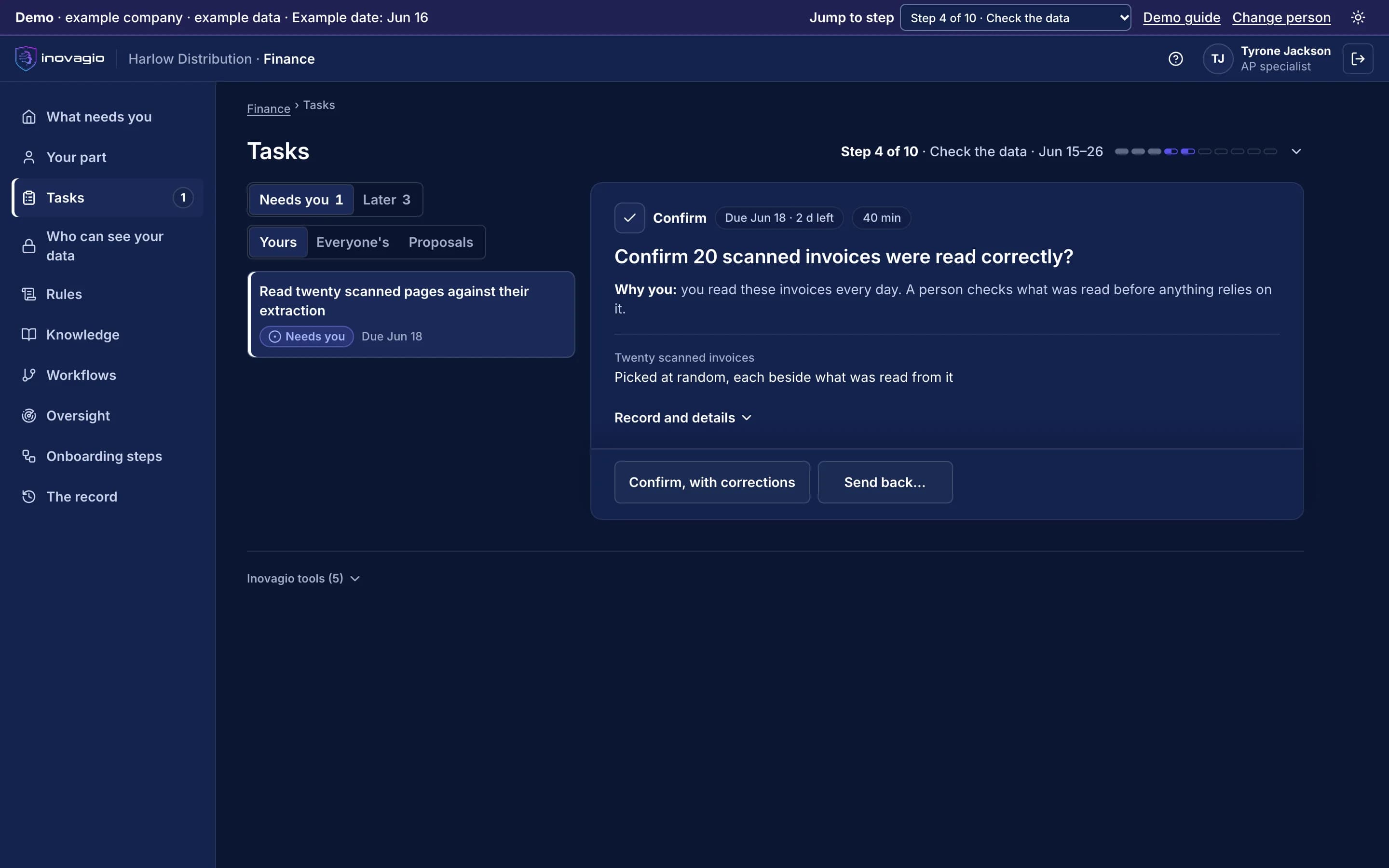
In the App at step 4: Check, protect and prove the data.
- Twenty scanned invoices, picked at random.
- Each one shown beside what was read from it.
- Nothing relies on the reading until a person confirms it.
Inside Perception
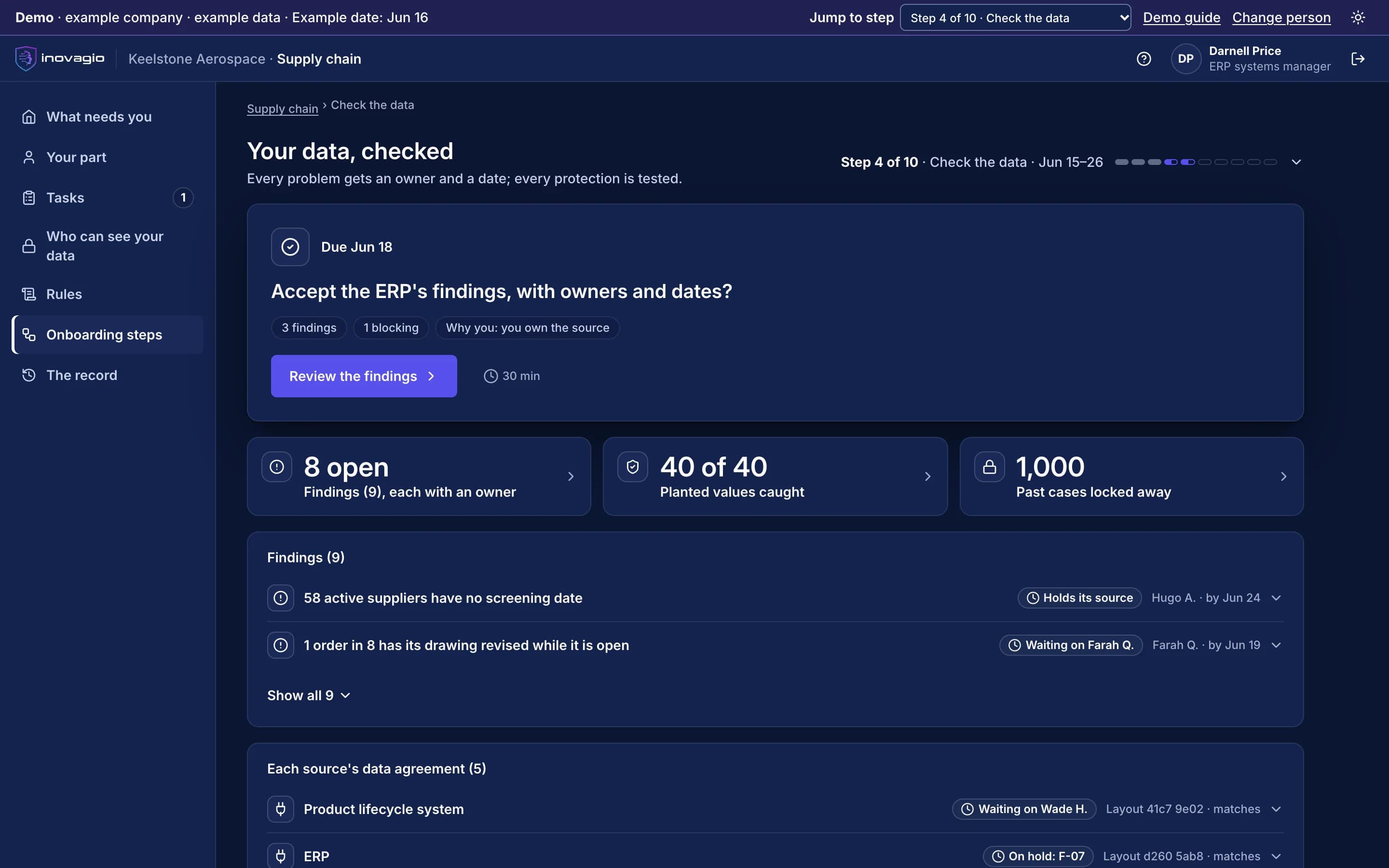
The views Perception gives the people who run it, on sample data from Inovagio’s example companies.
- Synesis
- Virtual Employees
- Agent Harness
- Opsis
- Origin
- Phylax
- Operations
- Platform services
Adjuster report · claim CL-58214
Scanned PDF · 3 pages · read on the claims shared drive
Property loss · adjuster report
Page 1 of 3
Policyholder:
Phone:
Policy: HP-4409131
Loss: water damage, reported 3 weeks ago2
Cause: supply line failure, kitchen3
Estimate summary
- Flooring, 18 sq ftline 14
- Cabinet base, 1 unitline 24
- Drying, 3 daysline 34
Adjuster signature: · photos attached: 65
Extracted fields
| Field | Value | Source |
|---|---|---|
| Policy number | HP-440913 | 1 |
| Loss type | Water damage | 2 |
| Cause | Supply line failure | 3 |
| Estimate lines | 3 rows, 1 table | 4 |
| Photos | 6 attached | 5 |
Personal data masked
- Name
- Masked · 2 places
- Phone
- Masked · 1 place
- Signature
- Masked · 1 place
- Reveal
- Authorized roles only · every reveal recorded
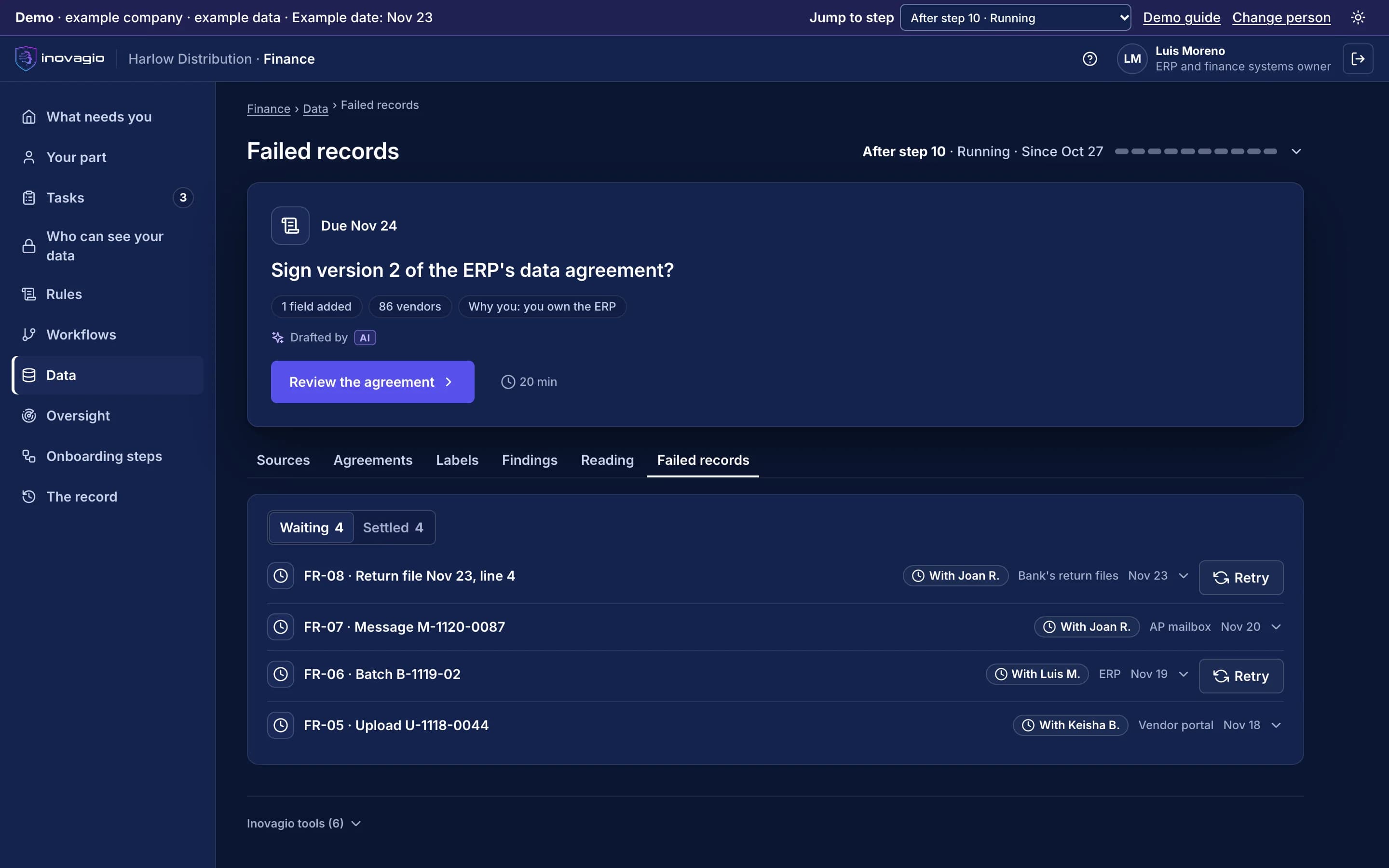
Perception › Data checked: the problems found in a company’s records, each with an owner and a date, and how many of the test values planted in the data were caught. Sample data from Inovagio’s example companies.
Everything Perception does, by area.
Born-digital documents
- PDF, including encrypted and CID-font files
- DOCX and XLSX, every sheet
- HTML and plain text
- Recursive folder ingestion
- Source attribution on every chunk
- Knowledge source sync
Scanned and image documents
- Vision-language OCR
- Scanned-PDF pipeline
- Handwriting and multilingual text
- Layout and region classification
- Table structure recognition
- Form selection marks
Other sources
- Email intake as a governed source
- HTTP, SQL database, object storage, key-value store and spreadsheet connectors
- MCP servers
- Device and sensor readings into MNEMOS
- Task ingestion from email and APIs
Trust
- Sandboxed processing
- Coordinates and confidence on extracted text
- Classification and PHI controls
- Audit of every ingestion
- Signed model packs
- Accuracy reported with the evidence behind it
What Perception replaces
Perception does the work of these, inside one platform with one identity, one policy and one record:
- Cloud document-intelligence API
- OCR software
- Document parsing pipelines
- ETL scripts that feed a search index
The controls Perception brings
Every Inovagio product keeps the same five commitments, because regulated work needs all five at once.
Security
Files are read where they live, with personal data detected and masked before storage.
Governance
What may be ingested, from where and by whom is set by policy.
On the record
Every document keeps its source, version and the step that changed it.
Monitoring
Each ingestion run is traced, with failures and retries in Panoptes.
Cost per task
Documents are parsed once and reused, not re-read on every question.
Perception in your industry
Every industry runs the same ten steps, so Perception does the same job in each, on that industry’s own work.
- Financial servicesBanks, credit unions, lenders and insurersWorked example: Alder Ridge Community Bank · Example company
- Healthcare providersHealth systems, hospitals and physician groupsWorked example: Meridale Health · Example company
- Health plansMedicare Advantage, Medicaid and commercial plansWorked example: Ashgrove Health Plan · Example company
- LegalLaw firms and in-house legal teamsWorked example: Calloway Finch · Example company
- GovernmentState, county and city agenciesWorked example: City of Larkhaven · Example company
- DefenseDefense contractors and their suppliersWorked example: Keelstone Aerospace · Example company
- Finance operationsFinance teams in any industry
For developers: Perception at a glance
- Formats
- PDF, DOCX, XLSX, HTML, text; PNG, JPEG, TIFF images; scanned PDFs
- Inference
- Inovagio’s own C++ engine on CPU, Metal or CUDA
- Output
- Structured, coordinate-grounded content indexed in MNEMOS
- Sources
- Files and folders, email, connectors, APIs, sensors
- Deployment
- Single host or multi-host server; air-gapped supported
- Interfaces
- CLI, agent tools, C ABI
$ inovagio knowledge add --from-dir ~/Clients/Acme$ inovagio knowledge source sync$ inovagio knowledge ask contracts/msa-2025.pdf --query "When does this agreement renew?"$ inovagio knowledge doctor
Perception in the platform.
Where Perception fits
One platformAgent HarnessAgent harness
Inovagio CLIInovagio DesktopWeb ChatInovagio SDK
OpsisExperience layer
FolioMorphe
Virtual EmployeesVirtual Employee layer
NexusErgon
Synesis (this layer)Knowledge layer
Perception (this product)MNEMOS
OriginModel layer
Inference ServerForge
PhylaxTrust layer
AuthInovagio SecretsGuard
OperationsOperations
PanoptesArchon
Platform servicesPlatform services
ServerAPI ManagementConnect
Further reading
Guides and posts on Perception
 Guide · Data qualityAI-ready data checklist for regulated teamsTwenty-eight checks to run against the data an AI process will read, before it goes live and at set intervals after. Grouped by stage, from sources and owners to documents, mapping and run-time checks, each with why it matters to an examiner and how to test it. · updated November 18, 2026 · 8 min read
 Article · Data qualityData hygiene for AI: your knowledge layer is only as clean as your dataAn AI agent acts on whatever record it is handed, so a duplicate customer or an old policy becomes a wrong action, not just a wrong number. What dirty data looks like to an agent, what regulators have already seen, and why a knowledge layer makes the problems visible and fixable. · updated November 18, 2026 · 8 min read
 Article · Data qualityGet ahead of data cleanup before AI: a 90-day planData cleanup before AI goes wrong when it tries to fix everything. A 90-day plan that fixes only what the first AI queue reads, at the system it comes from, with a named owner for each source, plus the quick wins and what to leave alone. · updated November 18, 2026 · 7 min read
 Guide · Data qualityPreparing data for a knowledge layer: a step-by-step guideHow to get data ready for a knowledge layer and the AI agents that read it, in the order that works. Scope by the first queue, profile against named quality dimensions, name owners, resolve entities reversibly, clean documents, record lineage, map to the ontology and put a contract on every source. · updated November 18, 2026 · 17 min read
See Perception on one of your workflows.
Every project starts with one workflow your people know well, measured against what it costs you today.