Skip to content
InovagioInovagio

Healthcare providers · Health systems, hospitals and physician groups

Virtual Employees for healthcare providers, each denial matched to its reason.

Inovagio’s Virtual Employees are AI that do revenue cycle work inside your rules: they match each denial to its reason, draft the appeal for a person to sign, and check each remittance against the contract.

We’ll spend 30 minutes with you on one of your workflows, and you don’t need to share any data.

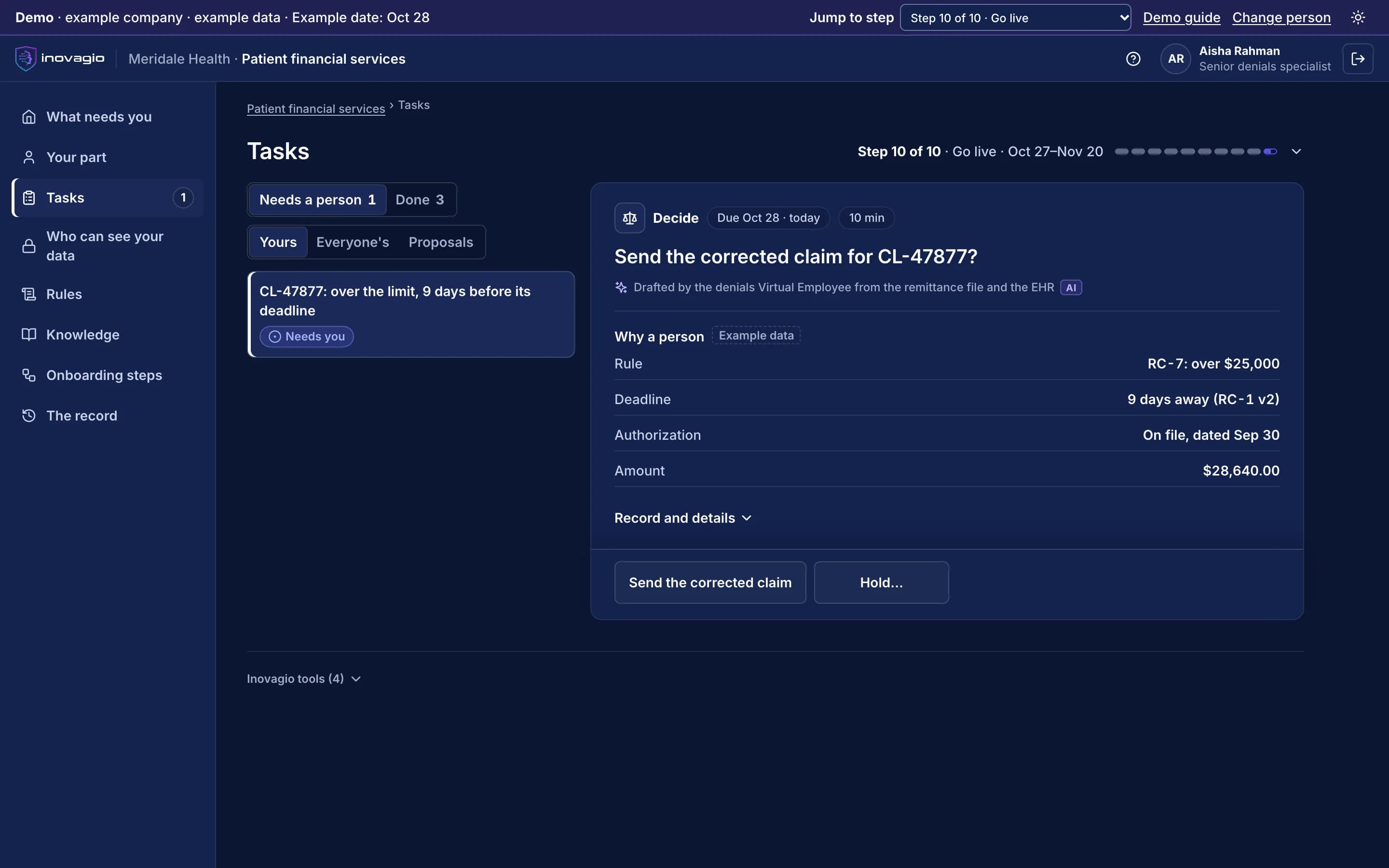
A senior denials specialist’s task in the Inovagio App for Meridale Health, an example company with example data. A corrected claim is over the rule’s limit and its deadline is nine days away, so the specialist decides whether to send it. The authorization is on file.
Pictured: a corrected claim at Meridale Health in the Inovagio App. It is over the rule’s limit and close to its deadline, so it waits for a person to send it (example company).

Denials have deadlines, and underpayments hide in remittance lines.

A denial missed before its appeal deadline is revenue lost, and an underpayment is found only when someone compares the remittance line with the contract rate. The work around care means applying rules to documents and money, which is work Virtual Employees take on.

From your first decision to live work: the ten steps at Meridale Health.

Meridale Health is an example company, not a customer. Its sponsor signs a charter for denials and remittances. Nothing touches live cases until the work has been tested, signed off, checked and run beside the team, and each kind of case goes live only when it clears the bar.

1 of 5 · Prepare · Steps 0–2

An account, a business associate agreement and a charter

  1. Step 0: Open your account

    Meridale’s account opens where it runs, and health information is read only after the business associate agreement is recorded.

  2. Step 1: Choose the work and sign the charter

    The revenue cycle director signs a charter for denials and remittances: a target, a pass mark, a cost limit and when to stop.

  3. Step 2: Set up sign-in and access

    Staff sign in with Meridale’s accounts. The denials Virtual Employee starts with no access, and outside models stay off.

What the payer’s appeal reviewer and your revenue cycle auditor see: The recorded agreements, the signed charter, and every person allowed into the account, until when.

At work: One sign-in for people, services and Virtual Employees (Auth) · Holds every credential sealed and scoped (Inovagio Secrets) · Lists the models you may use (Origin)

2 of 5 · Learn · Steps 3–5

Your EHR, your clearinghouse and your denials team’s practice

  1. Step 3: Map the work and connect, read-only

    The EHR, the clearinghouse and the billing system are connected read-only through the standards they already use, each approved by its owner.

  2. Step 4: Check, protect and prove the data

    Health information is labeled and protected first, fields the work doesn’t need are masked, and planted test values prove it.

  3. Step 5: Learn from your people

    Our agents interview the denials and coding teams on how each payer’s reasons are worked, and each gap goes to the person who decides.

What the payer’s appeal reviewer and your revenue cycle auditor see: Each source’s owner, the protections proven with planted test values, and where each rule came from.

At work: Connects your systems, read-only first, under each owner’s approval (Connect) · Turns documents, scans, email and system data into cited knowledge (Perception) · Turns interviews into decided rules (Synesis) · Holds your records, documents and every decision (MNEMOS)

4 of 5 · Prove · Steps 7–9

Tested on past denials, then run beside your team

  1. Step 7: Test it, try to break it, fix it

    Tested on past denials locked away first. A kind of denial that misses the pass mark stays with your staff.

  2. Step 8: Sign off and verify

    Each rule decided by its owner, checked by someone who built none of it, and signed on the exact version.

  3. Step 9: Run in shadow mode and prepare the team

    On live denials its drafts stay hidden until your specialist decides. Each kind of denial goes live only when it clears the bar.

What the payer’s appeal reviewer and your revenue cycle auditor see: Test and shadow-mode results for each kind of denial, and the verifier’s report.

At work: Checks every prompt, response and tool call (Guard) · Every log, trace, cost and decision (Panoptes)

5 of 5 · Run · Step 10 and Operate

One kind of denial at a time, every appeal signed by a person

  1. Step 10: Go live, one kind of case at a time

    Each kind of denial goes live on its own, spot-checked first. A person signs every appeal and sends every dispute.

  2. Operate: Operate: watch, re-test, decide

    A payer’s changed rule is tested again before it runs, and each review decides to continue, expand or stop.

What the payer’s appeal reviewer and your revenue cycle auditor see: Each appeal with the payer’s reason, the record pages it cites and who signed it; every posting and adjustment with its rule.

At work: Each one has its own queue, rulebook, record and stop button (Virtual Employees) · Stops or starts any Virtual Employee, by scope (Archon) · Watches the work against the protection rules for each kind of data (Phylax)

Every step in full, on How it works

The revenue cycle work where provider teams start.

  • Denials and appeals

    Each denial matched to its reason and the record, the appeal drafted for a person to sign.

  • Remittances and underpayments

    Each line checked against your contract, with any underpayment drafted as a dispute.

  • Eligibility and estimates

    Coverage checked with the payer before the visit, and estimates drafted for staff to review.

  • Prior authorization packets

    Each order checked against the payer’s rules and its packet drafted. The payer decides.

  • Release of information

    Each records request checked and gathered before its deadline, for your staff to release.

  • Credentialing files

    Files checked against your checklist and expiring items raised. Your committee decides.

  • Referrals and intake

    Each referral checked for what the clinic needs, with the gaps sent back to the sender. Your staff route and schedule every one.

  • Patient correspondence

    Letters and messages drafted in your templates and checked before a person sends them.

The Virtual Employee prepares. A licensed or authorized person decides.

Clinicians decide care and medical necessity, coders assign the codes, and your committee decides privileges. It never decides a patient’s care, coverage or eligibility.

  • Denials and appeals

    The Virtual Employee prepares: Matches each denial to its reason, the claim and the record, and drafts the appeal with the pages it cites

    A person decides: A person signs every appeal; a physician advisor signs each medical necessity appeal

  • Remittances

    The Virtual Employee prepares: Posts each line, checks it against the contract and drafts the dispute with the clause

    A person decides: A person sends every dispute; two people approve an adjustment over your limit

  • Eligibility and estimates

    The Virtual Employee prepares: Checks coverage with the payer, flags any mismatch to a person and drafts the estimate from your rates

    A person decides: Staff review each estimate over your limit; a person decides financial assistance

  • Prior authorization packets

    The Virtual Employee prepares: Checks each order against the payer’s current list, gathers the notes it asks for and drafts the packet

    A person decides: The ordering clinician decides the clinical content and urgency; the payer decides coverage

  • Coding questions

    The Virtual Employee prepares: Shows the documentation behind each code and drafts a neutral question

    A person decides: A coder assigns every code; the treating clinician answers every question

  • Release of information

    The Virtual Employee prepares: Checks each authorization, gathers the pages and tracks the deadline

    A person decides: Your privacy officer decides legal requests and any denial of access

  • Credentialing files

    The Virtual Employee prepares: Assembles the file, checks each source with its date and raises items before they lapse

    A person decides: Your credentialing committee decides privileges

  • Revenue cycle directors and denials managers

    Each denial matched with its appeal deadline in view, each remittance checked against the contract, and the cost of every task shown.

  • Patient access and health information leaders

    Each authorization tracked to the payer’s deadline and each records request to its own, with every release decided by your staff.

  • Compliance and privacy officers

    Patient records stay where your policies say. Logs keep the category and count of personal data, never the value, under a rule proven before any work runs, and every step is recorded.

  • CIOs and security teams

    One platform to review, signed in through your identity provider, running in your data center or your cloud.

Decisions about patients stay with people.

Clinicians decide care and medical necessity, coders assign every code, and a person signs every appeal. No Virtual Employee ever decides a patient’s care, coverage or eligibility (step 10).

Your data stays yours, end to end.

Meridale Health’s records stay in its own account, where it chooses to run, and never train anything for anyone else. Your rules, your record and the models trained on your approved results are yours.

Where your data lives, and who owns it

Your procedures, payer rules and specialists don’t always agree.

In his interview, James says every denied claim is appealed. Aisha says: “Not when the payer missed an authorization we had. Then we send a corrected claim with the number. An appeal is for when the payer disputes the facts.” Two other specialists agree. Inovagio flags the gap instead of guessing, and James decides, with the Compliance Officer as second approver: when the authorization was on file, send a corrected claim with its number; otherwise draft the appeal with the record pages it cites, for a person to sign. That approved rule is now followed on every denial.

  • Every gap between policy and practice goes to the person who decides it; nothing is guessed.
  • Every rule quotes the words it came from, by the speaker’s role, and names who approved it.
  • Nobody approves their own change, and every change is tested again before it runs.

Read the Meridale worked exampleHow a rule is approved

Rule review · Authorization denials · Meridale Health · example company

What the policy says
“Every denied claim is appealed.”Director of Revenue Cycle · interview
What the team does
“When the authorization was on file, a corrected claim with its number goes back instead of an appeal.”Three specialists · interviews
The rule its owner approved
“Authorization on file: send a corrected claim with its number. Otherwise: appeal with the cited pages, signed by a person.”Approved by the Director of Revenue Cycle and the Compliance Officer

In force on every denial. The Virtual Employees follow version 2, and each corrected claim links back to the rule and the interviews it came from.

Works with your EHR, your clearinghouse and your billing system.

We connect to each system the way it already supports, and reuse what exists before building anything new: read-only first, approved by the system’s owner, under its own limited identity (step 3). Your systems remain the system of record.

  • Electronic health records

    FHIR R4 · HL7 v2

    your EHR’s FHIR R4 APIs, and HL7 v2 messages for admissions, orders and results

  • Clearinghouse

    X12 837 · X12 835 · X12 270/271 · X12 278

    your clearinghouse’s X12 transactions: claims (837), remittances (835), eligibility (270/271) and authorizations (278)

  • Billing and patient accounting

    X12 837 · X12 835

    the claim and remittance files your billing system already sends and receives, and its APIs

  • Medical imaging

    PACS · Vendor-neutral archives

    DICOM and DICOMweb

Each kind of data gets its protections before any work runs.

Each protection is a rule your privacy and security teams approve, proven with planted test values and checked again before go-live.

Health information
Read only after your business associate agreement is recorded, with outside models off. Fields the work doesn’t need are masked before indexing.
Personal data
Every prompt, response and tool call is screened inside your network. Logs keep the category and the count, never the value.
Documents, letters and portal pages
Screened before a model reads them. An instruction found inside one carries no authority.

What your outside checker sees.

The record answers their questions: who decided, under which rule, on what evidence.

  • The payer’s appeal reviewer

    Each appeal with the payer’s reason, the record pages it cites and the person who signed it.

  • Your revenue cycle auditor

    Every denial, posting and adjustment with the rule and version it followed, who approved it and when.

What your auditors and examiners can check, on Trust

Further reading

Guides and articles for healthcare providers.

Tell us about your provider organization’s work.

A short form with the questions that matter to health systems and physician groups. We reply within one business day.

About your healthcare work

We use these details to answer your request. See our privacy policy.

What happens next

  1. 1We reply within one business day to find a time.
  2. 2A 30-minute walkthrough of one of your tasks, start to finish.
  3. 3You leave with a short write-up of what we covered.

Healthcare providers questions

How are denials worked?

Each denial is matched to the payer’s reason, the claim, the authorization and the record. Where a rule allows, a corrected claim is drafted; otherwise an appeal is drafted with the pages it cites, and a person signs it before it goes.

How are remittances checked against our contracts?

Each remittance line is posted and compared with the rate in your contract. An underpayment is drafted as a dispute citing the clause, and a person sends it.

How are prior authorization packets prepared?

Each order is checked against the payer’s current rules, the notes the payer asks for are gathered from your records, and the request is drafted. Anything missing or outside your rules goes to a person before it is sent.

How does it keep up with payer deadlines?

Each request carries the payer’s decision deadline, and each denial its appeal deadline. When a decision would come after the date of service, the ordering clinician decides whether the patient’s condition warrants an expedited review, or the service is rescheduled.

Does it make clinical decisions?

No. It works the administrative steps around care, such as denials, remittances, authorizations, referrals and records requests. Clinical judgment stays with your clinicians, and every code with your coders.

How are our systems reached?

Your EHR through its FHIR R4 APIs and HL7 v2 messages, and your clearinghouse and billing system through the X12 transactions they already exchange: claims (837), remittances (835), eligibility (270/271) and authorizations (278). Each connection is set up during onboarding, reusing what your systems already offer before anything new is built; it is approved by the system’s owner and starts read-only. Your systems remain the system of record.

Where do patient records go?

Only where you approve: your data center, your cloud, or an isolated hosted environment under your agreement with us. Each customer’s data is bound to the signed-in identity, and logs keep the category and count of personal data, never the value, under a rule proven before any work runs.

How is health information protected?

Health information is handled only after your business associate agreement is recorded, and outside models stay off. Ask us for our audit and test status, with dates.

Is our data used to train shared models?

No. Your records train only models you own, and only on results your people approved.

Who approves what Virtual Employees do?

Your staff. Anything outside your rules, such as a request with missing notes or an appeal, pauses for a named person.


See how this works for your team.

A 30-minute briefing on one workflow of yours: whether it fits, what the first steps would be, and roughly what it would ask of your people. No data needed.