AP invoice exception handling, before anything is paid.
Inovagio is AI for AP invoice exception handling, inside your rules: each invoice matched, coded and held if it fails a check, so your team sees only the exceptions.
Since June 2026, Nacha requires businesses that send ACH payments to have risk-based processes to identify payments that may be unauthorized or made under false pretenses, such as vendor impersonation, and to review them at least once a year.
From your first decision to live work: the ten steps at Harlow Distribution.
Harlow Distribution is an example company, not a customer. Its sponsor signs a charter for vendor invoice intake. Nothing touches live cases until the work has been tested, signed off, checked and run beside the team, and each kind of case goes live only when it clears the bar.
1 of 5 · Prepare · Steps 0–2
An account, a charter and sign-in, before anything connects
0
Step 0: Open your account
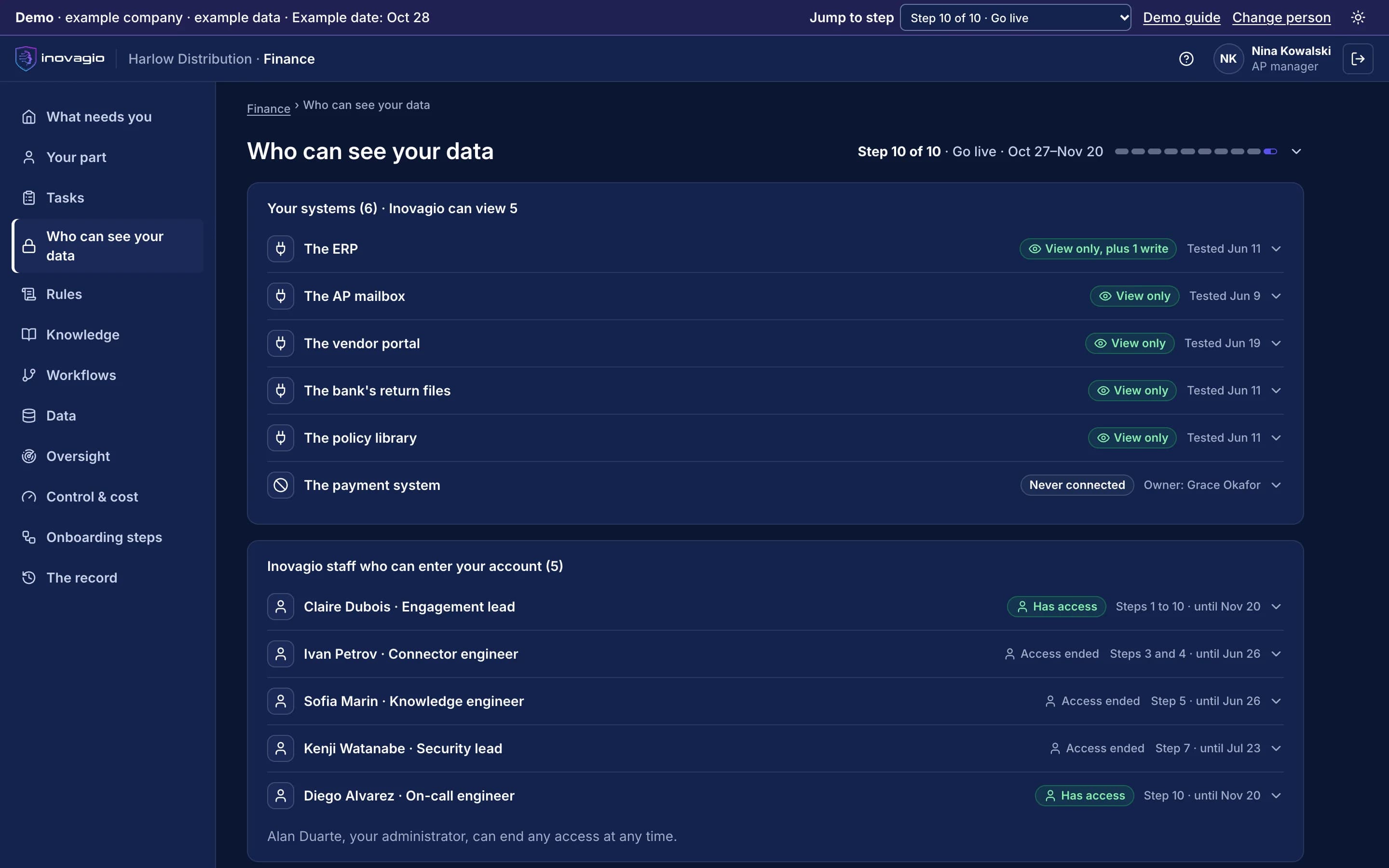
Harlow’s account opens where it chooses to run it, and its administrator approves each Inovagio person by name, steps and end date.
1
Step 1: Choose the work and sign the charter
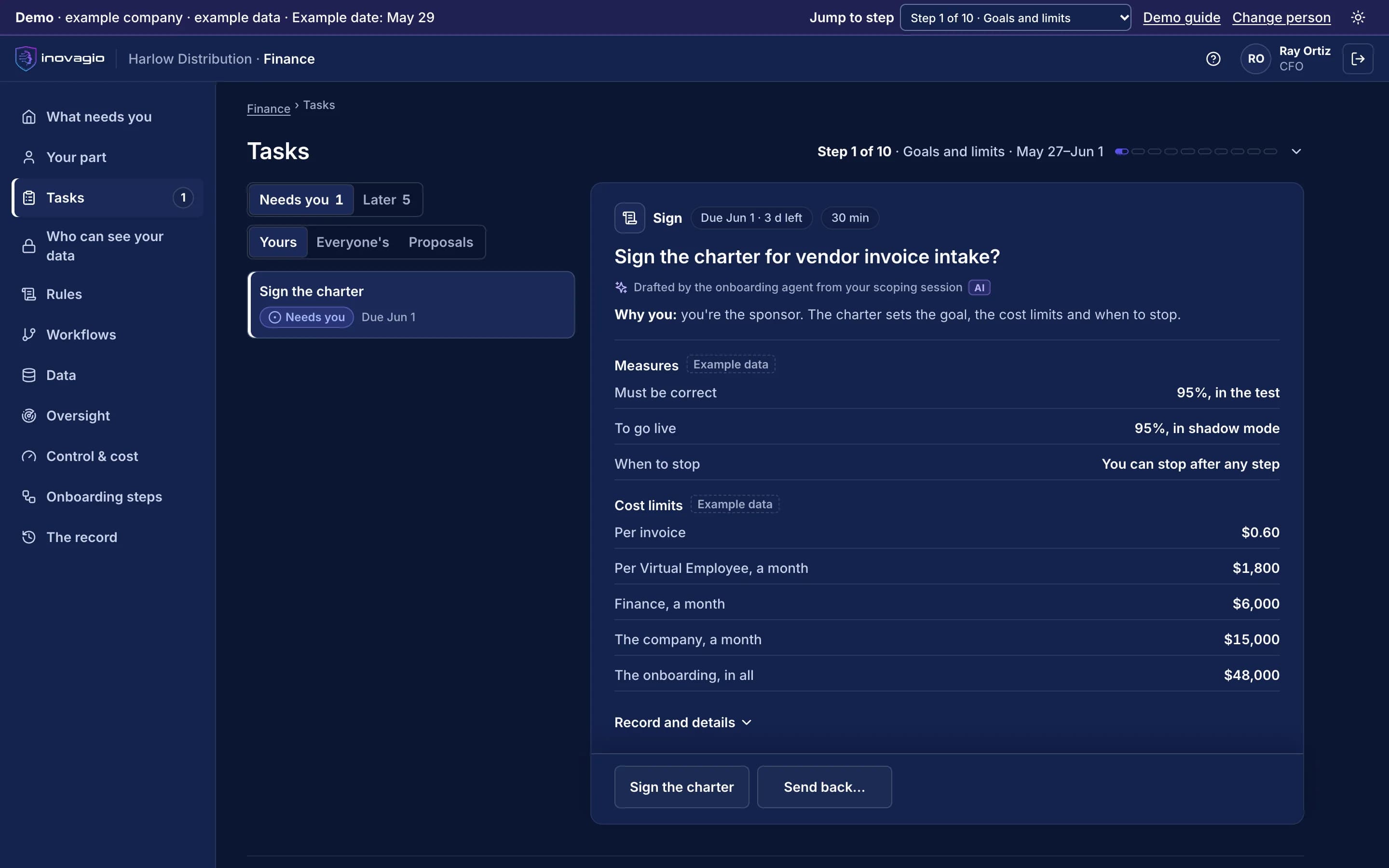
The CFO signs a charter for vendor invoice intake: a target, a pass mark, a cost limit per invoice and when to stop. The AP team is told first.
2
Step 2: Set up sign-in and access
Staff sign in with Harlow’s own accounts. The AP Virtual Employee gets its own identity, with no access.
What your external auditor sees: The signed charter, every person approved to work in the account and until when, and the sign-in tests.
The screen beside this step: The CFO’s task in the Inovagio App: sign the charter for vendor invoice intake, with the pass mark, the go-live bar, when to stop and the cost limits.
The Inovagio App, from the demo · example company, example data
The Inovagio App, from the demo · example company, example data
2 of 5 · Learn · Steps 3–5
The ERP, the AP mailbox and the team’s know-how
3
Step 3: Map the work and connect, read-only
The ERP, the AP mailbox and the bank’s return files are connected read-only, each approved by its owner. The payment system is never connected.
4
Step 4: Check, protect and prove the data
Problems in the vendor master get an owner and a date, and bank details are protected before anything reads them.
5
Step 5: Learn from your people
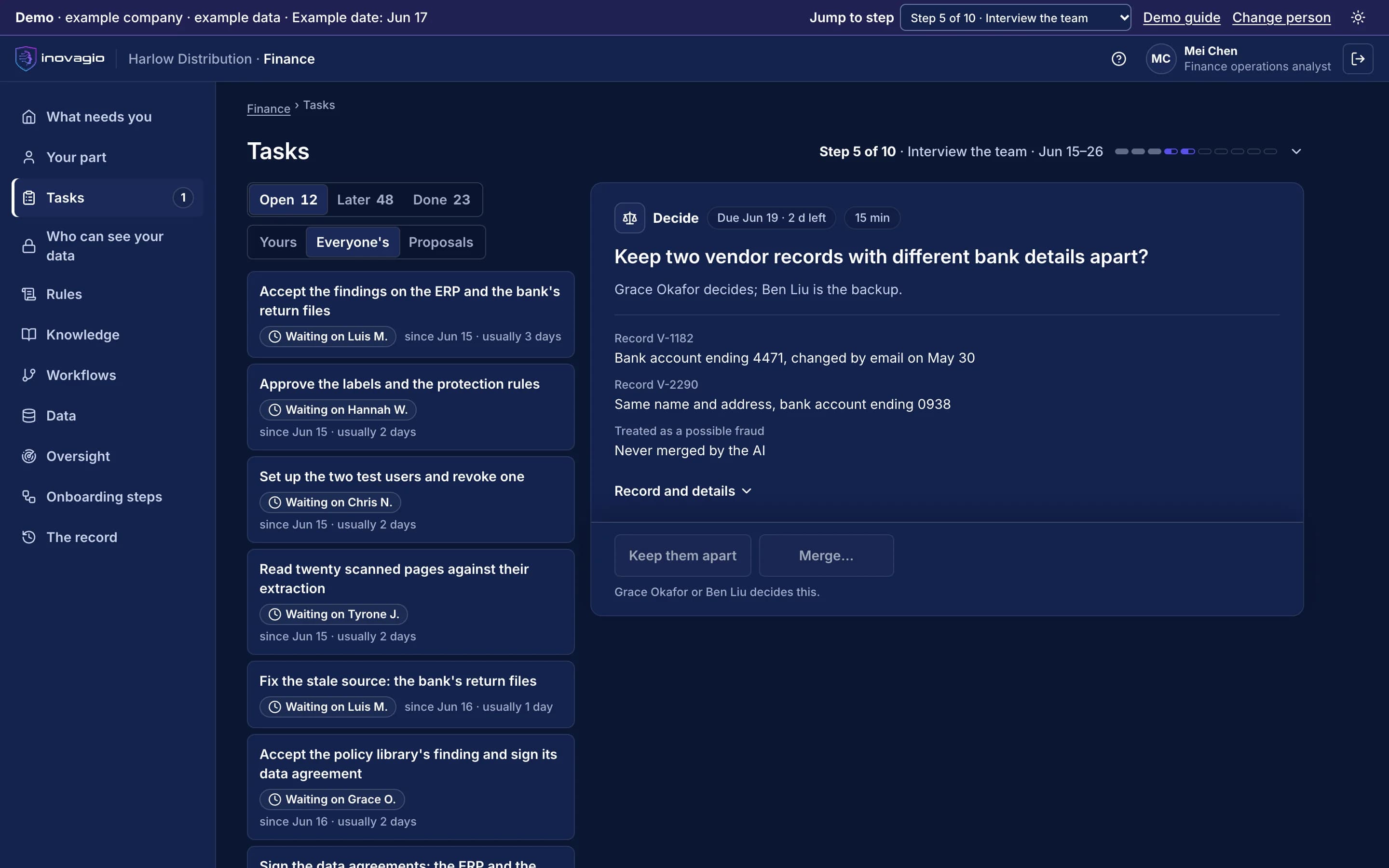
Our agents interview the AP team in sessions of 15 minutes or less. Two vendor records with different bank details are never merged; they go to a person.
What your external auditor sees: Each source’s owner and read-only approval, every data finding with its owner, and where each rule’s words came from.
The screen beside this step: A task in the Inovagio App: keep two vendor records with different bank details apart? Treated as a possible fraud, never merged by the AI, and decided by a named person.
The Inovagio App, from the demo · example company, example data
The Inovagio App, from the demo · example company, example data
3 of 5 · Build · Step 6
Every AP rule with its source, in one version
6
Step 6: Build the release
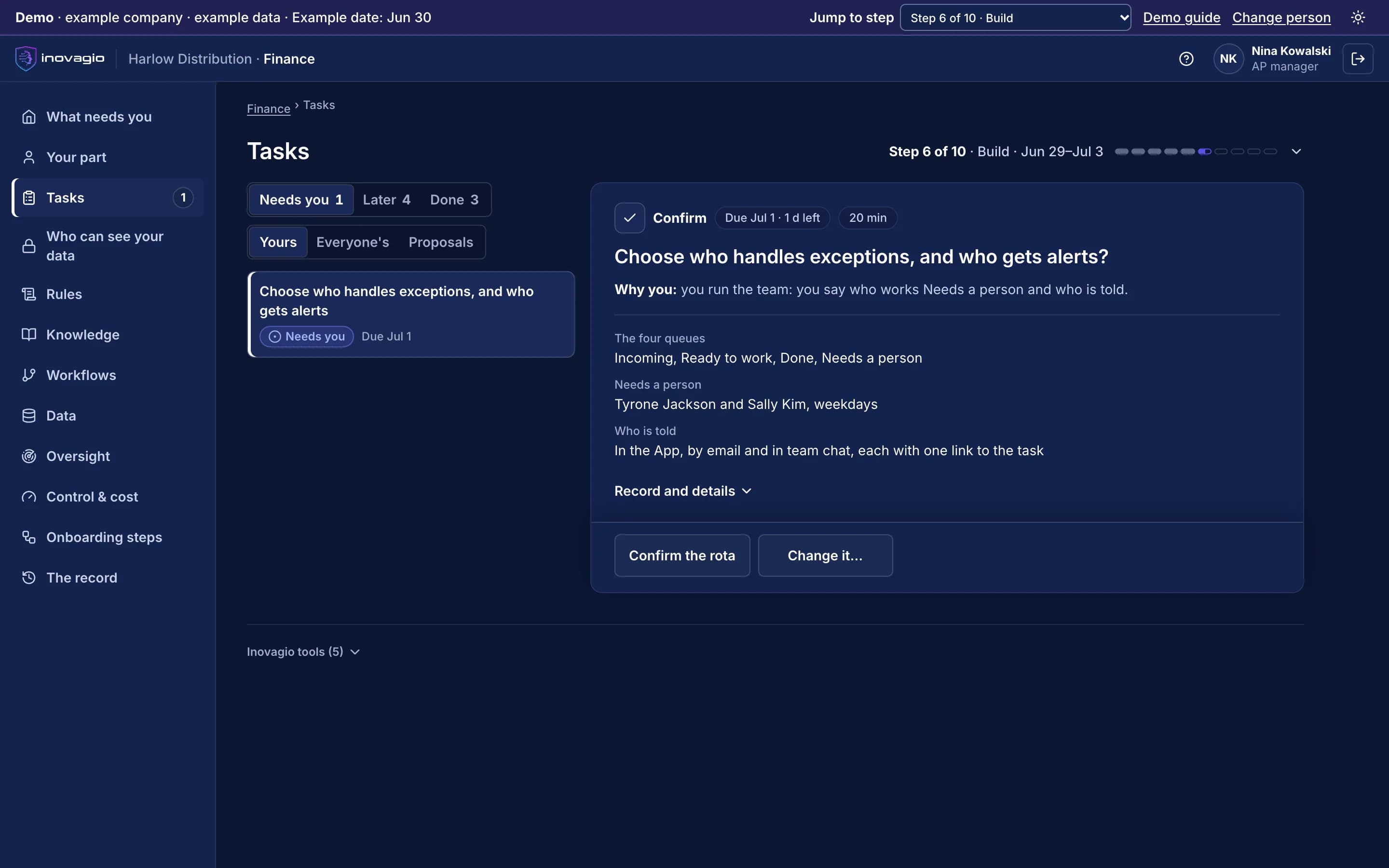
Matching, coding, duplicate and approval-limit rules, each quoted from its source with its example invoices; the queues set up, and who handles exceptions named.
What your external auditor sees: Each rule’s owner, the words it came from and the exact version that will run.
The screen beside this step: The AP manager’s task in the Inovagio App: choose who handles exceptions, and who gets alerts.
The Inovagio App, from the demo · example company, example data
The Inovagio App, from the demo · example company, example data
4 of 5 · Prove · Steps 7–9
Tested on past invoices, signed off, then run beside the team
7
Step 7: Test it, try to break it, fix it
Tested on past invoices that were set aside before the build began, and attacked on purpose. Each failed invoice becomes a rule for the AP lead to decide.
8
Step 8: Sign off and verify
Each rule decided by its owner, verified by internal audit, who built none of it, and signed by the CFO on the exact version.
9
Step 9: Run in shadow mode and prepare the team
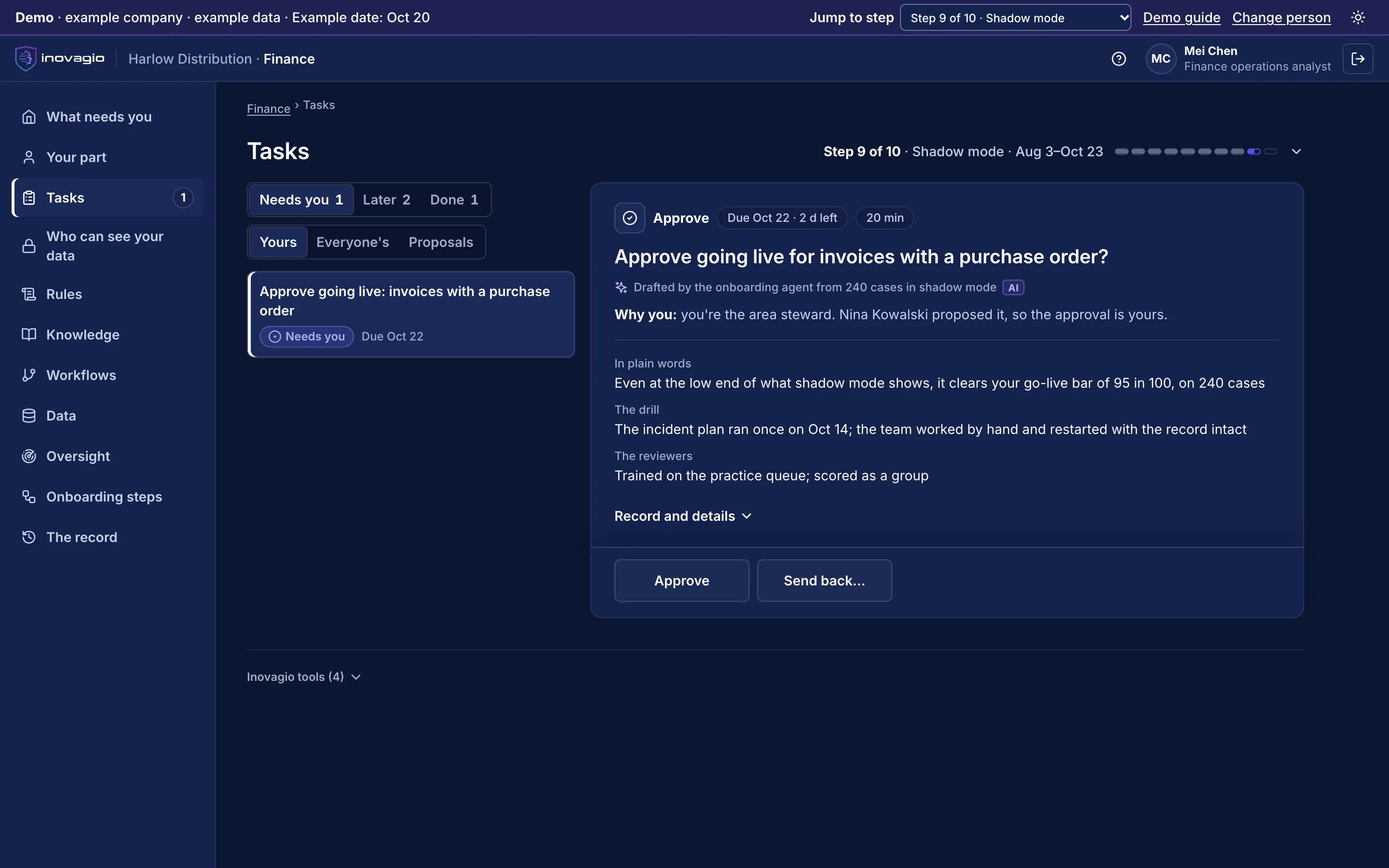
On live invoices its drafts stay hidden until Sally decides. Invoices with a purchase order go live only when they clear the CFO’s bar.
What your external auditor sees: The test on locked-away invoices, the sign-off packet with the verifier’s report, and shadow-mode results for each kind of invoice.
The screen beside this step: The area steward’s task in the Inovagio App: approve going live for invoices with a purchase order, after shadow mode cleared the go-live bar.
The Inovagio App, from the demo · example company, example data
The Inovagio App, from the demo · example company, example data
5 of 5 · Run · Step 10 and Operate
One kind of invoice at a time, money always with a person
10
Step 10: Go live, one kind of case at a time
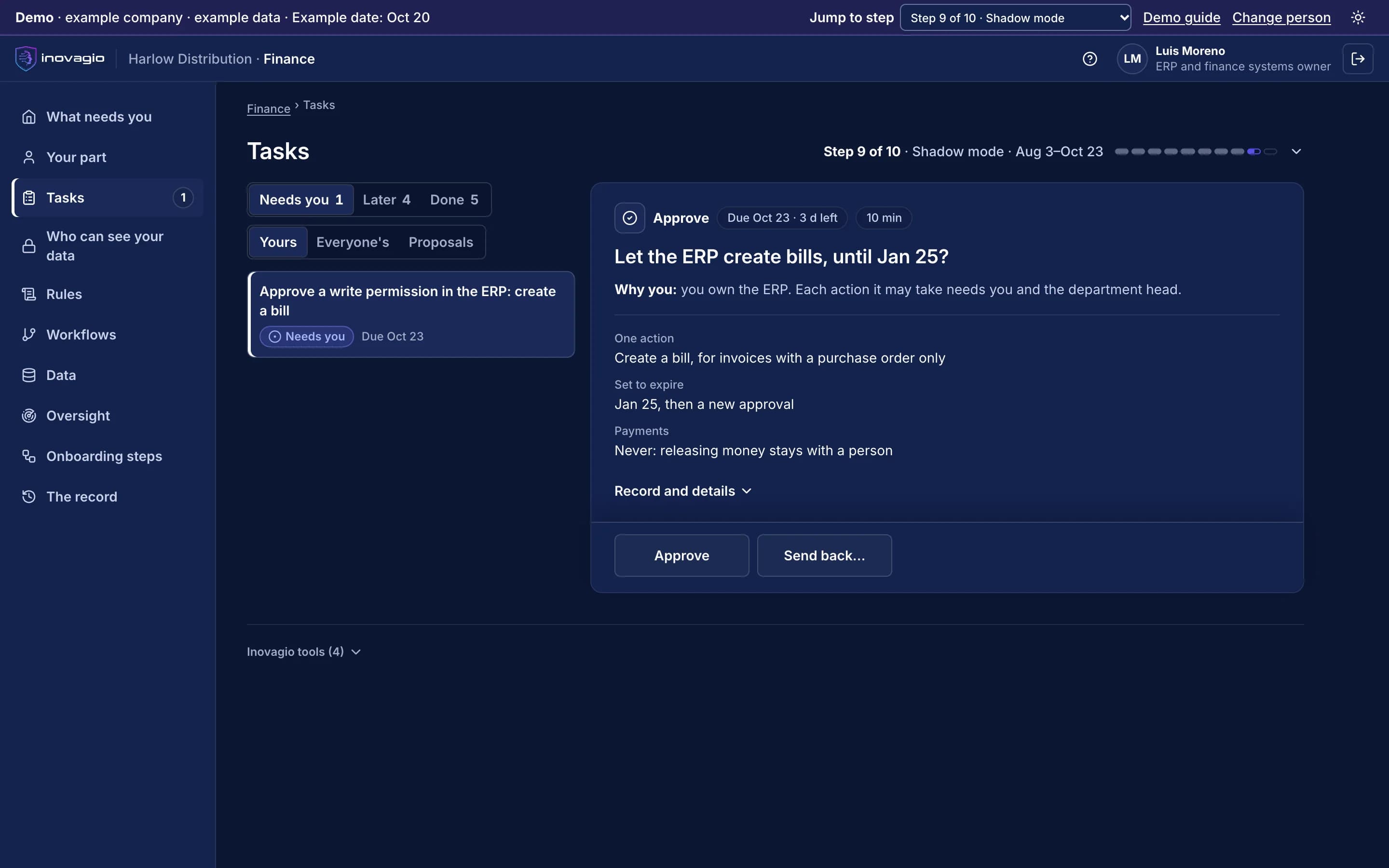
Invoices with a purchase order go live first, spot-checked. The ERP grants one expiring action at a time, such as creating a bill.
O
Operate: Operate: watch, re-test, decide
Every rule change is tested again and signed before it runs. Each review sets cost per invoice beside today’s and decides to continue, expand or stop.
What your external auditor sees: Each check, rule version, approval and callback on every invoice, for your audit and your yearly ACH fraud-control review.
The screen beside this step: The ERP owner’s task in the Inovagio App: let the ERP create bills for invoices with a purchase order only, set to expire, with releasing money kept with a person.
The Inovagio App, from the demo · example company, example data
The Inovagio App, from the demo · example company, example data
The Inovagio App, from the demo: Harlow Distribution’s finance team. Example company, example data.
Invoices are read from the AP mailbox and uploads: vendor, lines, terms and bank details.
2 · Match
Each invoice is matched to its purchase order and goods receipt, line by line.
3 · Check
Each invoice is checked for duplicates, quantities, coding rules, approval limits, tax IDs and any change to bank details.
4 · Decide
Clean invoices join the run. Anything else goes to the named person with the reason.
5 · Record
Every check, approval and callback is written to the record your auditors read.
Sally’s day, accounts payable specialist at Harlow Distribution.
Harlow Distribution is an example company. “With Inovagio” is the target shadow mode measures, never a result.
Sally’s day, accounts payable specialist at Harlow Distribution.
Part of the day
Today
With Inovagio
Invoices arrive
Today: Keys each invoice from the mailbox into the ERP
→
With Inovagio: Invoices read and matched as they arrive
Matching
Today: Checks orders and receipts line by line
→
With Inovagio: Sees only the lines that differ, with both documents
Coding
Today: Looks up the account for each line
→
With Inovagio: Lines coded by your approved rules, each rule named
Bank-detail changes
Today: Logs callbacks by hand in email, when the deadline allows
→
With Inovagio: Every change held until a callback to the number on file is logged
Approvals
Today: Chases approvers by email before the run
→
With Inovagio: Invoices over a limit wait in the approver's queue
Payment run
Today: Builds the run and rechecks each invoice by hand
→
With Inovagio: Releases a run where every invoice passed its checks
Month-end
Today: Builds the received-not-invoiced list by hand
→
With Inovagio: Reviews an accrual list already drafted for the controller
Audit
Today: Pulls approvals and callback notes from inboxes
→
With Inovagio: Shows the record: each check, rule, approval and callback
What gets checked, and who decides.
No payment to changed bank details without a callback
A change to a vendor's bank details holds the payment until someone calls the number already on file and logs it. The controller approves the change.
Your approval limits, on every invoice
Virtual Employees never release payments. Invoices over a limit wait for the approver your policy names.
Segregation of duties, built in
The person who enters a vendor change never approves it, and no Virtual Employee approves its own work.
A record for your auditors and your annual ACH review
Each invoice, the checks it passed, the rule versions, every approval and every callback, ready for your external auditor and the yearly review of your fraud controls.
Moving money always stays with a person.
Virtual Employees prepare the payment run and never release a payment. Write access in the ERP is granted one action at a time and set to expire (step 10).
Your data stays yours, end to end.
Harlow Distribution's invoices, vendor records and bank details stay in its own account, where it chooses to run, and never train anything for anyone else. No outside AI lab is needed to do this work.
Your AP policy, your ERP and your AP team don’t always agree.
The AP policy says every invoice line is matched to a purchase order line. The AP specialists say freight listed on its own line never has one: “Freight always goes to its own account.” Inovagio flags the gap instead of guessing, and the AP lead decides: freight on its own line is coded to the freight account and matched to the receipt. That approved rule is now followed on every invoice.
Every gap between policy and practice goes to the person who decides it; nothing is guessed.
Every rule quotes the words it came from, by the speaker’s role, and names who approved it.
Nobody approves their own change, and every change is tested again before it runs.
Rule review · Freight on its own line · Harlow Distribution · example company
What the policy says
“Every invoice line is matched to a purchase order line.”AP policy
What the team does
“Freight on its own line has no order line; it is coded to the freight account.”Three AP specialists · interviews
The rule its owner approved
“Freight on its own line: coded to the freight account and matched to the receipt.”Approved by the AP lead
In force on every invoice. The Virtual Employees follow version 2, and each coded line links back to the rule and the interviews it came from.
Where Sally’s team works, and how Inovagio connects.
We connect to each system the way it already supports, and reuse what exists before building anything new: read-only first, approved by the system’s owner, under its own limited identity (step 3). Your systems remain the system of record.
ERP and general ledger
NetSuite · Sage Intacct · SAP
Vendor API · reads vendors, orders and receipts; drafts bills and entries for a person to post · limited worker identity
The AP mailbox
Your mailbox
Mail connector · reads invoices and vendor requests; drafts replies for approval · limited worker identity
Bank and payments
ACH portal · Positive pay
Bank file feeds · reads payment files and returns; never releases a payment · limited worker identity
Vendor master and tax IDs
Vendor master · IRS TIN Matching
ERP · reads vendor details; prepares TIN Matching requests for an authorized user to submit · limited worker identity
Each kind of data gets its protections before any work runs.
Each protection is a rule your privacy and security teams approve, proven with planted test values and checked again before go-live (steps 4, 7 and 8).
Vendor bank details and tax IDs
Masked when they are read and never sent to a model the work doesn’t need. A change holds the payment until a callback is logged.
Personal data
Every prompt, response and tool call is screened inside your network. Logs keep the category and the count, never the value.
Invoices, email and attachments
Screened before a model reads them. An instruction found inside one carries no authority.
Cost per correct task: the AI and compute, the platform’s share, your people’s minutes at your rates, and any rework, divided by the work done correctly. Both sides are counted the same way, and every input comes from a record you can check.
Cost per invoice: today, and with Inovagio
What counts
Today
With Inovagio
Cost per invoice
Today: What each invoice costs you today, from your records and your team's estimates, by a method your finance lead approves. No one is timed.
With Inovagio: The same formula, counted the same way from shadow mode's own task records, at your rates
People's time
Today: Minutes per invoice, from your team's estimates for each kind of invoice
With Inovagio: Review and approval minutes, logged on every invoice
Invoices that need a person
Today: Counted from last quarter's records
With Inovagio: Counted from the queue, every run
AI, compute and the platform
Today: Your current tools' share, if any
With Inovagio: Recorded on every task, with the platform fee's share
Rework
Today: Duplicates or errors found after payment
With Inovagio: An invoice corrected later counts against us
What shadow mode measures, and what it asks of your team.
What we measure
Minutes per invoice
Invoices sent to a person
Bank-detail changes caught before payment
Days to close the month's accruals
Your team’s time
Each person sees what they will be asked, and roughly how long, against a weekly cap before the charter is signed. Nothing is approved because time ran out.
Who takes part
From your team: the AP lead, one AP specialist and the controller who approves vendor changes.
What IT does
IT provides read access to the ERP and the AP mailbox, and the bank's payment files.
A short form with the questions that matter. Scope, timing and terms are agreed on the workflow review.
Finance operations questions
How does Inovagio handle AP invoice exceptions?+
Each invoice is matched to its purchase order and goods receipt, then checked for duplicates, quantities, coding, approval limits, tax IDs and bank-detail changes. Clean invoices join the payment run. Anything else goes to the right person with the rule and the evidence attached.
What happens when a vendor's bank details change?+
The payment is held until someone calls the vendor at the number already on file and logs the call. The controller approves the change, and the record keeps who called, when and the number's source.
Can it release payments?+
No. It prepares the run and holds anything outside your rules. People release payments, and anything over a limit waits for the named approver.
Which ERP systems does it work with?+
It connects to the finance systems you run, such as NetSuite, Sage Intacct and SAP, and drafts entries in their format under the permissions you set.
See how this works for your team.
A 30-minute briefing on one workflow of yours: whether it fits, what the first steps would be, and roughly what it would ask of your people. No data needed.