

Series · How we solve it
A mistake your team fixes once stays fixed
Good AI exception handling doesn't stop at the flag. Every task moves through four queues, every failure reaches a named person with the reason attached, and that person's fix becomes an approved rule, so the same exception doesn't come back next week.
Inovagio team · Published · Updated · 8 min read
On this page
Every Thursday the same trucking carrier's invoice lands in accounts payable at Hollis Industrial Supply, and every Thursday it carries a fuel surcharge that isn't on the purchase order. The AP specialist who has handled this carrier for years knows what to do: the surcharge is allowed up to the rate in the carrier's contract, and anything above that goes to the controller. That rule isn't written anywhere. It lives in her head, and this month she is on vacation for two weeks. (Hollis Industrial Supply · Example company)
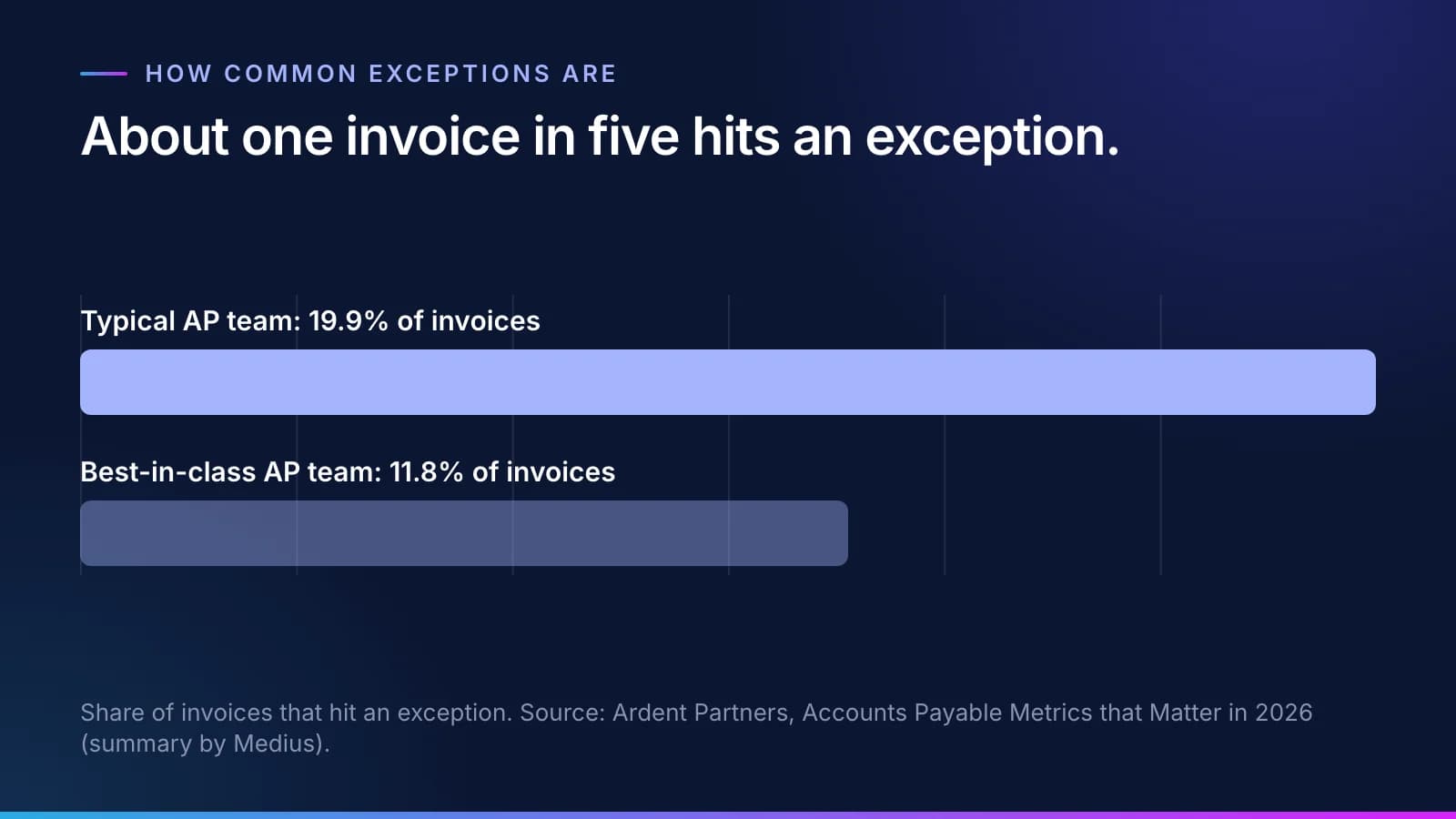
The Thursday invoice is ordinary. On a typical accounts payable team, 19.9% of invoices hit an exception, and even best-in-class teams see 11.8% (Ardent Partners, 2026, summarized by Medius). That is a lot of Thursdays for AP invoice exception handling.
Ordinary AI exception handling does one of two things with that invoice. It pays the surcharge because nothing told it not to. Or it flags the mismatch and waits. The flag is the safer outcome, and it is also the one that wears a team down. Someone clears it on Thursday. The same flag is back the next Thursday, because nothing about the fix was kept.
Exception handling should end somewhere else. When a person resolves an exception, their answer should become a rule; someone with authority approves it, and the next invoice like it goes through without them. That is how a Virtual Employee handles the Thursday invoice.
AI exception handling in four queues
#Every request a Virtual Employee picks up follows the same path. Requests arrive in Incoming. Most come by email or team chat, and some are passed on by another department or sent straight from another system. Before any work starts, each one is checked against the goals it's meant to serve, from the team's up to the company's. An unclear request is rewritten and one that doesn't fit is sent back, while anything that passes moves on to Ready to work, where the Virtual Employee assigned to that department does it inside the approved rules.
Finished work lands in Done, with every step recorded, and a person approves the batch where the rules require it. Anything that fails a check goes to the fourth queue, Needs a person.
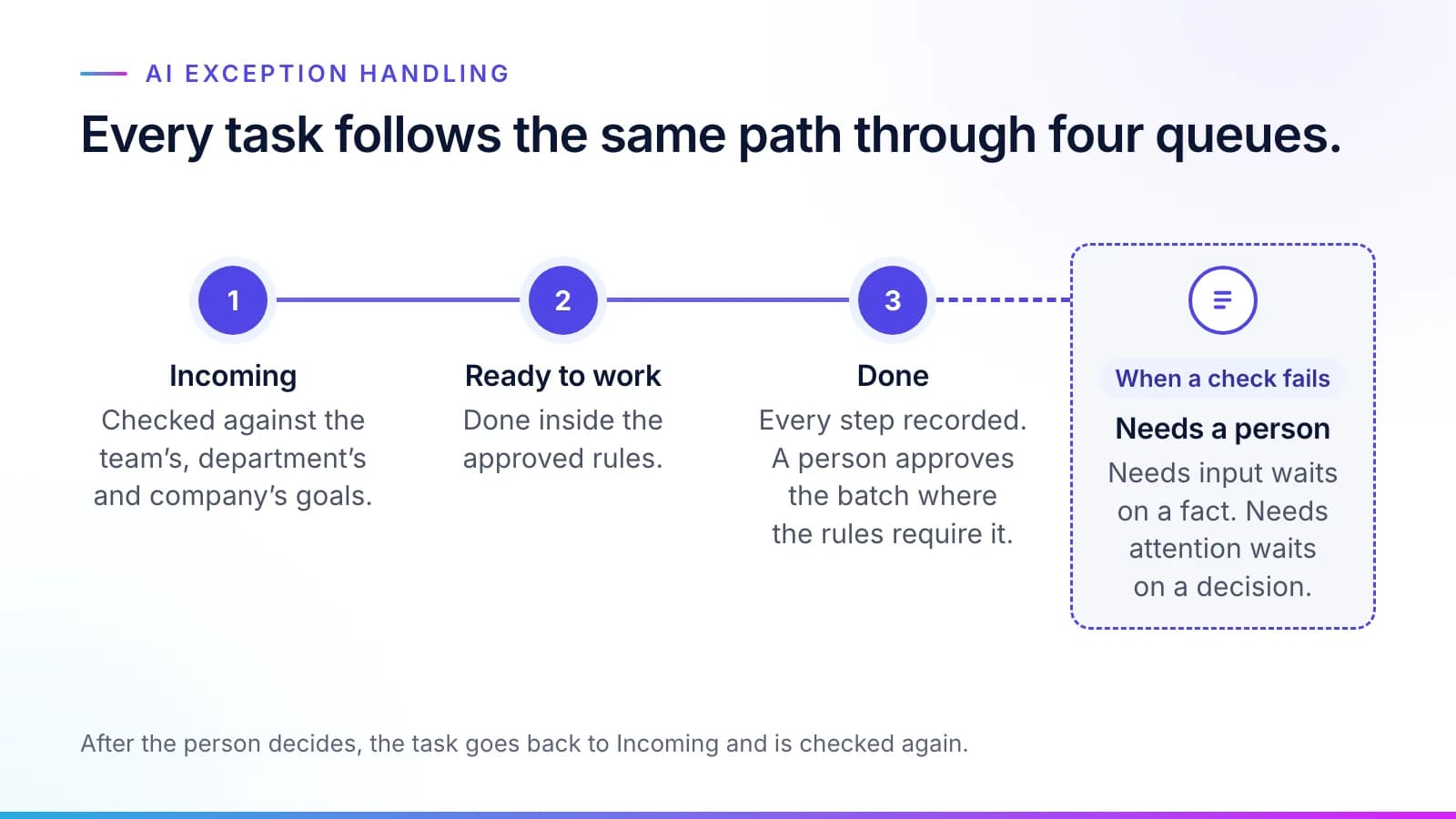
Needs a person holds two kinds of task, and the difference matters to whoever receives them. Needs input is waiting on a fact: a missing receipt, a purchase order number, a signature. Needs attention is waiting on a decision, because a check failed, a rule is missing or two rules conflict. The Thursday invoice is Needs attention. Nothing in the rulebook covers surcharges, so the Virtual Employee stops instead of guessing.
Tip
Choosing where to start? Ask how often the same exception comes back each week. A queue full of repeat exceptions is a good first queue, and our guide to picking your first queue walks through the other signs.
After the person decides, the task doesn't jump straight to Done. It goes back to Incoming and is checked again before it returns to Ready to work, like any new request.
How a failure becomes a rule
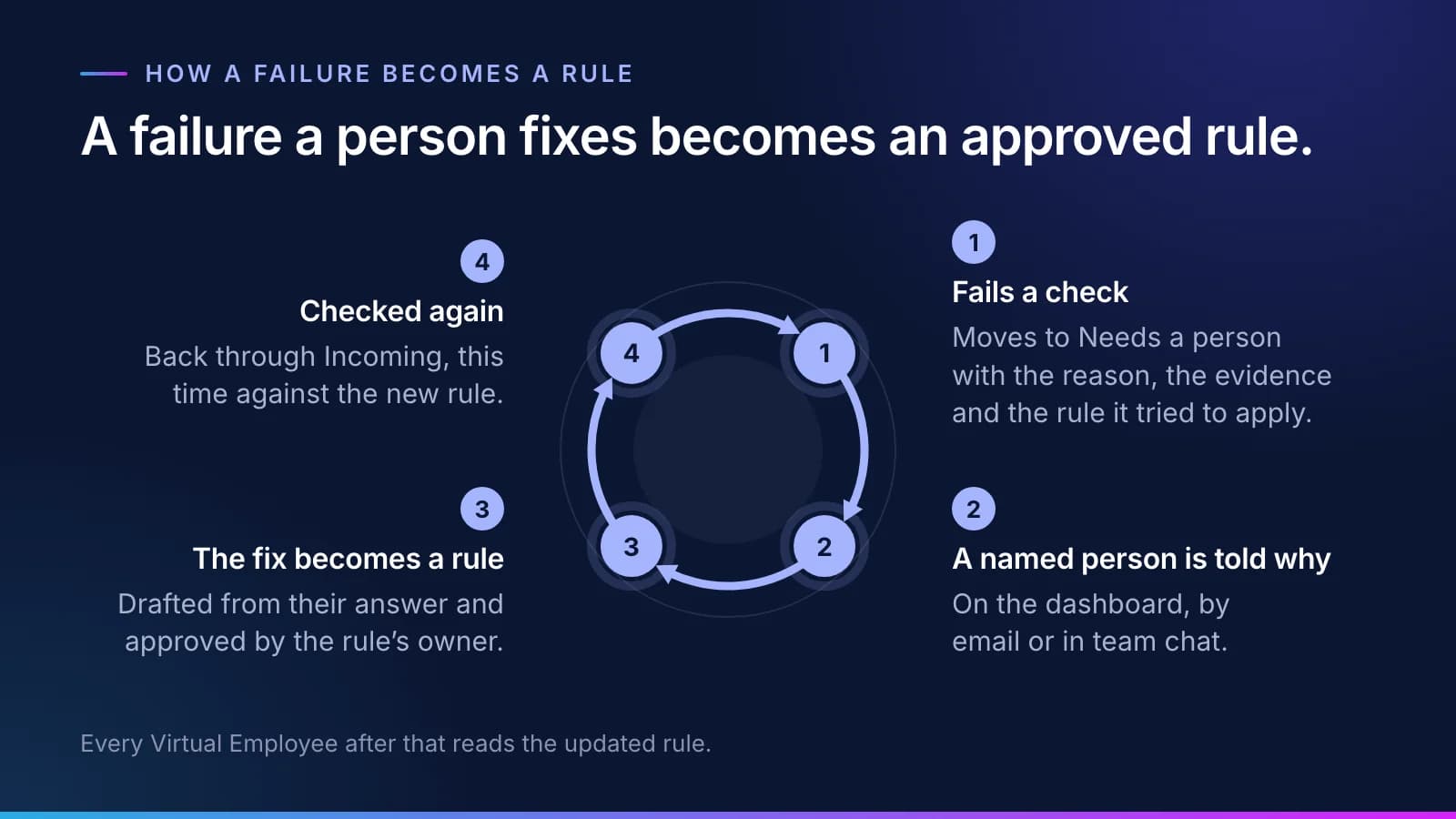
#Here is what happens to the surcharge invoice, step by step.
- The task fails a check and moves to Needs a person, carrying the reason and the evidence. Here that's the invoice line and its purchase order, plus the fact that no surcharge rule exists.
- The team member named in the rule, this week the colleague covering for the AP specialist, gets a message where they already work: the dashboard, email or team chat. It says the task failed and why, and asks what the right rule is.
- Their answer is drafted as a new or changed rule, and the rule's owner approves it. Nobody approves their own change, and the agent that drafts the rule never approves it. In the example, the controller approves this one: fuel surcharges up to the contract rate are allowed, and anything above it goes to the controller.
- The task goes back through Incoming and is checked again, this time against the new rule.
- Every Virtual Employee after that reads the updated rule, and next Thursday's invoice goes to Done.
The vacation problem gets smaller along the way. The rule now sits in the rulebook with the name of the person who approved it. It will still be there after the AP specialist retires. The absent expert is one of the four stalls we cover in why the knowledge build stalls.
Human in the loop: review belongs at the exception
#Human review of AI decisions often means a person rereading every output, which spends the hours the AI was meant to save. Or it means a sample check at month end, which finds the error after the payment has gone out. Neither one changes what happens next time.
Review placed at the exception works differently. The person sees only the task a check couldn't confirm, with the evidence in front of them, and their decision is exactly the input the rulebook needs. Who gets told is written into the rule itself: the team member it names, alerted where they already work.
Some decisions never become routine, and they aren't meant to. Exceptions and judgment calls go to a person with the reason attached, and so does every regulated decision. Decisions about people stay with people, whether it's a loan or a patient's care. A payment above the limit your policy sets waits for an approver. And if a whole queue needs to halt, the AI agent kill switch stops one Virtual Employee, a department or everything at once.
Why the model doesn't retrain itself
#A natural assumption is that the AI learns from a correction by retraining. It doesn't. The models stay the same. The rules change, each change has an approver, and any change can be rolled back.
A Virtual Employee does keep a memory of its own past work, and that memory fills in on its own as tasks finish. The fix doesn't stop there. It goes on into the approved rules, which a person signed and every Virtual Employee reads, and our guide to context engineering for AI agents explains why the two are kept apart.
That is deliberate. A correction absorbed into a model can't be read, traced to the person who made it or undone on its own, but a rule can. Your auditor can open it, see who approved it and when, and see every task that ran under it. If the controller changes her mind about surcharges in March, the rule gets a new version, and the record shows which invoices ran under which version.
The format is set out in our guide to how a rule is written and approved: what a rule contains, how it is versioned and how it is rolled back. Whether the AI retrains itself is also one of the Virtual Employee questions and answers in our FAQ guide.
Measuring whether exceptions are falling
#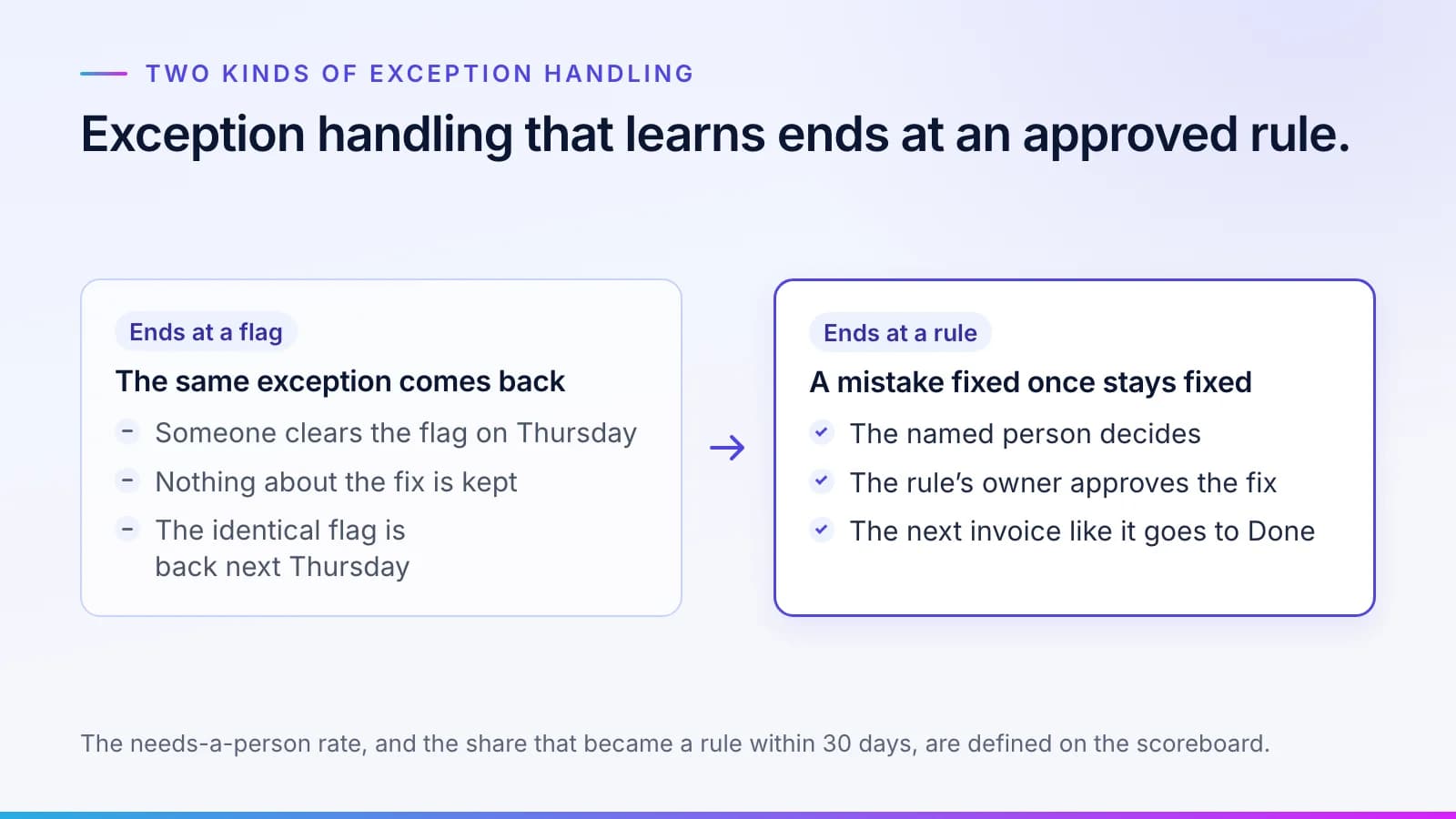
If failures become rules, the share of work that needs a person should fall, and you should be able to watch it fall. Two measures show it, and both are defined on the Inovagio scoreboard. The needs-a-person rate is the share of tasks routed to a person. Beside it sits the share of those tasks that became an approved rule within 30 days.
When the loop is working, the needs-a-person rate drifts down toward the success measure your sponsor set in the charter. The same records feed cost. Every minute a person spends on an exception is counted in the cost of the work, so a fix that becomes a rule shows up in your cost per correct task. The method for measuring it against your own baseline is in our guide to measuring cost per correct task.
The exceptions are the interesting part of the job
#The people who take the exceptions are the people who know the work best, and their names are on the rules. Virtual Employees take the routine queue, and your people take the exceptions, which is the part of the job most of them would rather do anyway.
To see how this would run on one of your queues, look at the roles you can hire, or request a briefing.
Questions
What people ask.
What is AI exception handling?
AI exception handling is what happens when an AI system meets a task its checks can't confirm. With Inovagio, the task stops and moves to the Needs a person queue with the reason, the evidence and the rule it tried to apply. The named person decides, and their answer becomes a new or changed rule that the rule's owner approves, so the next task like it doesn't need anyone.
Does the AI retrain itself when someone corrects it?
No. The models stay the same. The correction is drafted as a rule, the rule's owner approves it, and the change is versioned so it can be rolled back. Your auditors can read every rule, see who approved it and when, and see which tasks ran under each version, which a correction hidden inside a model would never let them do.
How do AI agents hand exceptions to people?
Every task that fails a check moves to Needs a person, in one of two kinds. Needs input is waiting on a fact, such as a missing receipt or a purchase order number. Needs attention is waiting on a decision, such as a missing rule or two rules that conflict. The team member named in the rule is alerted on the dashboard, by email or in team chat.
Which AI decisions should always have human review?
Exceptions, judgment calls and regulated decisions go to a person, with the reason attached. Decisions about people, such as a claim, a loan or a patient's care, stay with people, and a payment above the limit your policy sets waits for an approver. Lighter review on routine work is earned on evidence from shadow mode, and your business owner signs each change to it.
How do I know the number of exceptions is falling?
Watch the needs-a-person rate, which is the share of tasks routed to a person, and the share of those tasks that became an approved rule within 30 days. Both are defined on the Inovagio scoreboard and reported every month against the success measure set in the charter.
The products, industries and examples it covers.
- Role workersVirtual EmployeesVirtual Employees that plan, act and ask before anything leaves the building. Every plan is checked before it runs.
- Knowledge layerSynesisTurns your policies, procedures, records and your people’s know-how into a rulebook your experts approve, which you own and can take anywhere.
- Data engineMNEMOSRecords, documents, vectors, graph and agent memory in one engine, with a ledger behind every write.
- Workflow engineErgonDurable workflows where agents, people and systems each do their step.
- IndustryFinance operationsInvoices matched to orders and receipts and coded by your rules, and payments to changed bank details held until a callback is logged. Your team releases every payment.
- IndustryGovernmentPermit applications checked against your code and checklist before the review deadline, and records requests prepared with proposed redactions for staff to approve.
- IndustryDefenseFirst articles checked against the drawing and purchase order, each supplier’s required cybersecurity level tracked, and outgoing drawings compared with your release rules. Engineers and reviewers decide.
- OverviewHow it worksTen checked steps from your first decision to the day it handles real cases.
Read next.
 Guide · GovernanceHow an AI business rule is written and approvedEvery Virtual Employee works from rules approved one at a time by the people you make responsible. What a rule contains, who signs it, how a correction becomes a new version, and how any change is rolled back. · updated November 18, 2026 · 9 min read
 Article · KnowledgeWhy the knowledge build stallsWriting down how a team really works is where most AI implementation time goes, and almost none of it is spent writing. Four stalls account for most of the delay, and the method is built around each one. · updated November 18, 2026 · 7 min read
 Article · ApproachAI only improves when it finds out fast whether it was rightA chess program that learned from every game it played, and therapists who did not get better with years of experience. What the two say about AI at work, and why every Inovagio task is checked. · updated November 20, 2026 · 4 min read
See it on your work
See how one of your tasks runs, start to finish.
A 30-minute walkthrough of one of your workflows, the approval step and the audit record, with the people who build the platform.