

Series · Why AI is stalling
Enterprise AI doesn't fail on the AI
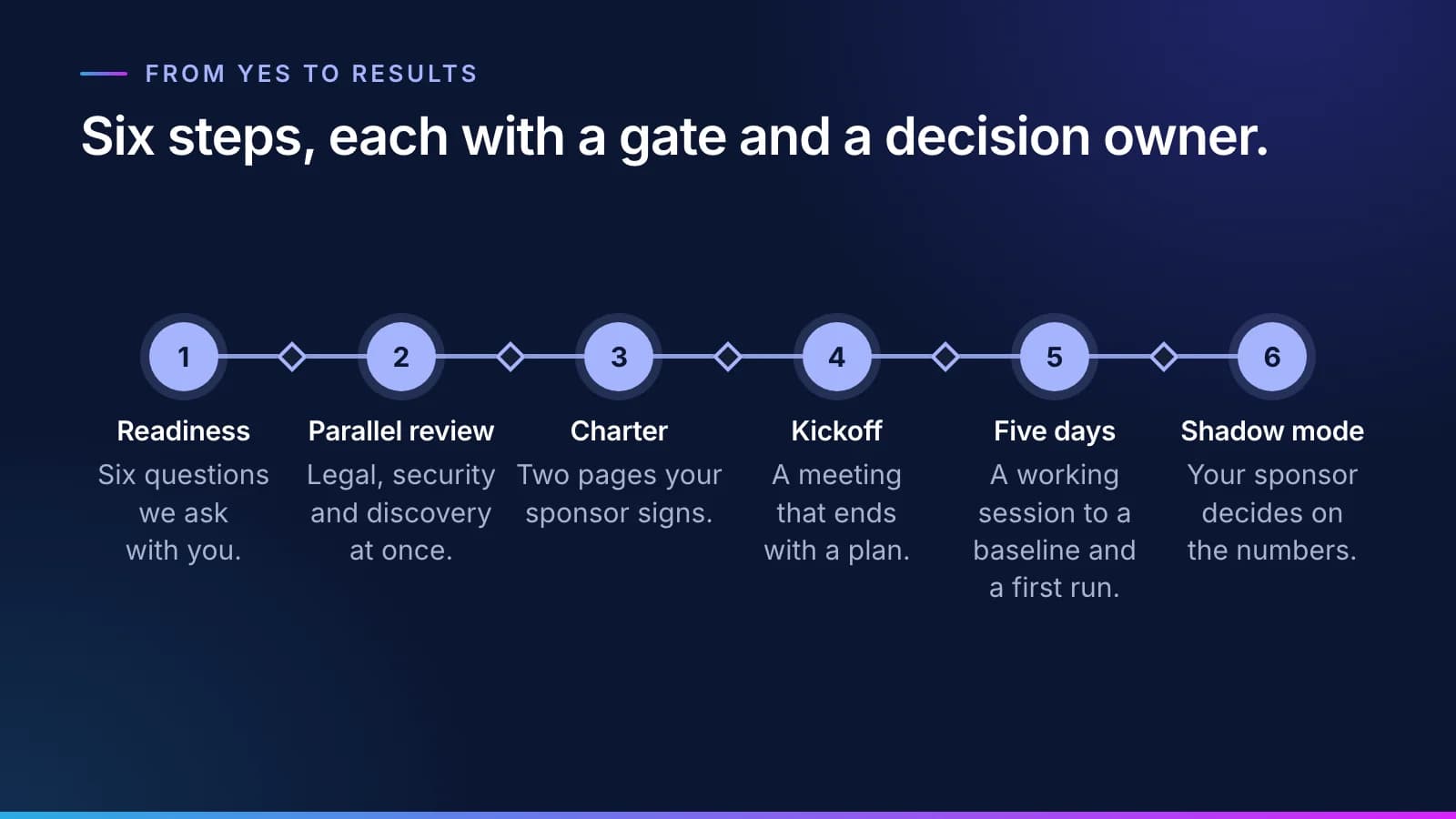
Two things decide whether AI works in a regulated business. One is a platform that can handle the data and do the work. The other is getting every team that has to say yes to say it, on dates. This is how we run the second half.
Inovagio team · Published · Updated · 9 min read
On this page
There are two halves to making AI work in a regulated enterprise. One is the platform. The other is AI stakeholder alignment: agreement, on dates, from every team whose yes the project needs.
The platform is software that reads your records and learns your rules, then does the routine work and keeps a checked record of each task. That half gets almost all of the attention.
Stakeholder alignment comes before the AI
#The second half is getting the project set up: the agreements signed, the security review passed, access to the systems granted, and a yes, on a date, from every team that has to give one. Most enterprise AI projects that stall don't stall on the AI. They stall here, on agreements, security review, system access and teams that move at different speeds. The other common cause, an AI that doesn't know your rules and waits to be asked, is the subject of why AI projects fail at work.
An outside vendor has no authority inside your organization. So we build that authority into the engagement before any work starts: a sponsor and a signed plan, with an escalation rule both sides agree to. This is how we run it.
The rules we work by
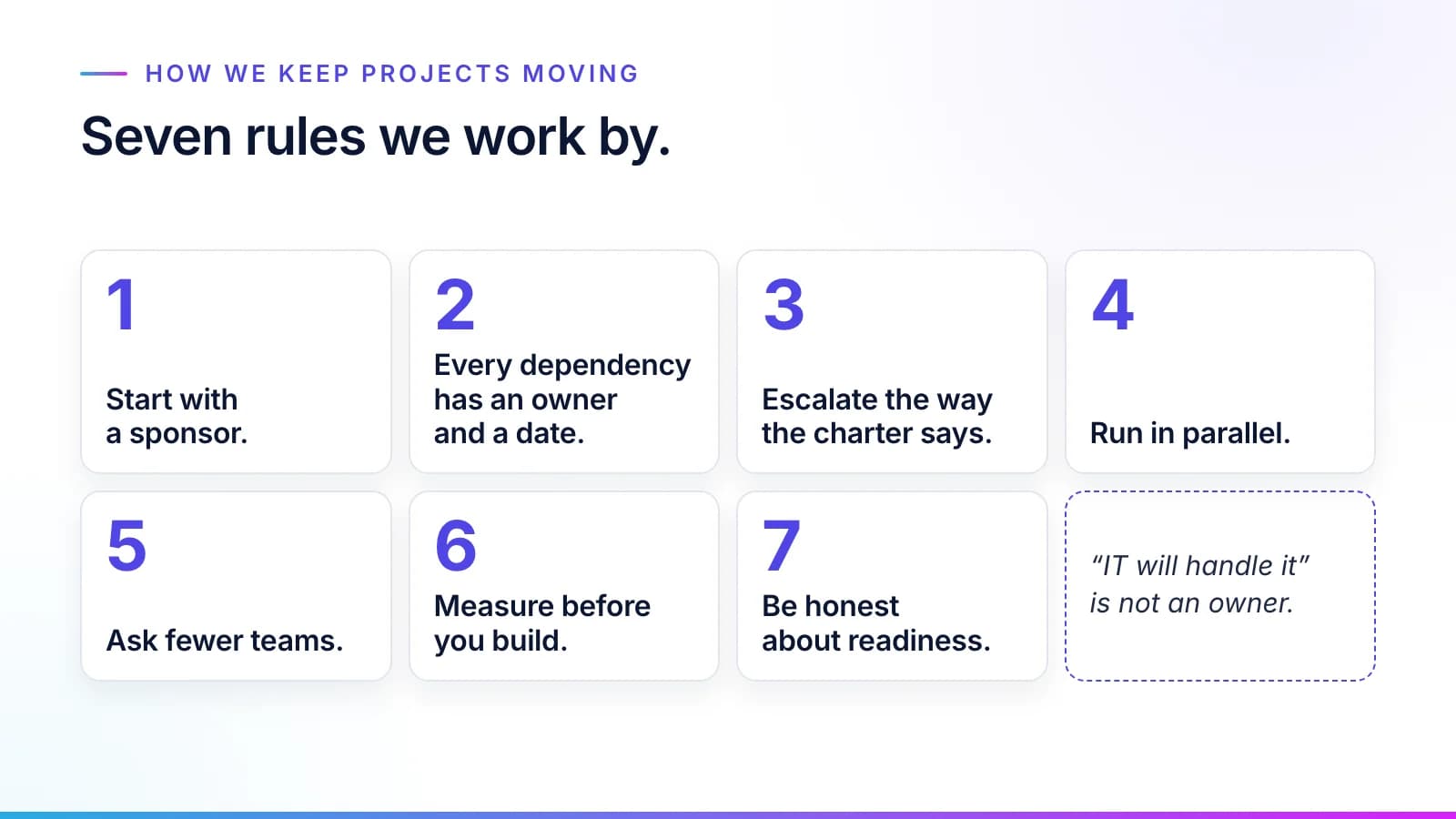
#- Start with a sponsor. An executive who owns the budget and the result signs the charter.
- Every dependency has an owner and a date. "IT will handle it" is not an owner.
- Escalate the way the charter says. A blocker that passes the agreed limit goes to the sponsor automatically.
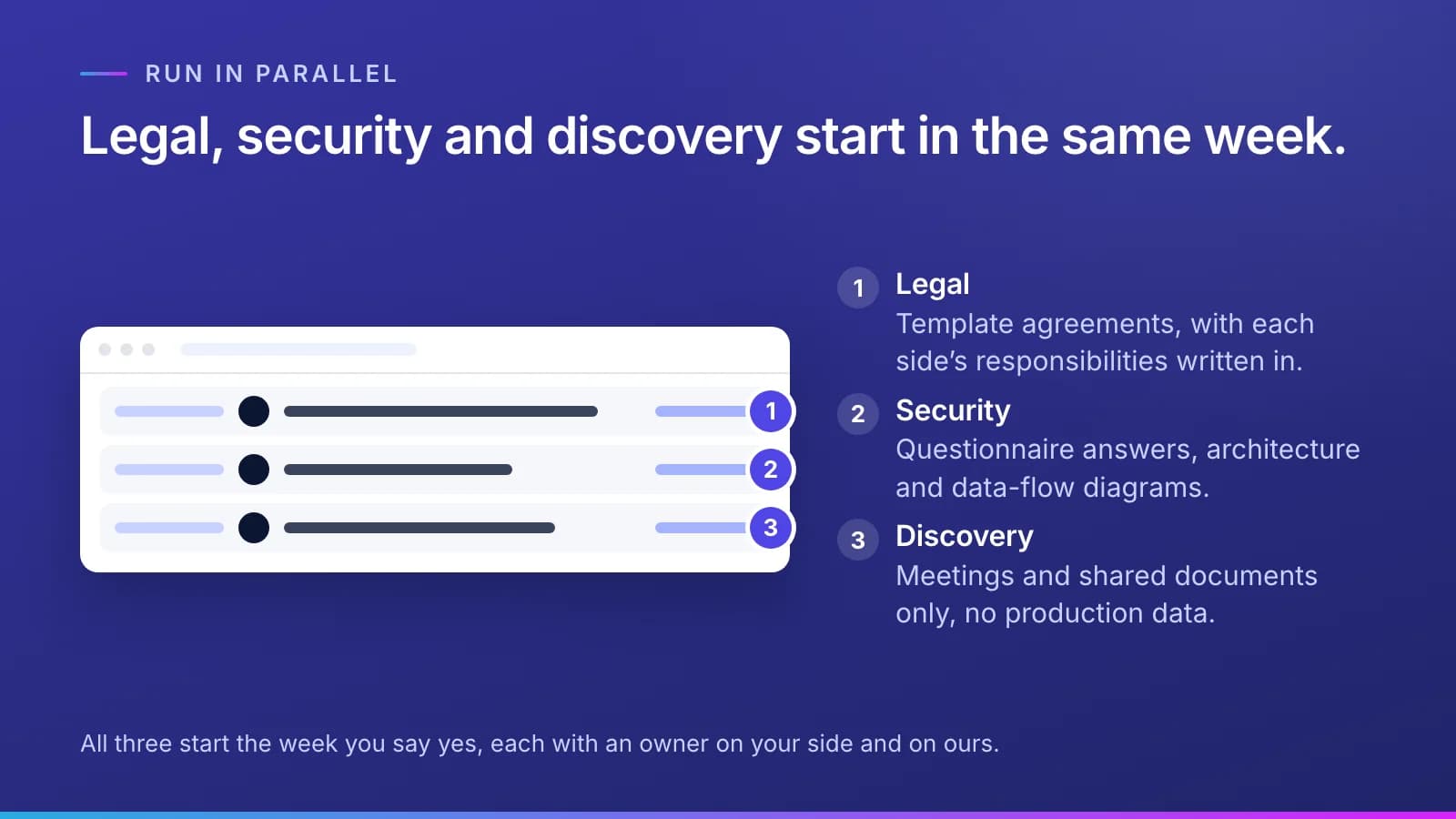
- Run in parallel. Legal, security and discovery start in the same week, not one after another.
- Ask fewer teams. Choose the path with the fewest approvals: read-only access, file exports, one department.
- Measure before you build. Nothing goes ahead without a baseline both sides agree on.
- Be honest about readiness. Gaps are named in the plan up front, each with an owner and a date, rather than discovered as delays later.
Readiness, before anyone signs
#Before an engagement starts, we check six things together with you:
- an executive sponsor who owns the budget and the result, and will attend steering;
- a named owner in every team that must approve, from IT and security to legal and the business;
- which systems hold the records, and who approves access to each;
- your standard vendor review for security and legal, and how long it usually takes;
- volumes and handling times for the work today;
- a named problem, with a cost the sponsor can state.
At a law firm, for example, a Virtual Employee that runs conflict checks on new matters needs a yes from the firm's general counsel, the records team and IT security before it reads a single client record.
Every "not yet" becomes a dated item in the plan rather than a surprise in month three. Some of the most useful questions are uncomfortable. We ask who loses sleep if this doesn't work, how long your last software vendor took to get through security and legal, and what else is competing for the same IT people in the next six months.
Legal, security and discovery, all at once
#The master agreement and the data agreement, plus the security review, are where months usually go, because they run one after another. We arrive with the answers already written, in one readiness pack:
- template agreements, with each side's responsibilities and what happens when a date slips already written in;
- answers to the standard security questionnaires your team is likely to send;
- architecture and data-flow diagrams: where the software runs, what data it reads, where data is stored, and what leaves your environment (the goal is nothing);
- a summary of the controls your security team will ask about first: identity and encryption, how one customer's data is kept apart from another's, where a person approves, and what goes on the audit record.
All three tracks start the week you say yes, each with an owner on your side and on ours. If one stalls, the others keep moving. Discovery before signing is meetings and shared documents only, with no access to production data. If a vendor's engineers will build inside your company, write the exit into the same agreements; what you should own when they leave lists what to ask for.
Two pages your sponsor signs
#The charter is two pages, signed by your sponsor before kickoff. Use this as the template:
- the problem in your words, with the cost you named, and what's in scope and what isn't;
- two or three success measures you choose, each with today's baseline and a target;
- the gates, and who decides at each;
- each team's role, and what your side commits in hours and access beside what we commit;
- the weekly and monthly meetings, the escalation rule, the open risks with owners and dates, and how both sides agree changes to scope.
Keep it short. A charter longer than two pages doesn't get read, and an unread charter doesn't settle disputes.
A kickoff that ends with a plan
#Everyone whose approval or time the project needs is in the room for 90 minutes. On your side that means the sponsor and your project lead, the business owner with two or three people who do the work today, the owners in IT and security, whoever covers privacy or compliance, and the data owner. Legal joins if the agreements are still open.
The sponsor opens it with why this matters and what success looks like. The business owner walks through how the work happens today, on a real example. We show what the software does and where it runs, and exactly what data it touches. Then the room fills in two lists together: every system we need with its approver and date, and every risk with its owner and date. The sponsor closes by asking each owner to commit.
Within 24 hours: the signed action plan, the two lists where both sides can edit them, the meetings booked through the readout, and a short email from the sponsor to everyone who attended. That email matters more than it seems. Teams prioritize the work their own leader asked for in writing.
Every team agrees for its own reasons
#Buy-in is earned team by team, before kickoff, not in it. We meet each owner one on one, learn what they're measured on, and show how the project helps them, or at least doesn't hurt them.
| Team | What usually worries them | What we bring |
|---|---|---|
| Business owner | Disruption; being blamed if it fails | A small first scope, human approval on, their own experts approving the knowledge |
| The people who do the work | Losing their job or their judgment | Virtual Employees prepare the work; people decide. We show the approval screen early |
| IT and platform | Another system to support | It runs where you choose, read-only first, with a clear support model |
| Security and privacy | Data leaving; unknown access | The data-flow diagram, a least-privilege access list, the audit record |
| Compliance | The regulator's questions | Every task traced to the rule, the model and the person behind it |
| Legal and procurement | Liability and terms | Standard terms and clear responsibilities, written down |
| Finance | Costs that creep | A delivery plan with a cap agreed up front, and the cost of every task, visible |
The signs that a team isn't on board are quiet ones: a delegate at every meeting, a request for "one more review", agreement in the room and no action after it. We take those to the sponsor privately and early, before they become a formal escalation.
Two lists and an agreed rule
#Two lists are the project's working memory, and both sides can edit them. The access list holds every system and data set the project needs, with the permission for each, starting with the least access that does the job, read-only first. Each risk or stall goes on the blocker list with its owning team and person and the day it was opened.
We write blockers as facts, not blame: "Security review not scheduled", not "Security is slow". The list will be read by the people it names.
A weekly 45-minute working session clears the action items and reads both lists. Every action has the same shape: what, who, by when. A monthly 30-minute steering meeting is where the sponsor decides what the team couldn't. Every Friday, the sponsor gets a one-page summary: the gates, the measures, the top blockers with how long each has been open, and the decisions needed.
The escalation rule is agreed at kickoff and written into the charter, for example:
- A blocker open five business days goes to your project lead, who works it with the owning team.
- At ten business days, your project lead raises it with that team's manager.
- At fifteen business days, or as soon as it blocks a gate, it goes to the sponsor before the next steering meeting, not at it.
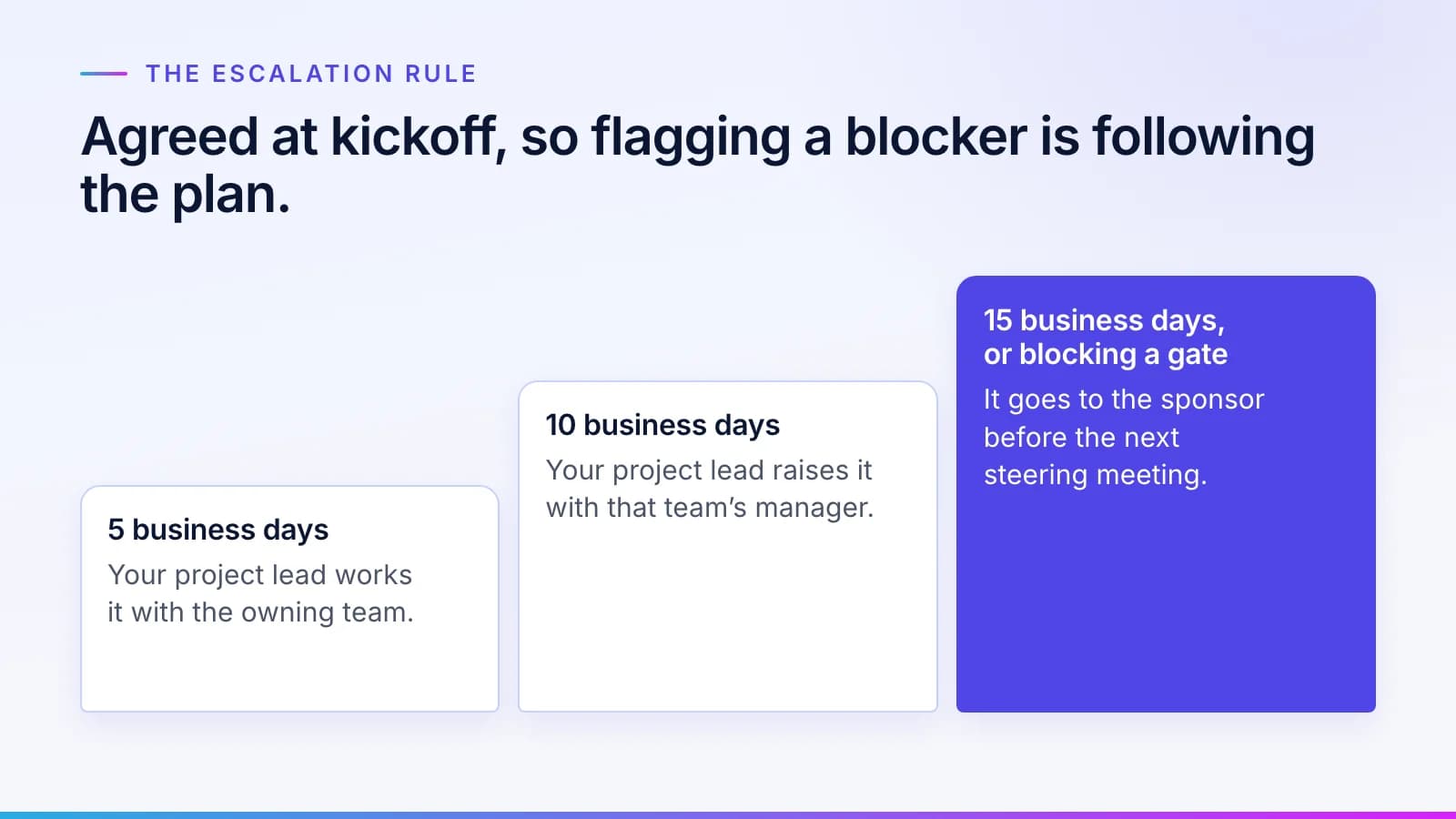
Because the rule was agreed in advance, flagging a blocker is following the plan, not complaining about a colleague.
Measure first, then prove it
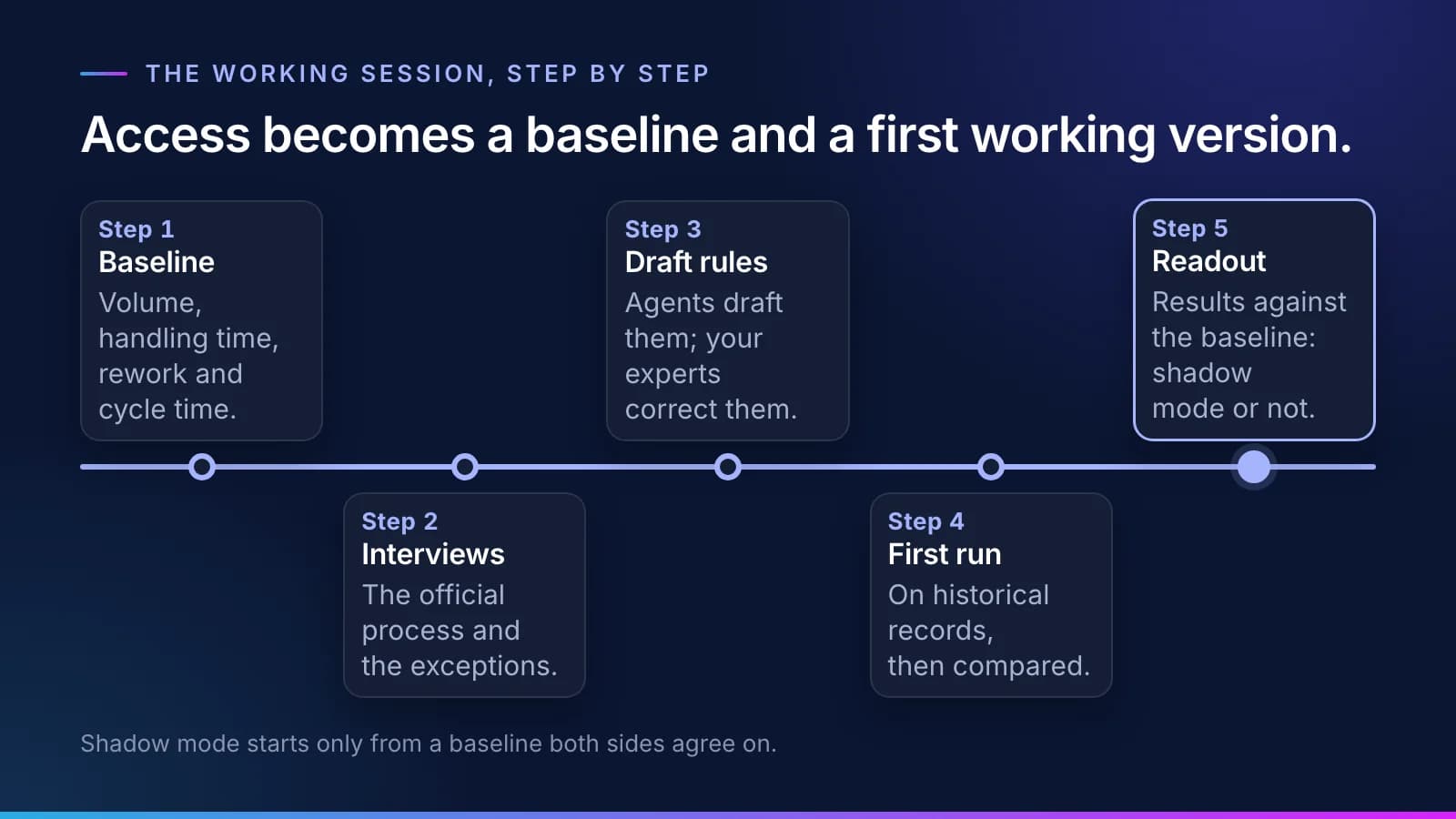
#A five-day working session turns access into a baseline and a first working version on your real records.
- Baseline. Cost today's process from your records and your team's estimates: volume, handling time, rework and cycle time. Both sides sign off on the numbers.
- Interviews. Short sessions with the people who do the work and their manager, capturing the official process and, more important, the exceptions.
- Knowledge draft. Our agents draft the rules and terms for each step, and your experts review and correct them.
- First run. Virtual Employees run the tasks on historical records, and we compare the results with what people actually did.
- Readout. Results against the baseline, the kinds of errors found, and a recommendation on whether to go ahead.
Good first tasks are high in volume and run on rules. They're already measured, and a mistake costs little: intake, document sorting, checklists, routine letters. Judgment-heavy decisions stay with people. Picking your first queue covers how to choose one.
Review is set in tiers, each approved as a rule by the business owner at sign-off:
| Tier | Example | Review |
|---|---|---|
| Routine, low risk | Indexing a document | A sample of tasks is checked |
| Standard | Drafting a coverage checklist | A person approves each task |
| Judgment or high value | Anything that affects a payment | A person decides; the Virtual Employee only prepares |
Before any live work, the workflow is built, tested on your past cases against the pass mark, signed off by your experts and checked by someone who did not build it, then run in shadow mode beside your team. A task moves to lighter review only on evidence from shadow mode, through a rule change the business owner signs.
At each review we report every success measure against the baseline, the share of tasks approved without changes, the errors by type and the hours both sides spent. The sponsor decides: expand, adjust or stop, and close support (hypercare) follows go-live. A clear stop is a fine outcome. A project that drifts for months is not.
What success looks like
#The projects that succeed have an engaged sponsor, a narrow first scope, a baseline both sides trust, and blockers raised early under a rule everyone agreed to. The ones that struggle almost always showed a warning sign in the first month: a sponsor who misses two meetings, the same blocker "in progress" three weeks running, scope that grows before the test starts, experts too busy to review the knowledge. Each has a known answer, and the answer is in the plan before it's needed.
If you'd like to see how this would run in your organization, request a briefing. How it works sets out the same steps on one page.
Questions
What people ask.
Why do enterprise AI projects stall?
Most stall not on the AI but on the second half of the work: agreements, security review, system access and teams that move at different speeds.
What does the executive sponsor do?
The sponsor owns the budget and the result, signs the two-page charter, decides at steering meetings and receives any blocker that passes the agreed limit. Without a sponsor, work doesn't start.
What is in the two-page charter?
The problem in your words, the scope, two or three success measures with today's baseline, the gates, each team's role and hours, the meetings, the escalation rule, the open risks and how scope changes are agreed.
How long until go-live?
After the five-day working session, the workflow is built, tested on your past cases, signed off and run in shadow mode beside your team, and the sponsor decides on go-live from the shadow-mode numbers, one kind of case at a time. Your charter sets the dates; the time it takes depends most on your review queues and access approvals.
What if it doesn't clear the bar?
The sponsor can expand, adjust or stop. A clear stop is a fine outcome; a project that drifts for months is not.
The products, industries and examples it covers.
- Role workersVirtual EmployeesVirtual Employees that plan, act and ask before anything leaves the building. Every plan is checked before it runs.
- Knowledge layerSynesisTurns your policies, procedures, records and your people’s know-how into a rulebook your experts approve, which you own and can take anywhere.
- IndustryLegalEach party on a new matter searched with its parent companies and former names, ethical wall requests drafted for lateral hires, and contracts compared with your playbook. Lawyers decide.
- OverviewTrust and governanceEvery action checked, every step recorded.
- OverviewHow it worksTen checked steps from your first decision to the day it handles real cases.
- OverviewHire a Virtual EmployeeThe roles, what each knows, and what always goes to a person.
Read next.
 Article · ApproachWhy AI at work stallsMost AI at work stalls because it doesn't know your team's rules and waits to be asked. Here is why AI projects fail in operations, and what changes when the routine queue goes to a worker that knows them. · updated November 18, 2026 · 8 min read
 Article · KnowledgeWhy the knowledge build stallsWriting down how a team really works is where most AI implementation time goes, and almost none of it is spent writing. Four stalls account for most of the delay, and the method is built around each one. · updated November 18, 2026 · 7 min read
 Guide · ApproachYour first AI use case: pick one queueThe best first AI use case is a queue, not an idea from the offsite. How to spot one, the triggers that make it urgent, the cases that are not a fit, and the charter to sign before any work starts. · updated November 18, 2026 · 7 min read
See it on your work
See how one of your tasks runs, start to finish.
A 30-minute walkthrough of one of your workflows, the approval step and the audit record, with the people who build the platform.