Virtual Employees for defense contractors, every first article checked.
Inovagio is AI for defense contractors: each first article checked against the drawing and the purchase order, on your own servers. Your reviewers decide.
We’ll spend 30 minutes with you on one of your workflows, and you don’t need to share any data.
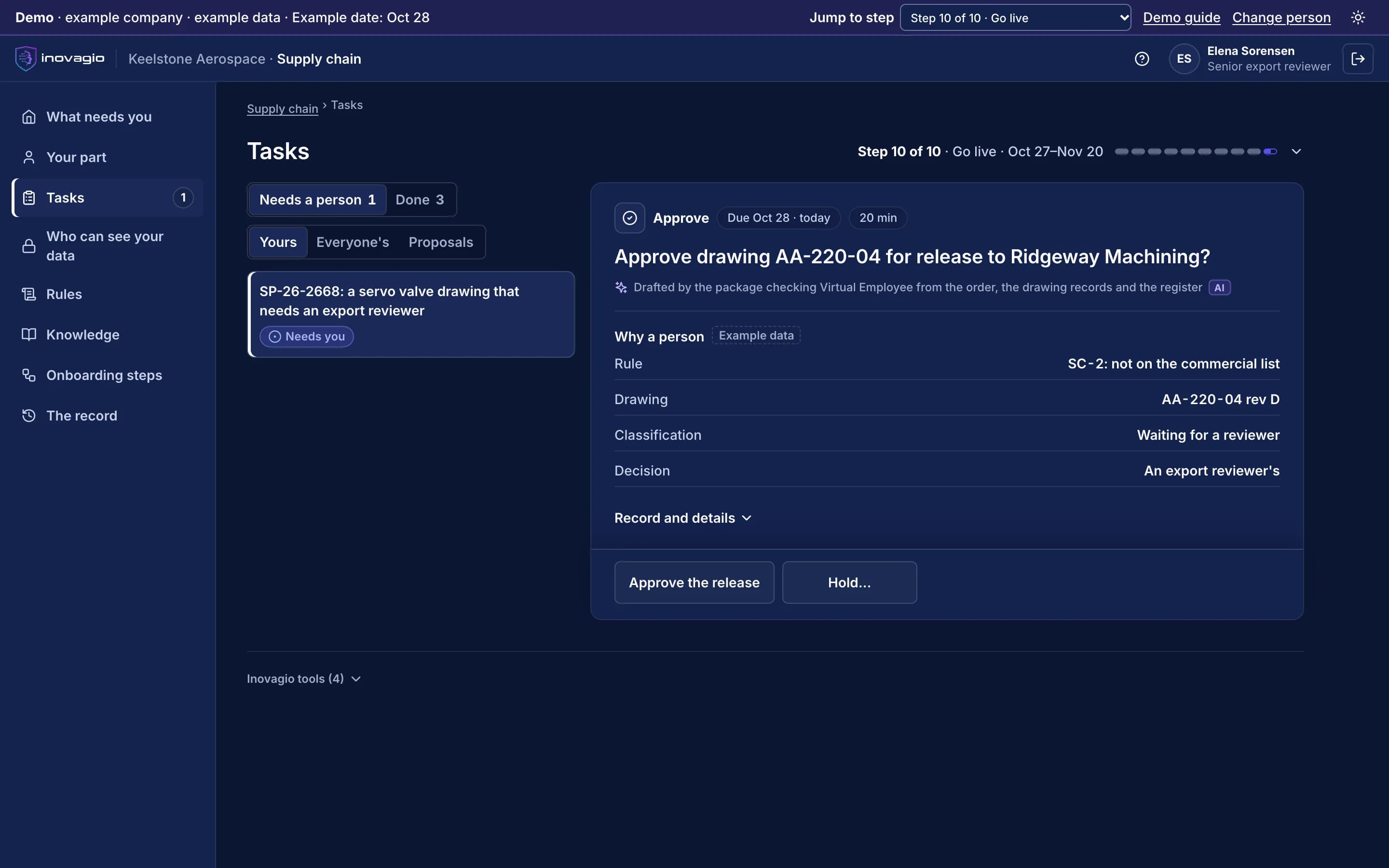
Pictured: a drawing release at Keelstone Aerospace in the Inovagio App, held for an export reviewer because the supplier is not on the commercial list (example company).
Every release and every supplier carries its own rules.
A drawing sent to the wrong supplier, a first article that doesn’t match its revision, a supplier without the level it needs: each is found late, by hand. Checking them means applying rules to documents, which is work Virtual Employees take on.
From your first decision to live work: the ten steps at Keelstone Aerospace.
Keelstone Aerospace is an example company, not a customer. Its sponsor signs a charter for first-article and export reviews. Nothing touches live cases until the work has been tested, signed off, checked and run beside the team, and each kind of case goes live only when it clears the bar.
1 of 5 · Prepare · Steps 0–2
An account on your own servers, and a charter
0
Step 0: Open your account
Keelstone’s account opens on its own servers, with no outside connection, and each Inovagio person is approved by name, steps and end date.
1
Step 1: Choose the work and sign the charter
The quality director signs a charter for first-article reviews: a target, a pass mark, a cost limit and when to stop.
2
Step 2: Set up sign-in and access
Staff sign in with Keelstone’s accounts. The quality Virtual Employee starts with no access, and controlled documents get their own locks.
What your customers’ and your own auditors see: The signed charter, the locks on controlled documents, and every person allowed into the account, until when.
Requirements in a solicitation traced to the sections that answer them, with gaps raised before the review.
Export reviews
Drawings and documents checked against your release rules before they leave, with anything your rules mark as controlled held for your reviewer.
Supplier quality
First-article inspection reports and material certificates checked against the drawing and the purchase order, with every finding cited.
Engineering changes
Change requests checked against the drawings, parts and contracts in your records, and routed to the right change board.
Contract deliverables
Reports assembled from program data in your customer’s format, checked before a person submits them.
Cost and schedule reports
Variances explained from the program’s own records, drafted for the program manager to sign.
Built for the people who answer for the work.
Program managers
Routine checks taken off the team, and the cost of every task shown beside today’s.
Security and export officers
Every release shows the rule and the document, and the person who approved it wherever your rules need one.
CIOs and security teams
One platform to review, running on your servers, signed in through your identity provider.
Every release and affirmation stays with your people.
Virtual Employees check and draft. Your engineers, reviewers and affirming official make every decision, and no Virtual Employee affirms on your behalf (step 10).
Your data stays yours, end to end.
Keelstone Aerospace’s records stay in its own account, where it chooses to run, and never train anything for anyone else. Your rules, your record and the models trained on your approved results are yours.
Your procedures, your parts lists and your reviewers don’t always agree.
In his interview, Ray says every drawing sent to an outside supplier needs an export review. Elena says: “Commercial-list parts going to our screened U.S. suppliers get a part-number check instead. Everybody knows that.” Two other reviewers agree. Inovagio flags the gap instead of guessing, and Ray decides, with the Empowered Official as second approver: commercial-list parts with an EAR99 classification on file, going to approved U.S. suppliers, are checked against the list and sent with a release note; everything else waits for an export reviewer. That approved rule is now followed on every supplier package.
Every gap between policy and practice goes to the person who decides it; nothing is guessed.
Every rule quotes the words it came from, by the speaker’s role, and names who approved it.
Nobody approves their own change, and every change is tested again before it runs.
Rule review · Drawings sent to suppliers · Keelstone Aerospace · example company
What the policy says
“Every drawing sent to an outside supplier needs an export review.”Export Compliance Manager · interview
What the team does
“Commercial-list parts for screened U.S. suppliers get a part-number check instead.”Three reviewers · interviews
The rule its owner approved
“Commercial-list parts with an EAR99 classification on file, for approved U.S. suppliers: part number checked, sent with a release note. Everything else: an export reviewer approves before it leaves.”Approved by the Export Compliance Manager and the Empowered Official
In force on every supplier package. The Virtual Employees follow version 2, and each release links back to the rule and the interviews it came from.
Works with your PLM, ERP and supplier systems.
We connect to each system the way it already supports, and reuse what exists before building anything new: read-only first, approved by the system’s owner, under its own limited identity (step 3). Your systems remain the system of record.
Each kind of data gets its protections before any work runs.
Each protection is a rule your privacy and security teams approve, proven with planted test values and checked again before go-live (steps 4, 7 and 8).
Controlled and export-controlled documents
Each opened only after its agreement is recorded, on your own servers, with outside models off, and seen only by the people your rules name.
Personal data
Every prompt, response and tool call is screened inside your network. Logs keep the category and the count, never the value.
Drawings and supplier documents
Screened before a model reads them. An instruction found inside one carries no authority.
A short form with the questions that matter to defense contractors. We reply within one business day.
Defense questions
Can it run with no outside connection?+
Yes. It runs on your own servers, models included, and needs no connection outside your network.
Does it track suppliers’ CMMC levels?+
It tracks which suppliers receive controlled unclassified information, the CMMC level each one needs and what each has on record, and drafts requests for missing plans. Your affirming official makes every annual affirmation; it never affirms on your behalf.
Who can see controlled documents?+
Only the people and Virtual Employees your rules allow, by person, role and document, and every access is on the record.
Does it release anything on its own?+
No. Drawings your approved rules cover, such as EAR99 parts on the approved commercial list for approved U.S. suppliers, get a part-number check and a release note, and your buyer sends them. Anything controlled or not yet classified waits for your export reviewer.
Is our data used to train shared models?+
No. Your records train only models you own, and only on results your people approved.
See how this works for your team.
A 30-minute briefing on one workflow of yours: whether it fits, what the first steps would be, and roughly what it would ask of your people. No data needed.