A quality audit on every claim file, every deadline kept.
Inovagio’s AI audits each claim file against your state’s standards and keeps each deadline, with letters drafted. Your adjusters make every claim decision.
We’ll spend 30 minutes with you on one of your workflows, and you don’t need to share any data.
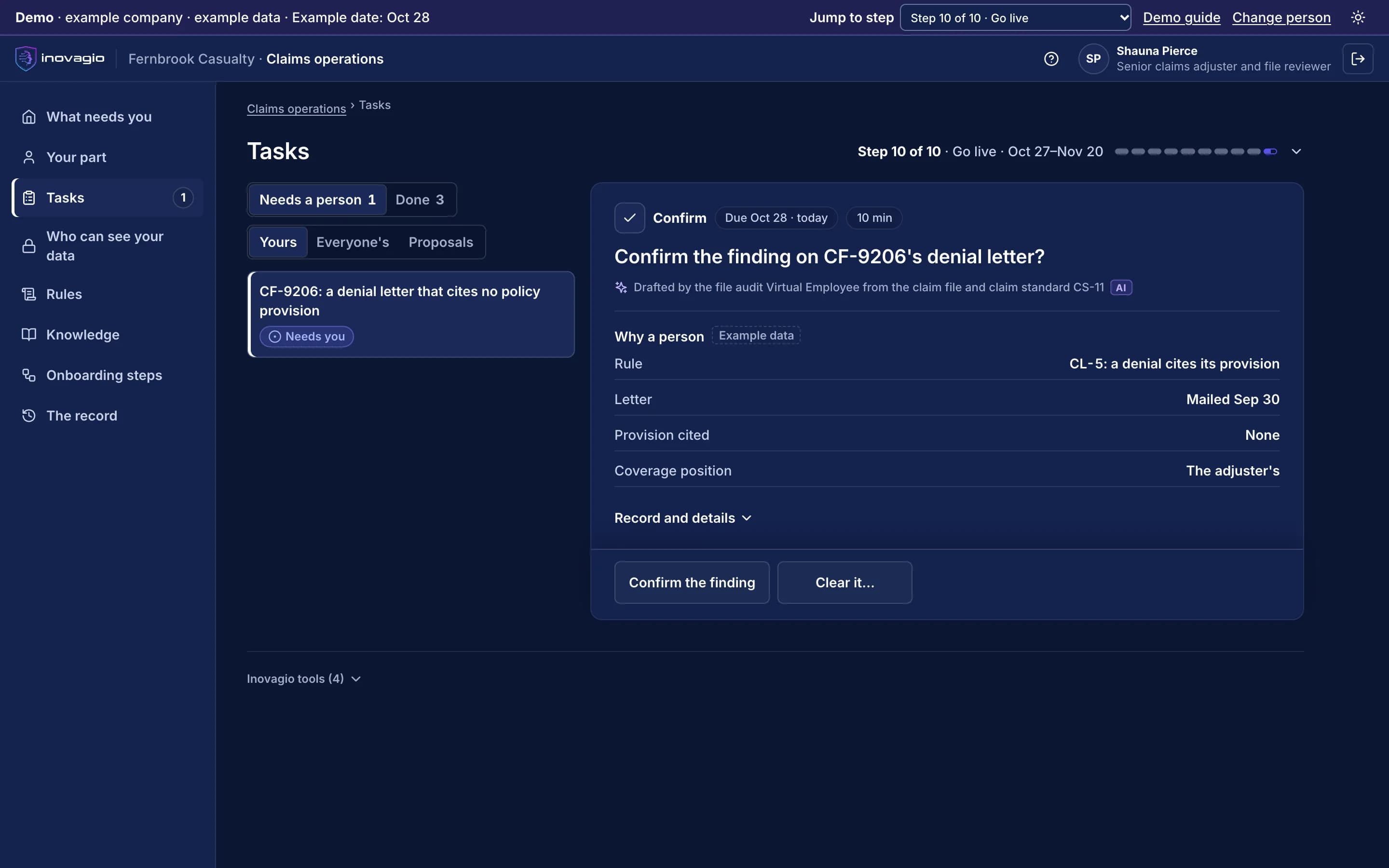
Pictured: a claim file at Fernbrook Casualty in the Inovagio App. Its denial letter cites no policy provision, so the adjuster is asked to confirm the finding (example company).
Examiners check deadlines, claimants wait, and regulators ask how AI is governed.
19%
In a 2025 Florida market conduct exam, one property insurer did not acknowledge claims communications within the required 14 days in 19% of the claims reviewed.
From your first decision to live work: the ten steps at Fernbrook Casualty.
Fernbrook Casualty is an example company, not a customer. Its sponsor signs a charter for claim file audits and the deadline diary. Nothing touches live cases until the work has been tested, signed off, checked and run beside the team, and each kind of case goes live only when it clears the bar.
1 of 5 · Prepare · Steps 0–2
An account and a charter for claim files, not claim decisions
0
Step 0: Open your account
Fernbrook’s account opens where it runs, and each Inovagio person is approved by name, steps and end date.
1
Step 1: Choose the work and sign the charter
The claims director signs a charter for file audits and the deadline diary: a target, a pass mark, a cost limit per file and when to stop.
2
Step 2: Set up sign-in and access
Adjusters sign in with Fernbrook’s accounts. The claims Virtual Employee starts with no access.
What the state’s market conduct examiner sees: The signed charter, which says the work is files and deadlines, never claim decisions.
One kind of file at a time, every decision with an adjuster
10
Step 10: Go live, one kind of case at a time
Each kind of file goes live on its own, spot-checked first. Letters and bills wait for the adjuster, and nothing is paid by the AI.
O
Operate: Operate: watch, re-test, decide
A changed state rule is tested again before it runs, and each review decides to continue, expand or stop.
What the state’s market conduct examiner sees: Every claim file’s record, with each document dated when received, processed and mailed, and each letter with the rule behind it.
Claim file audits first, then deadlines and bills.
Claim file quality audits
Each file checked against your state’s claim standards: what it must hold, and by when.
The deadline diary
Acknowledgment and status deadlines tracked by state, with each letter drafted for the adjuster.
Medicare reporting
The fields each report needs gathered from the file and checked, for a person to submit.
Medical bills
Workers’ compensation medical bills checked against the fee schedule, line by line.
Legal bills
Outside counsel bills checked against your billing guidelines before a person approves them.
Recoveries between carriers
Files where another carrier may owe the claim found, and the demand drafted for a person to send.
How one claim file moves
1 · Arrive
Each document, from email, the portal or an insurance agent's form, is attached to its claim file and dated when received.
2 · Audit
The file is checked against your state's claim standards: what it must hold, and by when.
3 · Deadlines
Acknowledgments, status letters and letters saying more time is needed are drafted before each deadline.
4 · Decide
Luis takes every coverage position, sets the reserve, and approves every letter, bill and payment.
5 · Record
Each document is dated when received, processed and mailed, so the file can be followed later.
Luis’s day, senior claims adjuster at Fernbrook Casualty.
Fernbrook Casualty is an example company. “With Inovagio” is the target shadow mode measures, never a result.
Luis’s day, senior claims adjuster at Fernbrook Casualty.
Part of the day
Today
With Inovagio
Documents arrive
Today: Files each document by hand and dates it in the notes
→
With Inovagio: Opens files with each document attached and dated
File audits
Today: Audits a sample of files against the state's standards
→
With Inovagio: Sees every file audited, with what is missing and the rule behind it
Deadlines
Today: Tracks deadlines in diaries and reminders
→
With Inovagio: Sees each file's next deadline, with the letter drafted
Missing documents
Today: Writes each request and follows up by hand
→
With Inovagio: Approves drafted requests; replies are logged to the file
Medical and legal bills
Today: Checks bills against the fee schedule and guidelines when time allows
→
With Inovagio: Reviews each bill with the lines that differ from the schedule or guideline
Audit and exams
Today: Rebuilds the file's dates from notes and inboxes
→
With Inovagio: Shows the record: every document, date and letter
What gets checked, and who decides.
Each state's deadlines, on every claim file
Acknowledgment, status and follow-up deadlines are tracked by state, and each letter is drafted before it is due.
Claims decisions stay with your adjusters
Coverage positions, reserves, payments, settlements and denials are decided by your people. The system never takes a coverage position.
Authority limits for MGAs and TPAs
A payment above the delegated limit waits for the carrier's approval, as the agreement requires.
A file your examiners can follow
Every document is dated when received, processed and mailed, with each letter and the rule behind it.
Claim decisions stay with your adjusters.
Virtual Employees prepare the file, the clock and the letters. A licensed adjuster takes every coverage position and makes every reserve, payment, settlement and denial decision (step 10).
Your data stays yours, end to end.
Fernbrook Casualty's claim files, policies, photos and bills stay in its own account, where it chooses to run, and never train anything for anyone else. No outside AI lab is needed to do this work.
Your claims manual, your state’s rules and your adjusters don’t always agree.
The claims manual says every file holds a written acknowledgment. The adjusters say a call to the claimant comes first, and the letter follows. Inovagio flags the gap instead of guessing, and the claims director decides with compliance: the call is logged to the file, and the written acknowledgment is drafted for the adjuster before the state’s deadline. That approved rule is now followed on every file.
Every gap between policy and practice goes to the person who decides it; nothing is guessed.
Every rule quotes the words it came from, by the speaker’s role, and names who approved it.
Nobody approves their own change, and every change is tested again before it runs.
Rule review · Acknowledging a claim · Fernbrook Casualty · example company
What the policy says
“Every claim file holds a written acknowledgment.”Claims manual
What the team does
“The adjuster calls the claimant first, and the letter follows later.”Three adjusters · interviews
The rule its owner approved
“The call is logged to the file; the written acknowledgment is drafted before the state’s deadline.”Approved by the claims director, with compliance
In force on every file. The Virtual Employees follow version 2, and each acknowledgment links back to the rule and the interviews it came from.
Where Luis’s team works, and how Inovagio connects.
We connect to each system the way it already supports, and reuse what exists before building anything new: read-only first, approved by the system’s owner, under its own limited identity (step 3). Your systems remain the system of record.
Claims system
Published API · ACORD forms
Your claims system’s API · reads claims, notes and diaries; drafts letters and audit notes for the adjuster · limited worker identity
Policy administration
Published API · ACORD messages
Your policy administration system’s API · reads the policy form, endorsements and declarations; writes nothing · limited worker identity
Documents
Document and imaging system
Imaging connector · reads photos, reports, estimates and bills, and dates each one · limited worker identity
Email and portal
Your mailbox · Claimant portal
Mail and portal connectors · reads what claimants and vendors send; drafts letters for the adjuster to approve · limited worker identity
Each kind of data gets its protections before any work runs.
Each protection is a rule your privacy and security teams approve, proven with planted test values and checked again before go-live (steps 4, 7 and 8).
Claimant personal data
Every prompt, response and tool call is screened inside your network. Logs keep the category and the count, never the value.
Medical information in bills and records
Read only where your rules allow, masked where the work doesn’t need it, with outside models off.
Documents, photos and email
Screened before a model reads them. An instruction found inside one carries no authority.
Cost per correct task: the AI and compute, the platform’s share, your people’s minutes at your rates, and any rework, divided by the work done correctly. Both sides are counted the same way, and every input comes from a record you can check.
Cost per claim file: today, and with Inovagio
What counts
Today
With Inovagio
Cost per claim file
Today: What each claim file costs you today, from your records and your team's estimates, by a method your finance lead approves. No one is timed.
With Inovagio: The same formula, counted the same way from shadow mode's own task records, at your rates
People's time
Today: Minutes per file, from your team's estimates for each kind of claim
With Inovagio: Review and decision minutes, logged on every file
Deadlines met
Today: Counted from last quarter's records
With Inovagio: Counted from the diary, every month
AI, compute and the platform
Today: Your current tools' share, if any
With Inovagio: Recorded on every task, with the platform fee's share
Rework
Today: Files reopened or letters corrected
With Inovagio: A file corrected later counts against us
What shadow mode measures, and what it asks of your team.
What we measure
Minutes per claim file
Deadlines met on time
Files complete at first audit
Letters corrected after review
Your team’s time
Each person sees what they will be asked, and roughly how long, against a weekly cap before the charter is signed. Nothing is approved because time ran out.
Who takes part
From your team: the claims director, two adjusters and the compliance lead for claims.
What IT does
IT provides read access to the claims and policy systems and the document store, and a mailbox for drafted letters.
A short form with the questions that matter. Scope, timing and terms are agreed on the workflow review.
Insurance claims questions
Does it decide coverage or pay claims?+
No. It audits the file, keeps the deadlines and drafts letters. Your adjusters take every coverage position, set reserves and approve every payment, settlement and denial.
What does a claim file quality audit check?+
It checks each file against your state's claim standards: the documents it must hold, the dates each was received, processed and mailed, and whether each letter went before its deadline. What is missing goes to the adjuster with the rule behind it.
How does it track state deadlines?+
Each claim carries its state's acknowledgment, status and follow-up deadlines, and each letter is drafted for the adjuster to approve before it is due.
Does it check medical and legal bills?+
Yes, for a person to review. Each medical bill is compared with the fee schedule, and each legal bill with your billing guidelines; every line that differs goes to the adjuster, who decides what is paid.
Does it work for MGAs and TPAs?+
Yes. It applies the authority limits in each program agreement, so a payment above a limit waits for the carrier's approval.
Which claims systems does it work with?+
It connects to your claims system through its published API, and reads ACORD forms and messages, under the permissions you set.
See how this works for your team.
A 30-minute briefing on one workflow of yours: whether it fits, what the first steps would be, and roughly what it would ask of your people. No data needed.