

Series · How we solve it
Your first AI use case: pick one queue
The best first AI use case is a queue, not an idea from the offsite. How to spot one, the triggers that make it urgent, the cases that are not a fit, and the charter to sign before any work starts.
Inovagio team · Published · Updated · 7 min read
On this page
Ask an operations leader where AI should start and you will often get the list from last quarter's offsite: a contract search tool, a meeting summarizer, a chatbot for the benefits handbook. Each idea is reasonable. Hardly any of them is a queue, and the best first AI use case is a queue: work that arrives every day under set rules, with someone who answers for it.
Think of invoices in accounts payable, servicing requests at an insurance carrier or renewal files at a community bank. A queue has a volume you can count, a cost you can measure and an owner who can say whether the work was right.
The software that works a queue goes by several names, including AI agents and AI employees. Ours are Virtual Employees, and each one is hired for a queue. If the term is new, our Virtual Employees questions and answers explain it in a few minutes.
This guide covers where to start with AI in operations, in five steps. Every piece on choosing and starting AI work is collected under approach.
Step 1: List the queues, not the ideas
#Start with the work, not the technology. Write down every queue in the department that someone works through each day, with its rough monthly volume, the systems it touches and who owns it. Ideas without a queue behind them, such as a better way to search the shared drive, go on a separate list. They may be worth doing, but they are not a first use case, because there is nothing in them to count from one month to the next.
Step 2: Score each queue on four signals of a good first AI use case
#A good first queue shows four signals. Put every queue from Step 1 through the same four questions and mark each one yes or no.
| Signal | Ask of the queue | Why it matters |
|---|---|---|
| Rules-based work at volume | Does one team do the same rules-based work every day? | Rules mean the work can be checked. Volume means a month of work is enough to measure. |
| An auditor or examiner checks it | Is this work audited or examined today? | It can look like a reason to wait, but an audited queue already has a standard to measure against, and each approved rule records who approved it and when. |
| The data stays in-house | Does the data have to stay inside your walls? | Virtual Employees can run on your servers, in your own cloud account or on a network with no internet connection, so the data stays where it is. |
| A named owner | Is one person answerable for the workflow? | The owner makes sure the right people approve the rules, and proposes when each kind of case is ready to go live. |
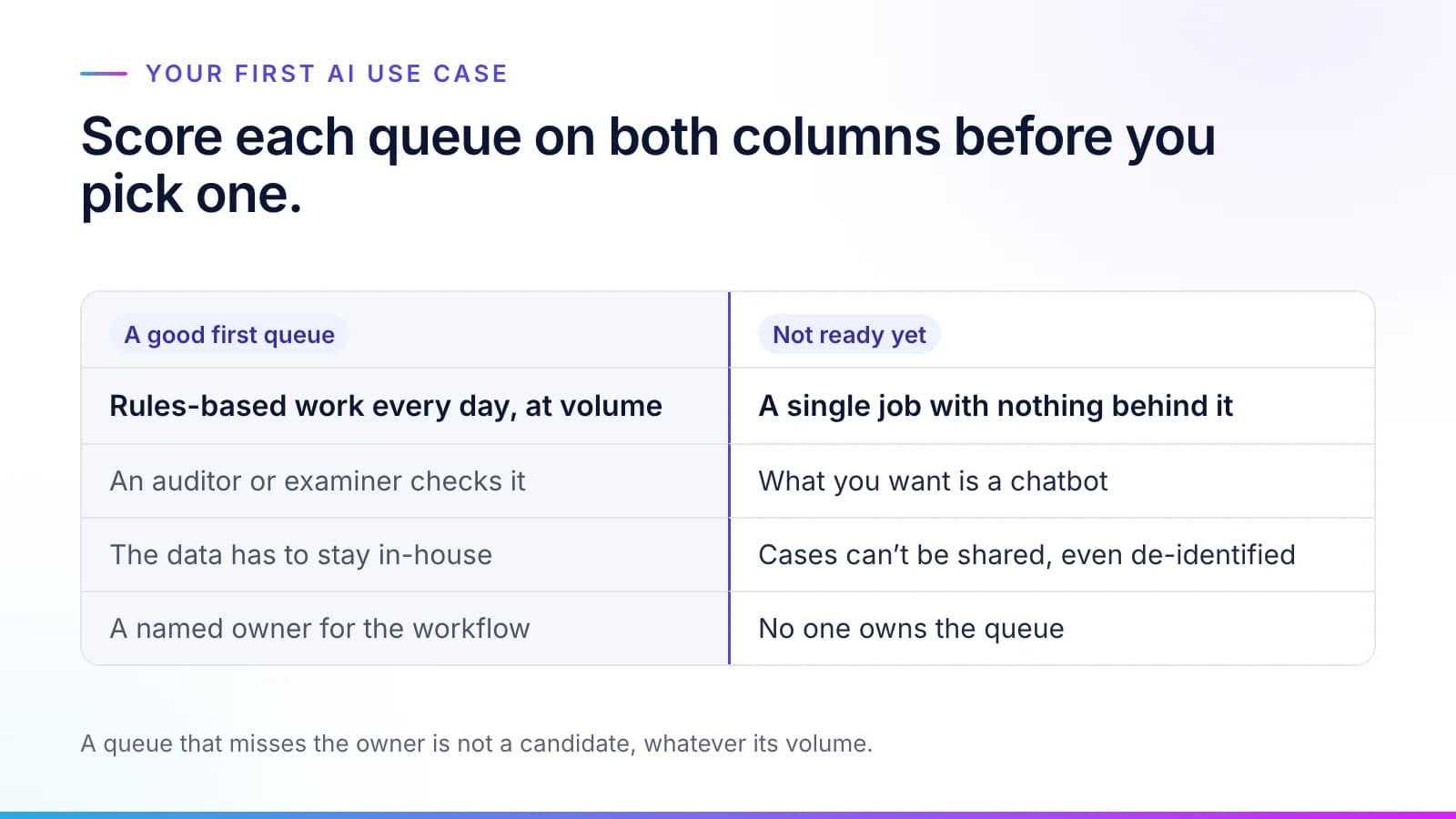
Score honestly. A queue with four yeses is a candidate. A queue that misses the owner is not, whatever its volume.
Step 3: Check for a trigger
#Good queues exist in every department. What turns one into a project is usually a trigger, and five come up again and again. They are listed roughly by how often they open the conversation.
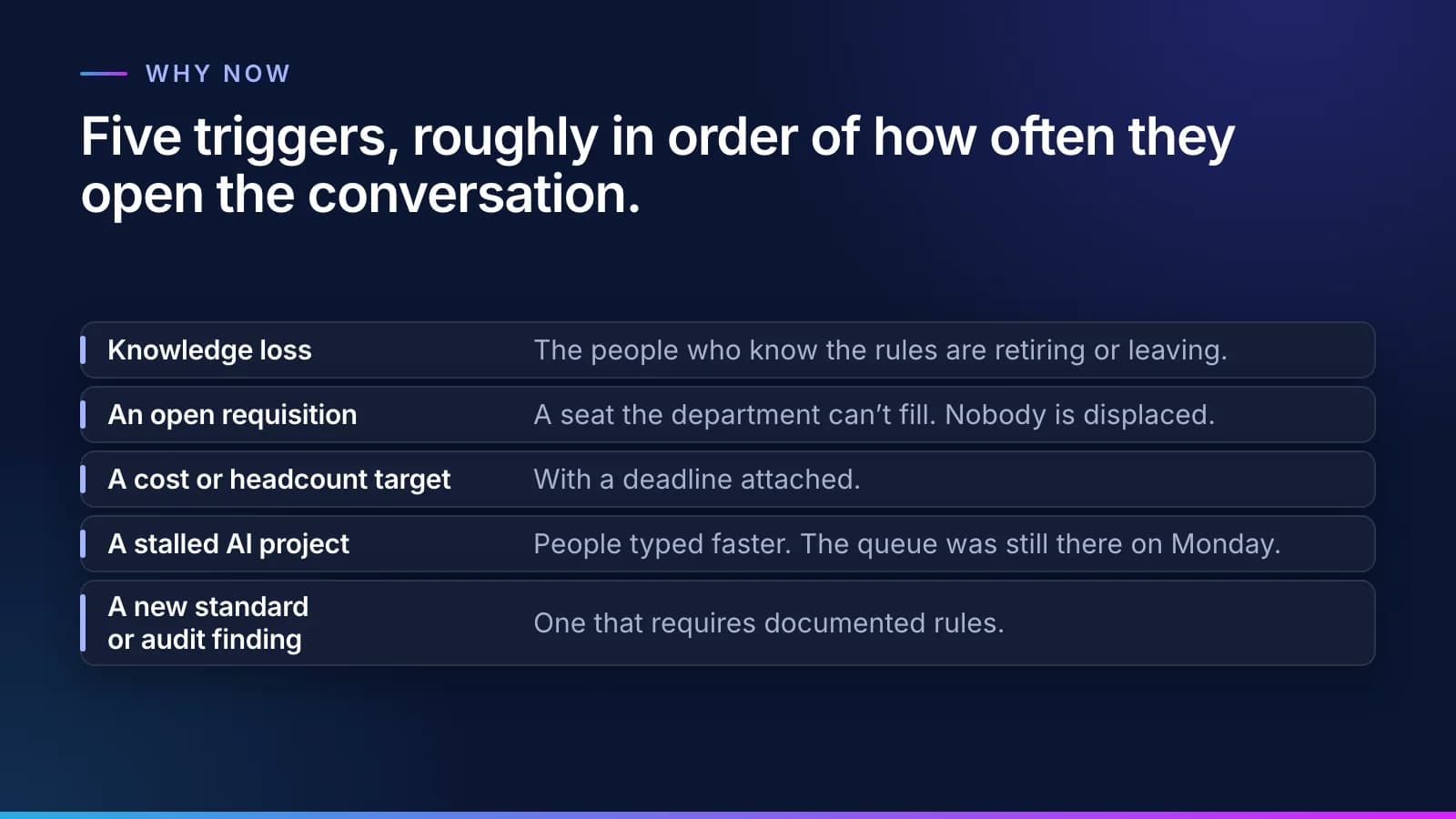
- Knowledge loss. The three people who know the rules are retiring or leaving. Writing their rules down has value on its own, before any Virtual Employee works the queue.
- An open requisition the department can't fill. Nobody is displaced, the budget line exists, and the manager is already tired of waiting.
- A cost or headcount target with a deadline. The leader needs a number that makes the case either way: cost per correct task, and how much more the same team handles.
- A stalled AI project. An AI assistant helped people write faster, and the backlog didn't move. We look at the reasons in why AI at work stalls.
- A new standard or audit finding that requires documented rules. In insurance that is often the NAIC AI Model Bulletin, covered in our NAIC AI bulletin checklist; in banking, the CSBS AI Supervisory Framework, covered in our CSBS AI framework checklist.
Step 4: Rule out the queues that are not a fit
#Saying no early saves everyone time. (A queue whose records are a mess isn't on this list: that's work to plan, not a reason to stop. Start with the records the queue touches, as our 90-day data cleanup plan lays out.) A queue is not ready when:
- No one owns it. Without an owner, nobody gets the rules approved or calls the result.
- What you want is a chatbot. A Virtual Employee works a queue and hands back results for review. If the goal is answering questions in a chat window, buy something built for that.
- You can't share cases, even de-identified. The rules are learned from your people and your records. Without sample cases there is nothing to check the work against.
- It is a single job with nothing behind it. If one narrow task is all you will ever automate, a single-purpose tool may suit you better. The knowledge layer earns its keep when a second role builds on the rules the first one needed.
- The data can go anywhere and the tools you already have do the job. Then keep them.
Step 5: Sign the charter before any work starts
#Once you have a queue, write down how you will judge it before any work starts. Your sponsor signs a charter that holds five things:
- The queue and its owner, with the people who will approve its rules.
- The baseline: what the work costs you today, counted from your records and your team's own estimates at your finance team's rates. No one is timed.
- Two or three measures, usually cost per correct task plus error rate or cycle time. Our guide to measuring AI cost per correct task explains how each is counted.
- How they are reported: monthly, from the task records, at your own rates.
- The way to stop, if the numbers don't hold up.
Tip
Security teams usually ask how to lower the risk of a first project. Start on a test copy with names and identifiers replaced, run in your environment, and keep the way to stop in writing.
The control and cost page shows how cost per task is calculated and what the monthly report contains.
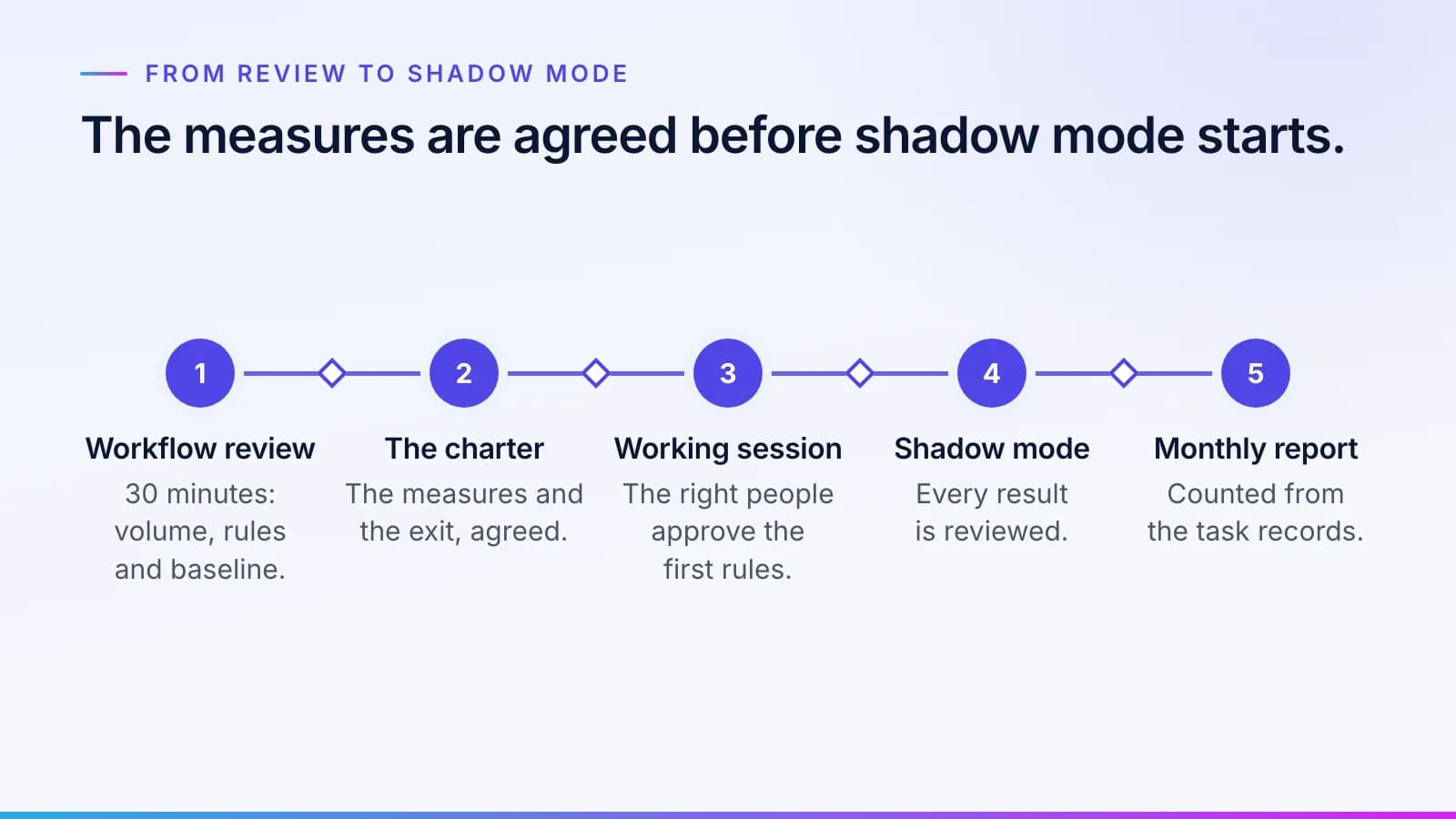
Here is the path from there. A 30-minute workflow review covers your volume and rules, and how you'll take the baseline. Then comes the charter, then the first working session, where our agents interview your people and the approvers you choose sign off the first rules in Synesis. The workflow is then tested on your past cases, signed off and run in shadow mode while your team still decides, and each kind of case goes live only when its results clear the bar your sponsor set. The How it works page lays out each step and who decides it.
Where first queues tend to be
#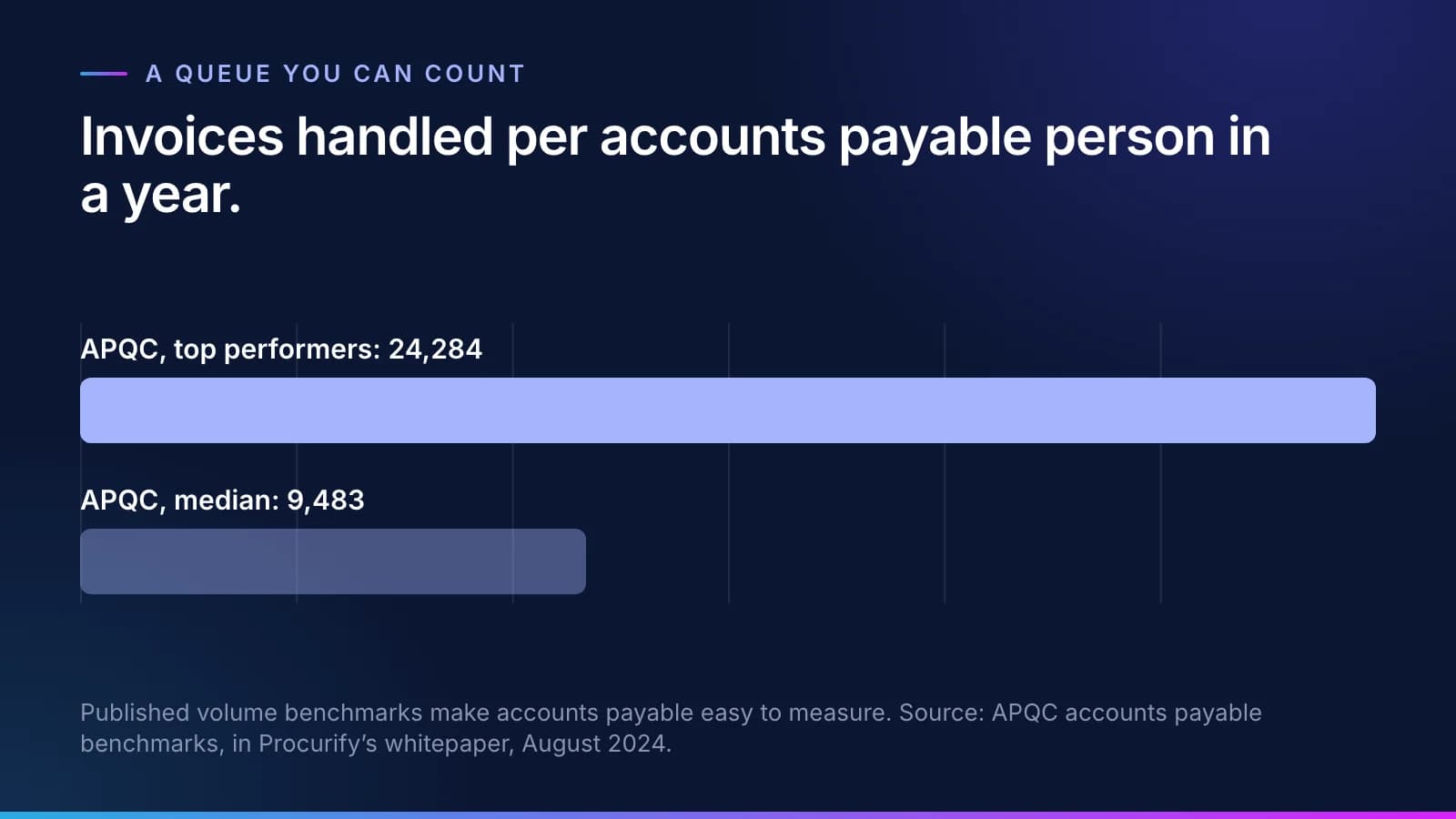
Accounts payable is the queue almost every company has, and the easiest to count. APQC puts the median at 9,483 invoices per accounts payable person a year, against 24,284 for top performers (APQC accounts payable benchmarks, in Procurify's whitepaper).
Published numbers like these give you a yardstick before any work starts. They don't replace your own baseline, but they tell you where your team sits.
Every customer type has its own first queue. Each of these pages shows one:
- Insurance servicing: servicing requests and premium reconciliation (insurance servicing).
- Finance operations: invoice matching and coding in accounts payable (finance operations).
- Community banks and credit unions: commercial renewal file prep and document collection (lending).
To see the roles a department can fill, browse the Virtual Employee roles you can hire. For what the hiring looks like from interview to shadow mode and live work, read how we hire a Virtual Employee.
Questions
What people ask.
What is a good first AI use case?
A good first AI use case is a queue: rules-based work one team does every day at volume, checked by an auditor or examiner, with data that has to stay in-house and a named owner. Those four signals mean the result can be counted on the queue's own volume, and someone has the standing to decide whether it worked.
Where should I start with AI in operations?
Start by listing the queues your department works every day, not the ideas from a strategy session. Score each on volume, rules, who checks it and who owns it. Pick the one with a clear owner and a trigger, such as knowledge loss or an open role, then set how you will measure it in the charter before any work starts.
How do I know if a process is not a good fit for AI?
A process is not ready when nobody owns it, when the real goal is a chatbot, when you can't share even de-identified cases, or when it is a single narrow job with nothing behind it. If the data can go anywhere and your current tools already do the job, keep them.
What goes in an AI project charter?
A charter is what your sponsor signs before any work starts. It names the queue and its owner, records what the work costs you today, sets two or three measures such as cost per correct task, error rate or cycle time, says how they are reported each month, and states the way to stop if the numbers don't hold up.
How long does it take to know if an AI project worked?
You know as the monthly reports come in, because the measures were set in the charter before any work started and are counted from the task records at your own rates. A queue with real volume gives a meaningful count in its first monthly report, which is one reason volume is one of the four signals.
The products, industries and examples it covers.
- Role workersVirtual EmployeesVirtual Employees that plan, act and ask before anything leaves the building. Every plan is checked before it runs.
- Knowledge layerSynesisTurns your policies, procedures, records and your people’s know-how into a rulebook your experts approve, which you own and can take anywhere.
- Workflow engineErgonDurable workflows where agents, people and systems each do their step.
- IndustryFinance operationsInvoices matched to orders and receipts and coded by your rules, and payments to changed bank details held until a callback is logged. Your team releases every payment.
- IndustryInsurance servicing and reconciliationEach program’s bordereau matched to your policy system, the MGA’s cash matched to what is due, and every line checked against the delegated authority. Your team approves every write-off.
- IndustryLending and account operationsBorrowers’ statements and tax returns spread, covenants tested and annual review memos drafted against your credit policy. Your credit team decides.
- OverviewHire a Virtual EmployeeThe roles, what each knows, and what always goes to a person.
- OverviewHow it worksTen checked steps from your first decision to the day it handles real cases.
Read next.
 Guide · QualityHow to measure AI cost per correct taskA per-task price shows what the AI charged. To know what the work cost, you need the formula, the baseline to take first, and a worksheet your finance team can fill in with its own numbers. · updated November 18, 2026 · 8 min read
 Article · OnboardingHow to onboard an AI employee, the way you hire a personA department hires a Virtual Employee using the same steps it uses for a person (interview, approval, account, a test and shadow mode, then the work). This is how to onboard AI employees so they earn the routine queue on evidence. · updated November 18, 2026 · 8 min read
 Article · ApproachWhy AI at work stallsMost AI at work stalls because it doesn't know your team's rules and waits to be asked. Here is why AI projects fail in operations, and what changes when the routine queue goes to a worker that knows them. · updated November 18, 2026 · 8 min read
See it on your work
See how one of your tasks runs, start to finish.
A 30-minute walkthrough of one of your workflows, the approval step and the audit record, with the people who build the platform.