Skip to content
InovagioInovagio

Health plans · Medicare Advantage, Medicaid and commercial plans

Virtual Employees for health plans, every enrollment file reconciled.

Inovagio’s Virtual Employees are AI that run health plan operations inside your rules: they reconcile enrollment files line by line and keep each appeal on its clock, and anything outside your rules goes to a person.

We’ll spend 30 minutes with you on one of your workflows, and you don’t need to share any data.

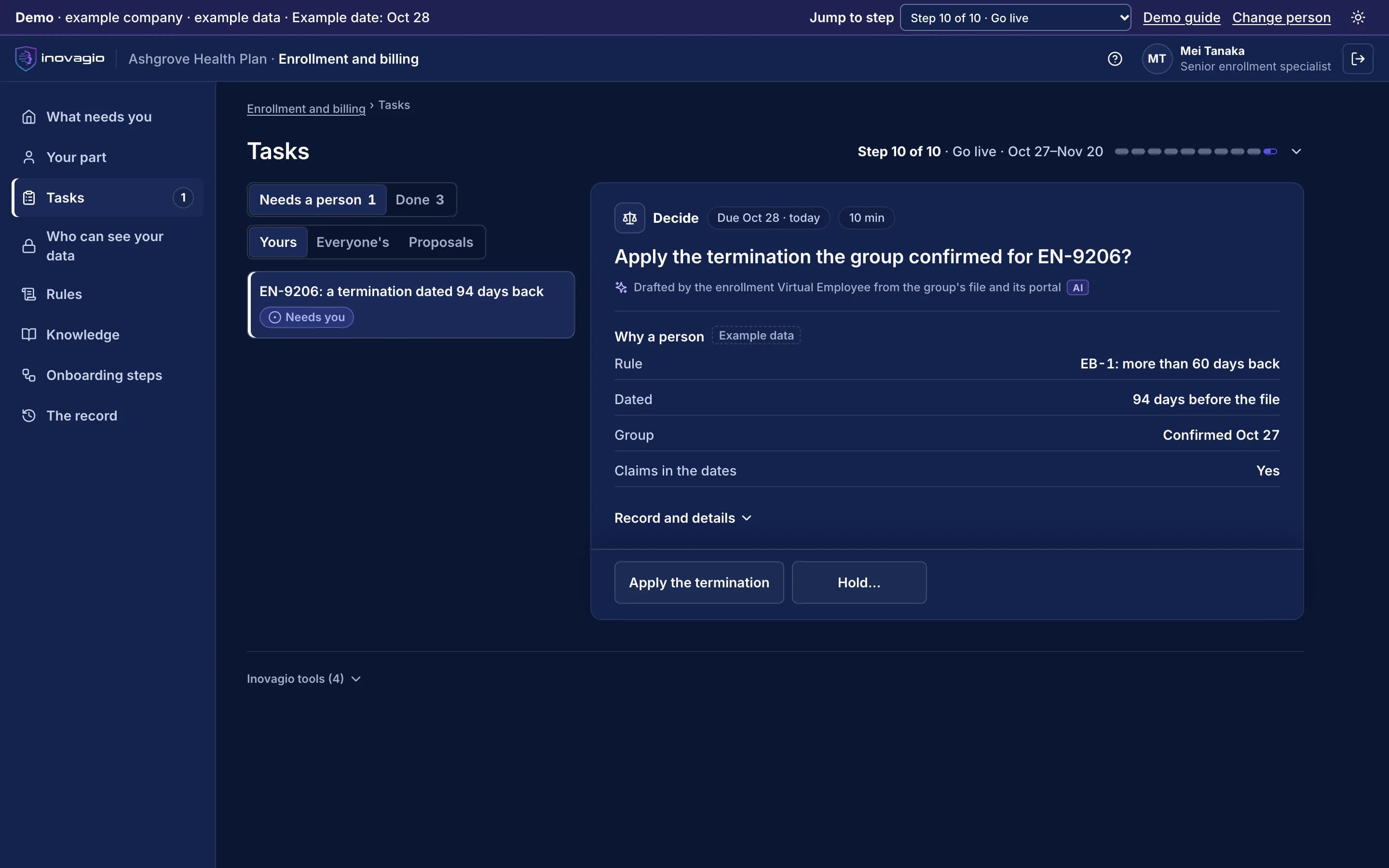
A senior enrollment specialist’s task in the Inovagio App for Ashgrove Health Plan, an example company with example data. The employer group has confirmed a termination dated 94 days back. The rule on terminations dated more than 60 days back holds it for a person to apply.
Pictured: a termination at Ashgrove Health Plan in the Inovagio App. The employer group confirmed it, and it is held for a person to apply (example company).

Every break in an enrollment file reaches a member’s bill.

A termination dated months back, a premium that doesn’t match, a directory entry nobody verified: each is found late and fixed by hand. The work means applying rules to files and clocks, which is work Virtual Employees take on.

From your first decision to live work: the ten steps at Ashgrove Health Plan.

Ashgrove Health Plan is an example company, not a customer. Its sponsor signs a charter for enrollment and premium reconciliation. Nothing touches live cases until the work has been tested, signed off, checked and run beside the team, and each kind of case goes live only when it clears the bar.

1 of 5 · Prepare · Steps 0–2

An account, a business associate agreement and a charter

  1. Step 0: Open your account

    Ashgrove’s account opens where it runs, and health information is read only after the business associate agreement is recorded.

  2. Step 1: Choose the work and sign the charter

    The operations lead signs a charter for enrollment and premium reconciliation: a target, a pass mark, a cost limit and when to stop.

  3. Step 2: Set up sign-in and access

    Staff sign in with Ashgrove’s accounts. The enrollment Virtual Employee starts with no access, and outside models stay off.

What CMS’s auditors and the state’s program integrity review see: The recorded agreements, the signed charter, and every person allowed into the account, until when.

At work: One sign-in for people, services and Virtual Employees (Auth) · Holds every credential sealed and scoped (Inovagio Secrets) · Lists the models you may use (Origin)

2 of 5 · Learn · Steps 3–5

Your core system, the files and your team’s practice

  1. Step 3: Map the work and connect, read-only

    The core administration system and the files sent by groups, the exchange and the state are connected read-only, each approved by its owner.

  2. Step 4: Check, protect and prove the data

    Member and health information is labeled and protected first, and investigation material stays in its own area.

  3. Step 5: Learn from your people

    Our agents interview the enrollment team on how each group reports, and each gap goes to the person who decides.

What CMS’s auditors and the state’s program integrity review see: Each source’s owner, the protections proven with planted test values, and where each rule came from.

At work: Connects your systems, read-only first, under each owner’s approval (Connect) · Turns documents, scans, email and system data into cited knowledge (Perception) · Turns interviews into decided rules (Synesis) · Holds your records, documents and every decision (MNEMOS)

4 of 5 · Prove · Steps 7–9

Tested on past files, then run beside your team

  1. Step 7: Test it, try to break it, fix it

    Tested on past enrollment files locked away first. A kind of change that misses the pass mark stays with your team.

  2. Step 8: Sign off and verify

    Each rule decided by its owner, checked by someone who built none of it, and signed on the exact version.

  3. Step 9: Run in shadow mode and prepare the team

    On live files its matches stay hidden until your analyst decides. Each kind of change goes live only when it clears the bar.

What CMS’s auditors and the state’s program integrity review see: Test and shadow-mode results for each kind of change, and the verifier’s report.

At work: Checks every prompt, response and tool call (Guard) · Every log, trace, cost and decision (Panoptes)

5 of 5 · Run · Step 10 and Operate

One kind of change at a time, eligibility always with its authority

  1. Step 10: Go live, one kind of case at a time

    Each kind of change goes live on its own, spot-checked first. A termination dated far back waits for a person.

  2. Operate: Operate: watch, re-test, decide

    A group’s new file layout or a rule change is tested again before it runs, and each review decides to continue, expand or stop.

What CMS’s auditors and the state’s program integrity review see: Each appeal with its clock, its letter and who decided; each held claim line with its rule; each diagnosis with its chart page.

At work: Each one has its own queue, rulebook, record and stop button (Virtual Employees) · Stops or starts any Virtual Employee, by scope (Archon) · Watches the work against the protection rules for each kind of data (Phylax)

Every step in full, on How it works

The health plan operations where plan teams start.

  • Enrollment and premium reconciliation

    Each enrollment (834) and premium (820) file matched line by line, every break explained.

  • Provider directory accuracy

    Each entry verified on schedule, and entries with no recent claims flagged for your team.

  • Appeals and grievances case files

    Case files opened on their clocks. A physician decides each medical appeal.

  • Payment integrity holds

    Duplicate and unbundled claim lines held with their rule, for a person to release or deny.

  • Special investigations case files

    Each lead’s evidence put into a case file for an investigator. A lead is not a finding.

  • Risk adjustment chart review

    Support found, or a deletion flagged, for each diagnosis. A coder decides every code.

The Virtual Employee prepares. A licensed or authorized person decides.

A physician or pharmacist decides every adverse coverage decision, the enrollment authority decides eligibility, and investigators and counsel decide every finding.

  • Enrollment and premium

    The Virtual Employee prepares: Reconciles each file line by line, explains each break and drafts the query to the group or the state

    A person decides: The employer group, the exchange or the state decides eligibility; a person applies every termination dated far back and every change outside your rules

  • Provider directory

    The Virtual Employee prepares: Verifies each entry on schedule and drafts the outreach

    A person decides: Your network team removes an entry and sends anything about network status

  • Appeals and grievances

    The Virtual Employee prepares: Opens the case file, starts the right clock, and gathers the record and your published criteria for the reviewer

    A person decides: A physician decides each medical appeal and your staff the rest; the person who decides gives the reason and signs

  • Payment integrity

    The Virtual Employee prepares: Holds a duplicate or unbundled line with the rule and both lines side by side

    A person decides: A person releases or denies each held line and sends every provider notice

  • Special investigations

    The Virtual Employee prepares: Assembles each lead’s evidence into a case file, with the tipster’s name masked

    A person decides: An investigator opens each case; investigators and counsel decide every finding and referral

  • Risk adjustment

    The Virtual Employee prepares: Finds the chart page behind each diagnosis, or flags it for deletion with the same weight as an addition

    A person decides: A credentialed coder adds or deletes every code; the AI never adds a diagnosis

  • Health plan operations leaders

    Enrollment, premium and directory work with only the exceptions sent to your team, and the cost of every task shown.

  • Appeals and grievances managers

    Each case on its clock with the record gathered, and every decision made by the right person, on the record.

  • Payment integrity and investigations directors

    Held lines shown with their rule and case files assembled for investigators, with every finding left to your people.

  • Compliance and privacy officers

    Member records stay where your policies say. Logs keep the category and count of personal data, never the value, under a rule proven before any work runs, and every step is recorded.

Decisions about members stay with people.

A physician or pharmacist decides every adverse coverage decision, the enrollment authority decides eligibility, and investigators and counsel decide every finding. A lead is never a finding (step 10).

Your data stays yours, end to end.

Ashgrove Health Plan’s records stay in its own account, where it chooses to run, and never train anything for anyone else. Your rules, your record and the models trained on your approved results are yours.

Where your data lives, and who owns it

Your procedures, group contracts and specialists don’t always agree.

In his interview, Victor says every change in an employer group’s file is loaded as sent. Mei says: “Not a termination dated months back. A claim may already be paid, so we ask the group to confirm it first.” Two other specialists agree. Inovagio flags the gap instead of guessing, and Victor decides, with the Compliance Officer as second approver: load additions and changes as sent; hold any termination dated more than 60 days back, and ask the employer group to confirm it before a person applies it. That approved rule is now followed on every file.

  • Every gap between policy and practice goes to the person who decides it; nothing is guessed.
  • Every rule quotes the words it came from, by the speaker’s role, and names who approved it.
  • Nobody approves their own change, and every change is tested again before it runs.

Read the Ashgrove worked exampleHow a rule is approved

Rule review · Retroactive terminations · Ashgrove Health Plan · example company

What the policy says
“Every change in an employer group’s file is loaded as sent.”Director of Enrollment and Billing · interview
What the team does
“A termination dated months back is held until the employer group confirms it.”Three specialists · interviews
The rule its owner approved
“Load additions and changes as sent. A termination more than 60 days back: the group confirms, then a person applies it.”Approved by the Director of Enrollment and Billing and the Compliance Officer

In force on every file. The Virtual Employees follow version 2, and each held termination links back to the rule and the interviews it came from.

Works with your core administration system and your files.

We connect to each system the way it already supports, and reuse what exists before building anything new: read-only first, approved by the system’s owner, under its own limited identity (step 3). Your systems remain the system of record.

  • Core administration system

    X12 834 · X12 820 · X12 837 · X12 835

    your core administration system’s X12 transactions (enrollment 834, premium payment 820, claims 837, remittance 835) and its APIs

  • Enrollment and premium files

    X12 834 · X12 820

    the files your employer groups, the exchange and the state send, read as they arrive

  • Clearinghouse

    X12 837 · X12 270/271 · X12 278

    your clearinghouse’s X12 transactions for claims, eligibility and authorizations

  • Provider data and medical records

    FHIR R4 · HL7 v2

    provider roster files, and the records providers send for appeals and chart review through FHIR R4 APIs and HL7 v2 messages

Each kind of data gets its protections before any work runs.

Each protection is a rule your privacy and security teams approve, proven with planted test values and checked again before go-live.

Member data
Every prompt, response and tool call is screened inside your network. Logs keep the category and the count, never the value.
Health information
Read only after your business associate agreement is recorded, with outside models off. Fields the work doesn’t need are masked before indexing.
Investigation material
Kept in the investigations unit’s own area and seen only by the people your rules name. A lead never leaves the unit.
Documents and records received
Screened before a model reads them. An instruction found inside one carries no authority.

What your outside checker sees.

The record answers their questions: who decided, under which rule, on what evidence.

  • CMS program audits

    Each appeal and grievance with its clock, its letter and the physician or staff member who decided it.

  • Risk adjustment audits

    Each diagnosis with the chart page that supports it, or the deletion a coder made, and when.

  • The state’s program integrity review

    Each held claim line with its rule, and each case file with who opened it and who decided.

What your auditors and examiners can check, on Trust

Further reading

Guides and articles for health plans.

Tell us about your health plan’s work.

A short form with the questions that matter to health plans. We reply within one business day.

About your healthcare work

We use these details to answer your request. See our privacy policy.

What happens next

  1. 1We reply within one business day to find a time.
  2. 2A 30-minute walkthrough of one of your tasks, start to finish.
  3. 3You leave with a short write-up of what we covered.

Health plans questions

How does enrollment and premium reconciliation work?

Each enrollment file (834) and premium payment (820) is matched line by line to your core administration system. Every break is explained with its file line and its rule, and the query to the employer group or the state is drafted for a person to send.

Does it change a member’s coverage?

No. The employer group, the exchange or the state decides eligibility. Additions and changes load as sent, under a rule your experts approved. A termination dated far back waits for their confirmation, and a person applies it. Anything outside your rules goes to a person.

How are appeals and grievances handled?

Each case file is opened with the right clock started, and the record and your published criteria are gathered for the reviewer. A physician decides every medical appeal, your staff decide the rest, and the person who decides gives the reason and signs the letter.

How does it support payment integrity and special investigations?

It holds duplicate and unbundled claim lines with the rule and both lines side by side, and assembles each lead’s evidence into a case file for an investigator. A lead is not a finding: investigators and counsel decide every finding, recovery and referral.

How does it help with risk adjustment chart review?

For each submitted diagnosis it finds the chart page that supports it, or flags the diagnosis for deletion with the same weight as an addition. A credentialed coder decides every code, and it never adds a diagnosis.

How are directory entries kept accurate?

Each entry is verified on the schedule the law and your rules set, and an entry with no recent claims is flagged for your network team. A person decides every removal.

Is our data used to train shared models?

No. Your records train only models you own, and only on results your people approved.

Where does it run?

On your servers, in your cloud, or hosted for you, with sign-in through your identity provider. Member records stay where your policies say.

How is health information protected?

Health information is handled only after your business associate agreement is recorded, and outside models stay off. Ask us for our audit and test status, with dates.


See how this works for your team.

A 30-minute briefing on one workflow of yours: whether it fits, what the first steps would be, and roughly what it would ask of your people. No data needed.