

Virtual Employees: questions and answers
Straight answers to what buyers ask about Virtual Employees, including what they are, how they learn your rules, what they never do, who owns what, where they run, how cost is measured, and how they differ from AI assistants.
Inovagio team · Published · Updated · 12 min read
On this page
This Virtual Employees FAQ answers what buyers ask before they hire one. It covers how a Virtual Employee learns your rules and what it will never do, then where it runs and who owns what. The last answers show how its cost is counted.
Three people read a proposal for a Virtual Employee, and each turns to a different page. The CFO wants to know how the cost is counted. The security lead wants to know what it can touch and how fast it stops. The manager who owns the queue wants to know what happens on the day it gets something wrong. The answers below take all three, along with the questions that come before them, roughly in the order people ask them.
Some vendors call them AI employees or AI agents. Ours are Virtual Employees, and the answers below say exactly what the name means.
What a Virtual Employee is
#What does a Virtual Employee do?
#A Virtual Employee is a worker a department hires for a routine queue, running on AI you own. It joins your team, learns your rules from your people, does the routine work inside those rules, and hands your people the exceptions. The work it takes is the high-volume, rules-heavy kind: matching invoices, assembling commercial renewal files and preparing servicing requests. Each of the Virtual Employee roles you can hire says what it knows out of the box and what it won't do. If you're deciding where to begin, our guide to picking your first queue lists the signs of a good fit.
How are AI employees different from AI assistants?
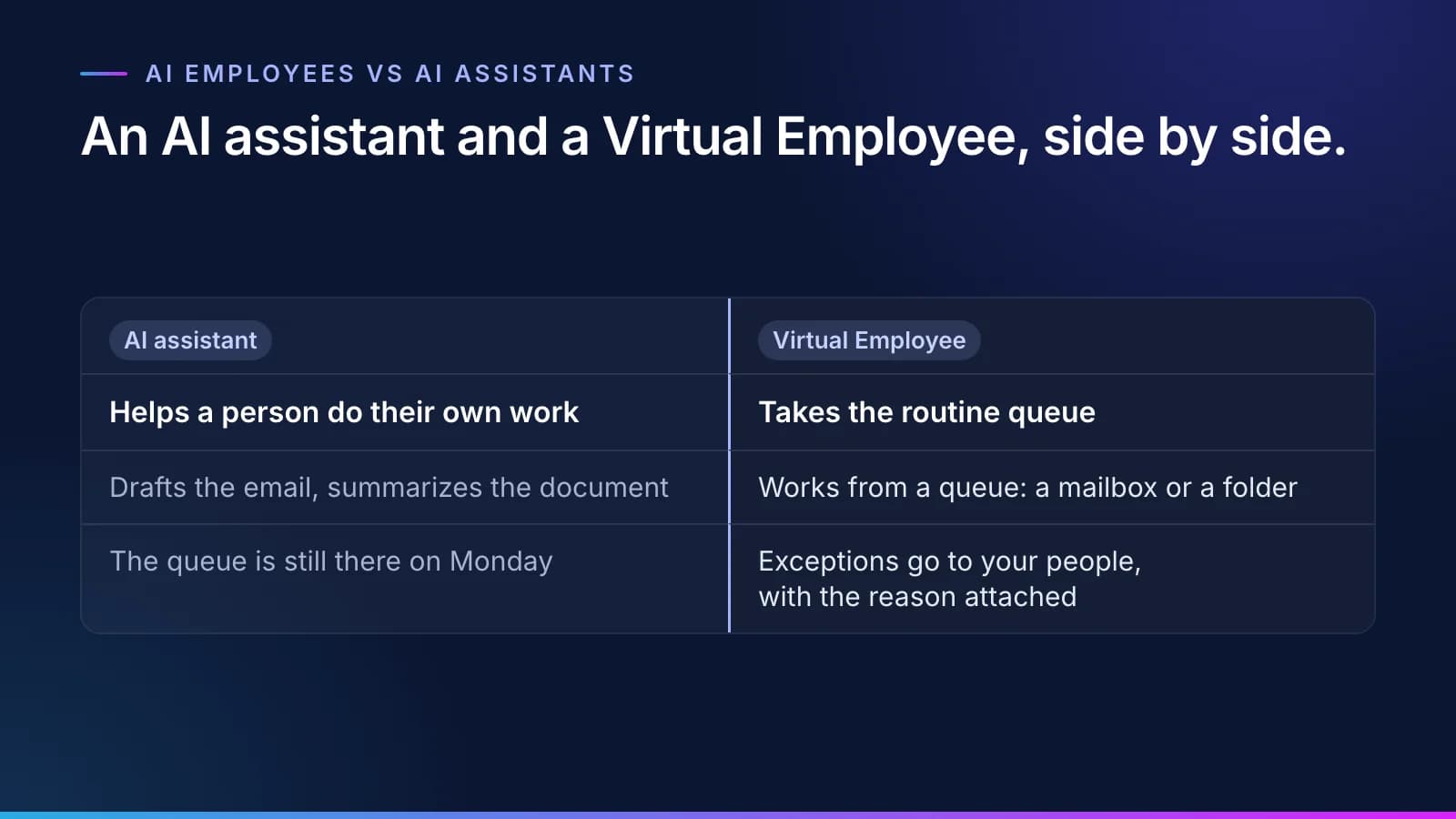
#An AI assistant helps a person do their own work faster. It drafts the email or summarizes the document, and the person still does the job, so the backlog stays where it was. That gap is why so much AI at work stalls.
A Virtual Employee takes the queue itself: you forward the pile to its mailbox or drop files in its folder. It also has a memory of past work, a receipt for every task showing what it did and what it cost, the approvals and spot checks its rules set, and a stop button. The memory is kept apart from your approved rules. A correction changes what it does only once it becomes a rule and the rule's approver signs it.
We don't claim our model knows more than anyone else's. AI assistants are good tools for email and documents, and you should keep yours. What you get with a Virtual Employee is a worker, and a worker, not a conversation makes that case at length.
Is a Virtual Employee the same as an AI agent?
#Broadly, yes. "AI agent" is the term much of the industry uses for software that takes steps on its own, and a Virtual Employee belongs to that category. What sets it apart is how it is run: it is hired the way a person is, works inside rules your organization approved, and sends anything it can't confirm to a person. In our product the worker is always a Virtual Employee. When we say "our agents", we mean the ones that interview your people and draft the rules.
Does a Virtual Employee replace people?
#It takes the routine queue, and your people take the exceptions and the judgment calls, including every regulated decision. The people who know the work shape the rulebook, and their names are on it. Nobody is asked to train their replacement. We recommend redeploying the time, not cutting jobs; only your company can promise that, so your sponsor writes it in the charter.
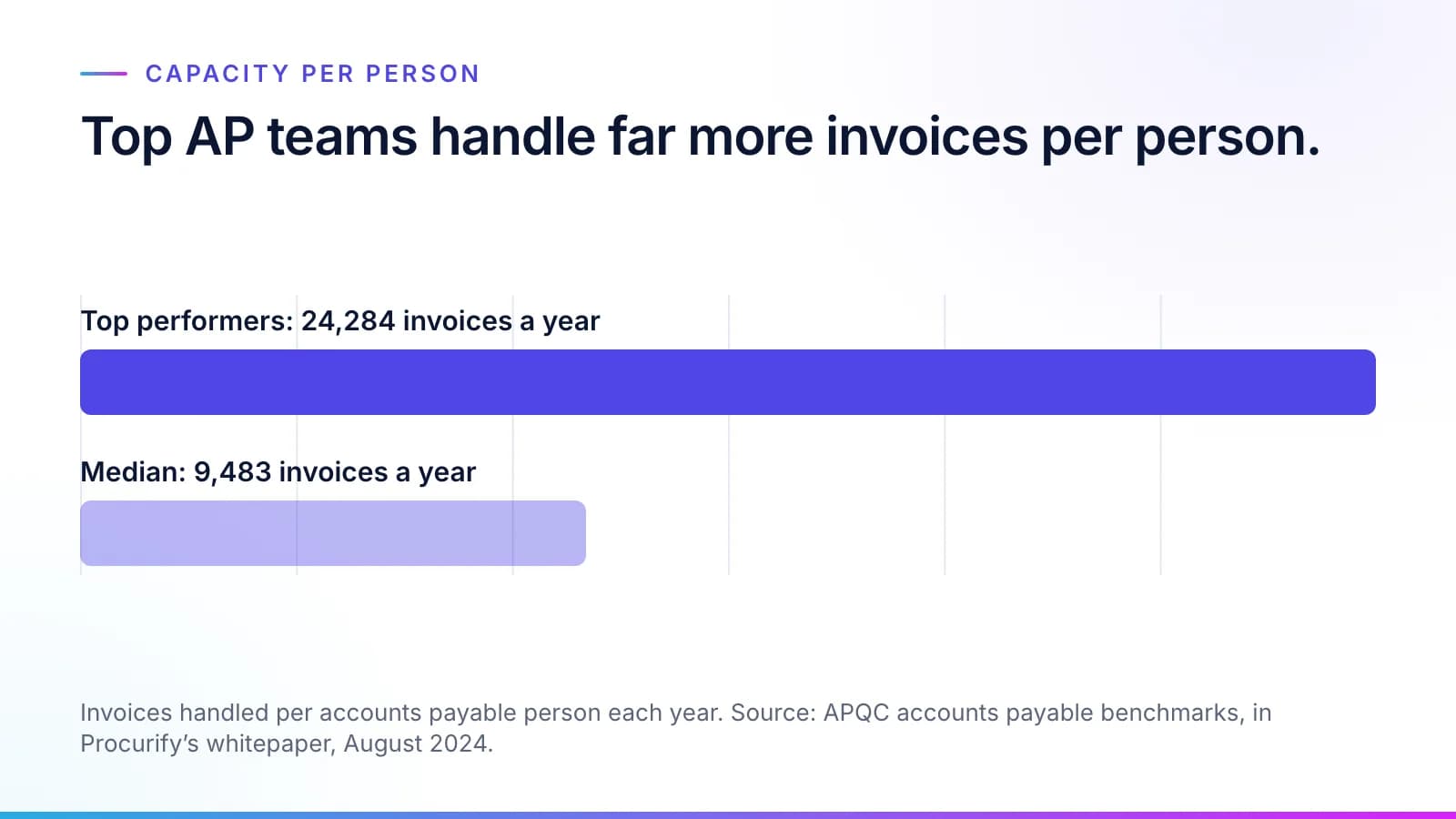
The number to watch is capacity per person. APQC's benchmarks put the median accounts payable person at 9,483 invoices a year, against 24,284 for top performers (APQC, via Procurify, August 2024). What matters is your own team's count before the routine queue moves and after it.
How it learns your business
#How does a Virtual Employee learn our business?
#
Our agents interview the people who do the work and read the records. They draft rules one at a time, each tied to who said it. Whoever your organization makes responsible for that part of the rulebook approves or corrects each one, and Synesis keeps the approved rulebook. You decide who that is.
A department head might approve their own team's terms, while a governance body or compliance approves the rules that cross departments or touch regulated work, and a rule can require more than one approver. Agents propose and never approve.
Audit, legal and compliance review are approval steps in the rulebook, not meetings outside it, so nothing waits on a workshop or on the expert who is on vacation.
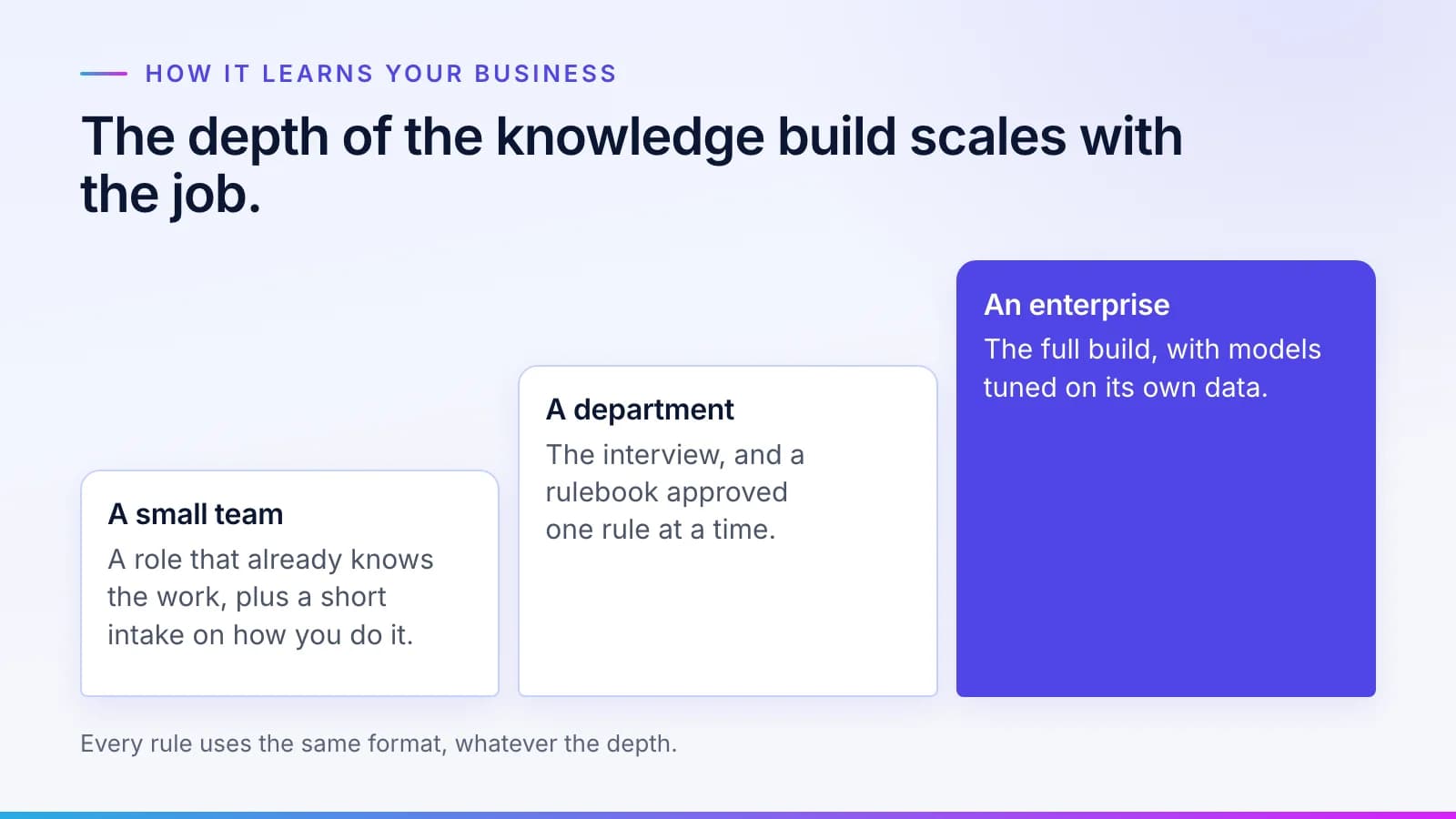
The depth scales with the job. A small team starts from a role that already knows the work, plus a short intake on how you do it. A department gets the interview and an approved rulebook. An enterprise gets the full build, with models tuned on its own data. Every rule uses the same format, which our guide to how a rule is written and approved sets out.
How is a Virtual Employee hired?
#The way you hire a person, in five steps:
- Interview. Our agents interview your people and read the records, then draft the rules.
- Approval. The right person approves or corrects each rule.
- Account. A Virtual Employee that works on your network gets an identity in your directory, with the least access the job needs and short-lived credentials.
- Test and shadow mode. It is tested on your own past cases against your pass mark, then works live cases beside your team while your people still decide. Each kind of case goes live only when it clears your bar.
- Work. The routine queue goes to the Virtual Employee, and exceptions go to a person with the reason attached.
Each step is covered in more detail in how we hire a Virtual Employee.
Does the AI retrain itself?
#No. The models stay the same. The rules change, and each change has an approver and can be rolled back. That keeps every change readable. Your auditor can open a rule, see who approved it and when, and see which tasks ran under each version.
What happens when a Virtual Employee gets something wrong?
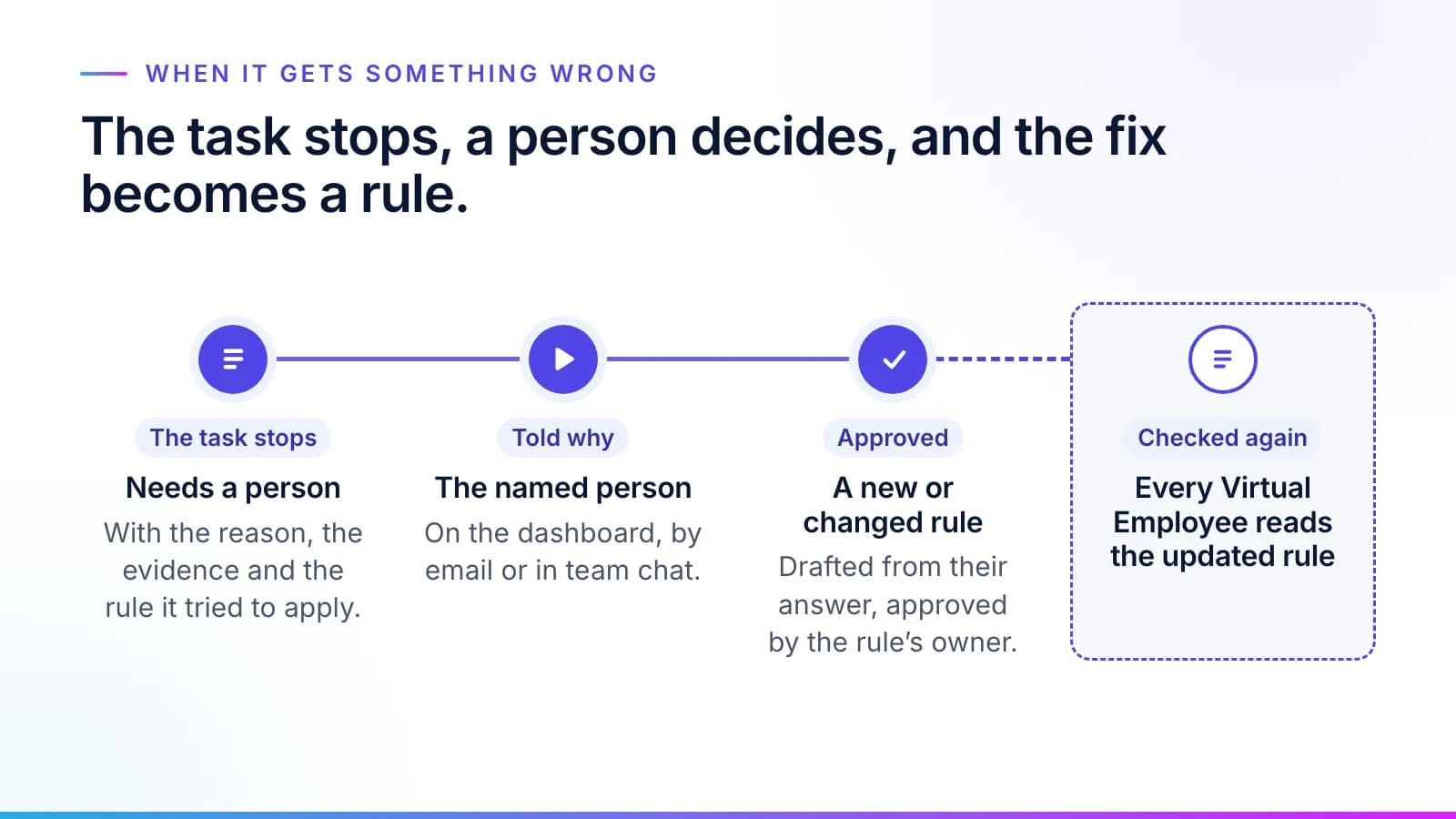
#The task stops and moves to a queue called Needs a person. The reason goes with it, along with the rule it tried to apply. The team member named in the rule is told why on the dashboard. The same message can go to their email or team chat. Their answer is drafted as a new or changed rule, the rule's owner approves it, and the task is checked again. Every Virtual Employee after that reads the updated rule, which is why a mistake your team fixes once stays fixed.
What a Virtual Employee never does
#What will a Virtual Employee never do?
#- It never makes a decision about a person. Your people decide claims and loans, and every question of a patient's care.
- It never works outside the approved rules. Only work that fits them goes ahead.
- It can't leave the network you give it. Every call goes through a gateway that allows only the destinations it needs.
- It never sends out work a licensed professional must sign, such as a legal opinion or a tax return, without that professional's review.
- It never trains anything for another customer. Your data never improves a model another customer uses.
- It never runs without a rulebook, however short.
Every role on the hire page carries a scope statement that says what that Virtual Employee doesn't do.
Is it safe to give a Virtual Employee a login?
#Five controls make it safe to credential: its own identity in your directory, a gateway that limits what it can reach, plans checked before anything runs, approval steps for whatever needs a person, and your approved rules as hard gates. You can stop one Virtual Employee, one department or everything at once from Archon, the control plane. Our post on giving AI a login safely goes through each control. The security and trust page covers the rest. Banks and credit unions can see the same controls set against examiners' questions in our CSBS AI framework checklist.
Can we turn a Virtual Employee off?
#Yes, at the level the problem needs: one Virtual Employee, a department or everything at once, from one screen in Archon. Spending limits stop work when they are reached, not after. For one that works on your network, disabling its account in your directory stops it too. What a stop has to cover, and what examiners now ask about it, is in the AI agent kill switch.
Who owns what, and where it runs
#Who owns the rulebook and the data?
#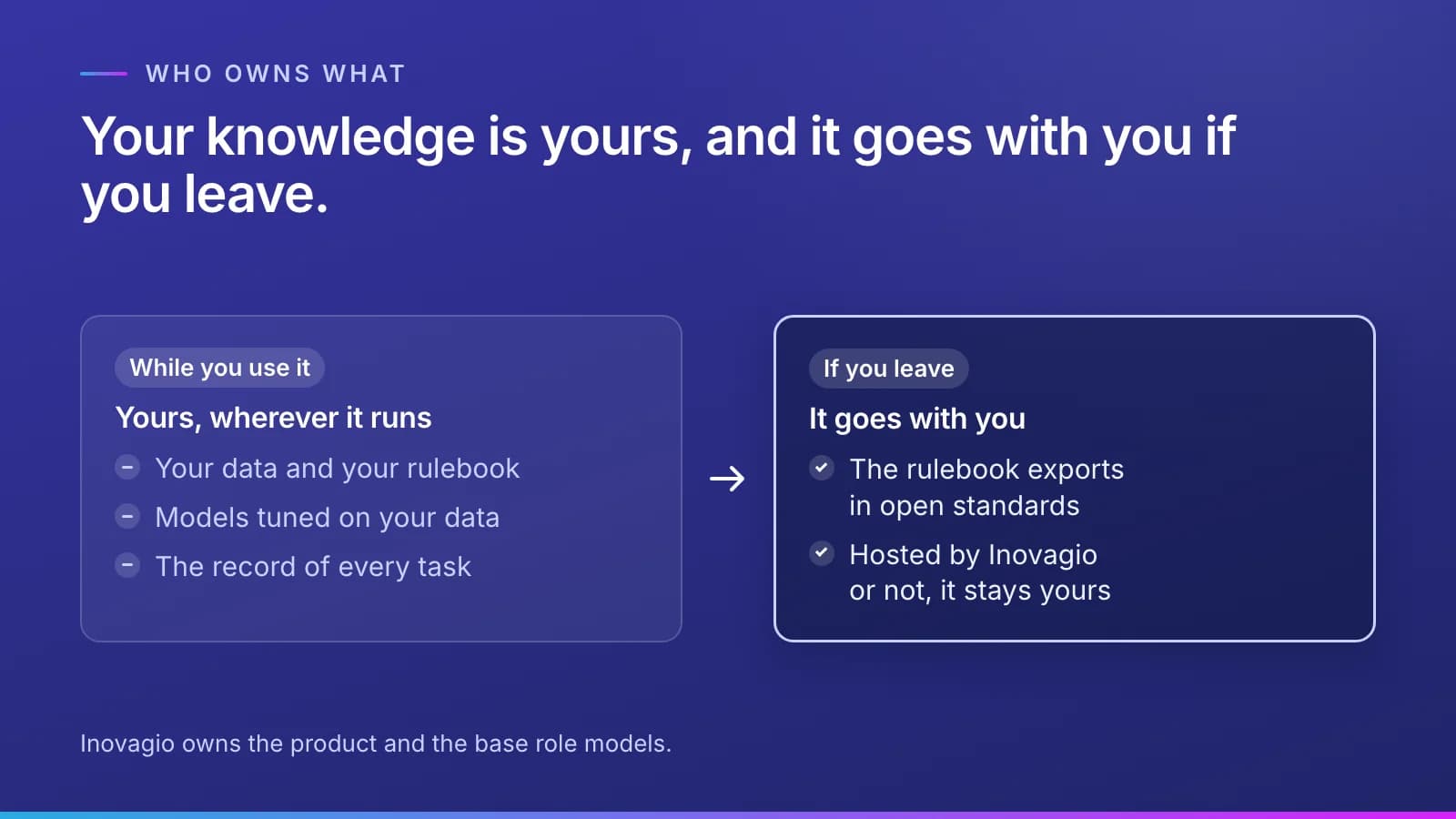
You do. Your data and your rulebook are yours, as are the models tuned on your data. The rulebook exports in open W3C standards such as SKOS and SHACL. Inovagio owns the product and the base role models.
The record of every task is yours as well. Your knowledge and your records go with you if you leave. That holds whichever way you run it, including when Inovagio hosts it for you.
Where does a Virtual Employee run?
#Wherever your data has to stay. There are four ways to run it: hosted for you on Inovagio's own servers, in your own cloud account, on your servers, or air-gapped, on a network with no connection to the internet.
Does our data train anyone else's AI?
#No. Your data never trains a model another customer uses. Learning across customers is off unless you opt in by contract, and then only counts, durations, step outcomes and connector types cross, never a document, a value, a rule, a transcript or personal data.
How cost is measured
#How is the cost of a Virtual Employee measured?
#Per correct task, against your own baseline:
Note
Cost per correct task = (AI and compute + the platform fee's share + review minutes × your loaded hourly rate + rework) ÷ tasks done correctly.
Before anything is built, today's process is costed from your records and your team's estimates, at your finance team's rates; no one is timed. The time your people spend reviewing is counted in the cost, a task reworked later doesn't count as done, and your sponsor puts two or three measures in the charter. The control and cost page lists every input, and our guide to measuring cost per correct task gives your finance team a worksheet for its own numbers.
What does every task record?
#Each task leaves a receipt: who did it, the checked plan, the model, the cost, the time, the rules it ran under, what it touched and the outcome. The record is tamper-evident, and the numbers your finance team sees are worked out from these receipts with your own rates.
Is there a per-seat charge?
#No. There is one platform fee per site, so adding people doesn't add licenses, and every task shows what it cost. Pricing works the way hiring does, in three parts: a place to work, onboarding and pay. The pricing page explains each part.
What results are published?
#For each customer that gives written consent, under an industry-and-size label rather than a name: time to first correct task, cost to first correct task, delays by cause, cost per correct task over time, first-pass success, the needs-a-person rate, rules approved, stop drills and the model family. The definitions are on the scoreboard.
Models
#What happens when better AI models come out?
#A better model can take on more of the queue. The model is a replaceable part: each role runs on a model family you choose behind one interface, and swapping it touches nothing else. The scoreboard shows cost per correct task and first-pass success before and after, on the same rulebook. We explain why in the model is a replaceable part.
Which AI models does a Virtual Employee run on?
#On open-model families, tuned on your data and served by Inovagio's own engine through Origin. There is no per-word bill to an outside AI lab. You choose the family for each role, and it is recorded on every task receipt. Outside models are off by default. Only an administrator you name can turn one on, and only for the tasks they choose.
Virtual Employees FAQ: short definitions
#- Virtual Employee: a worker hired for a routine queue, running on AI you own. It has its own identity and works to your approved rules, and every task it does is recorded. Inovagio uses no other product name for it.
- Rulebook: your rules and how your business works, written down and approved by the people you make responsible, one versioned rule at a time.
- Needs a person: the queue for tasks a check couldn't confirm, split into Needs input (waiting on a fact) and Needs attention (waiting on a decision).
- Shadow mode: the stretch before live work, when a Virtual Employee works real cases while your team still decides, and its results are compared with theirs.
- Cost per correct task: everything the work costs, your people's review time included, divided by the tasks done correctly.
If you'd like these answers applied to one of your own queues, request a briefing.
Questions
What people ask.
What is the difference between AI employees and AI assistants?
An AI assistant helps one person with their own work when they ask; an AI employee works a queue. Inovagio's Virtual Employees learn your rules from your people, do the routine work inside those rules, and hand your people the exceptions with the reason attached. Every task leaves a receipt showing what it did and what it cost.
What is the difference between a virtual employee and a virtual assistant?
A virtual assistant is usually a remote person, or an AI tool, that helps someone with their own tasks. A Virtual Employee takes a whole routine queue, such as invoice matching or servicing requests, and works it inside rules your people approved. It hands exceptions to your people and records every task, including what it cost, so its work can be checked and measured.
Can a virtual employee work in our existing systems?
Yes. A Virtual Employee reads from and writes back to the systems you already run, where you approve it. Many work from a queue through approved connectors, with no account on your network. Those that need a system directly get their own identity in your directory, and every call goes through a gateway that allows only the destinations the job needs.
How long does it take to put a virtual employee to work?
It depends most on your review queues and access approvals, which is why legal, security and discovery start in the same week. A five-day working session produces a baseline and a first run on your records. The workflow is then built, tested on your past cases, signed off and run in shadow mode beside your team, and your sponsor decides on the numbers whether to expand, adjust or stop.
How much does a virtual employee cost?
You budget for a Virtual Employee the way you budget for a hire, in three parts: a place to work, onboarding and pay. There is no per-seat charge. What matters most is cost per correct task, which counts AI, compute, your people's review time and rework, measured against what the same kind of work costs you today and set as a measure in the charter your sponsor signs.
Can we turn a Virtual Employee off?
Yes, from one screen, at whatever level the problem needs, up to everything at once. Spending limits also stop work when they are reached. A Virtual Employee that works on your network stops when its account is disabled in your directory.
The products, industries and examples it covers.
- Role workersVirtual EmployeesVirtual Employees that plan, act and ask before anything leaves the building. Every plan is checked before it runs.
- Knowledge layerSynesisTurns your policies, procedures, records and your people’s know-how into a rulebook your experts approve, which you own and can take anywhere.
- Data engineMNEMOSRecords, documents, vectors, graph and agent memory in one engine, with a ledger behind every write.
- Agent control planeArchonSee every agent at work, and stop or start any of them.
- ModelsOriginRun open models on your own hardware, or a frontier model, through one API, never locked to one vendor.
- IndustryFinance operationsInvoices matched to orders and receipts and coded by your rules, and payments to changed bank details held until a callback is logged. Your team releases every payment.
- IndustryInsurance servicing and reconciliationEach program’s bordereau matched to your policy system, the MGA’s cash matched to what is due, and every line checked against the delegated authority. Your team approves every write-off.
- IndustryLending and account operationsBorrowers’ statements and tax returns spread, covenants tested and annual review memos drafted against your credit policy. Your credit team decides.
- OverviewHire a Virtual EmployeeThe roles, what each knows, and what always goes to a person.
- OverviewHow it worksTen checked steps from your first decision to the day it handles real cases.
- OverviewTrust and governanceEvery action checked, every step recorded.
- OverviewPricingOne platform fee per site. No per-user charge.
Read next.
 Article · ApproachA worker, not a conversationWhat is a Virtual Employee? It has a queue, a memory, a receipt for every task, the approvals and spot checks a rule sets, and a stop button. Here is what each one means, and what a Virtual Employee is not. · updated November 18, 2026 · 7 min read
 Article · GovernanceIs it safe to give AI a login?Work that crosses systems needs a login, and a login is what a security team guards hardest. These are the five controls that make a Virtual Employee safe to credential, how the kill switch works, and the one number a security team should watch. · updated November 18, 2026 · 8 min read
 Guide · QualityHow to measure AI cost per correct taskA per-task price shows what the AI charged. To know what the work cost, you need the formula, the baseline to take first, and a worksheet your finance team can fill in with its own numbers. · updated November 18, 2026 · 8 min read
See it on your work
See how one of your tasks runs, start to finish.
A 30-minute walkthrough of one of your workflows, the approval step and the audit record, with the people who build the platform.