Virtual Employees for government agencies, every permit checked against the code.
Inovagio is AI for government agencies: each application checked against your code, every comment citing its section, before the deadline. Staff decide.
We’ll spend 30 minutes with you on one of your workflows, and you don’t need to share any data.
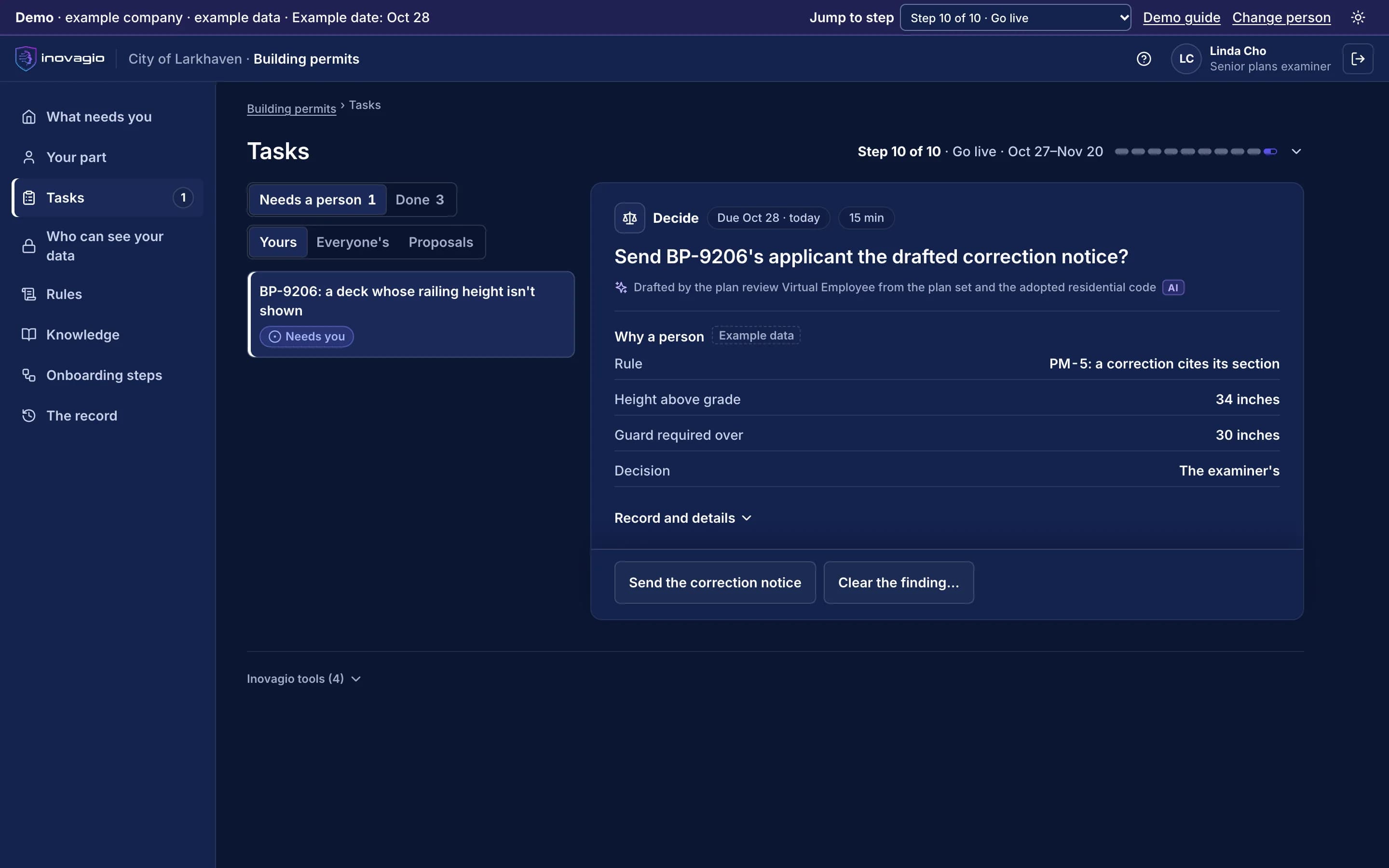
Pictured: a permit application at the City of Larkhaven in the Inovagio App, with a drafted correction notice for the plans examiner to send (example company).
Every application and request runs against a deadline the law sets.
Plan review deadlines and records-request response times don’t move when the backlog grows. Checking an application against the code means applying rules to documents, which is work Virtual Employees take on.
From your first decision to live work: the ten steps at City of Larkhaven.
City of Larkhaven is an example company, not a customer. Its sponsor signs a charter for permit plan review. Nothing touches live cases until the work has been tested, signed off, checked and run beside the team, and each kind of case goes live only when it clears the bar.
1 of 5 · Prepare · Steps 0–2
An account in your environment, and a charter
0
Step 0: Open your account
The city’s account opens on its servers or in its cloud, and each Inovagio person is approved by name, steps and end date.
1
Step 1: Choose the work and sign the charter
The building official signs a charter for plan review: a target, a pass mark, a cost limit per application and when to stop.
2
Step 2: Set up sign-in and access
Staff sign in with the city’s accounts. The plan review Virtual Employee starts with no access.
What your auditors see: The signed charter, and every person allowed into the city’s account, until when.
Permit plan review, with every comment citing the code.
Permit plan review and licensing
Applications checked against your code and checklists, with missing items drafted for staff to send to the applicant.
Benefit applications
Eligibility documents checked against program rules, with every finding cited for a caseworker to decide.
Public records requests
Requests logged, records gathered and redactions proposed for a person to approve, inside the deadline your law sets.
Case work and correspondence
Case notes summarized and letters drafted in your templates, checked before a person sends them.
Grants and compliance
Spending and reports checked against grant terms, with exceptions raised before the deadline.
Procurement and invoices
Invoices matched to contracts and receipts, with approvals where your rules need them.
Built for the people who answer for the work.
Department directors
Routine checks taken off the examiners, and the cost of every task shown beside today’s.
Auditors and compliance officers
Every decision shows the rule, the record and the person who approved it.
CIOs and security teams
One platform to review, signed in through your identity provider, running in your environment.
Decisions about residents stay with public servants.
Virtual Employees check and draft. A public servant decides every permit, benefit and records release, and the decision is on the record (step 10).
Your data stays yours, end to end.
City of Larkhaven’s records stay in its own account, where it chooses to run, and never train anything for anyone else. Your rules, your record and the models trained on your approved results are yours.
Your code, your procedures and your examiners don’t always agree.
In his interview, Frank says every residential permit needs a site plan. Linda says: “For a like-for-like replacement, a water heater or a roof, we don’t ask for one. Everybody knows that.” Two other examiners agree. Inovagio flags the gap instead of guessing, and Frank decides: like-for-like replacements need no site plan but do need a photo of the existing installation; everything else still needs the site plan. That approved rule is now followed on every application.
Every gap between policy and practice goes to the person who decides it; nothing is guessed.
Every rule quotes the words it came from, by the speaker’s role, and names who approved it.
Nobody approves their own change, and every change is tested again before it runs.
Rule review · Residential permits · City of Larkhaven · example company
What the policy says
“Every residential permit needs a site plan.”Building Official · interview
What the team does
“Like-for-like replacements go ahead without one.”Three examiners · interviews
The rule its owner approved
“Like-for-like: no site plan, photo of the existing installation required. Everything else: site plan.”Approved by the Building Official
In force on every application. The Virtual Employees follow version 2, and each decision links back to the rule and the interviews it came from.
Works with your permitting, finance and records systems.
We connect to each system the way it already supports, and reuse what exists before building anything new: read-only first, approved by the system’s owner, under its own limited identity (step 3). Your systems remain the system of record.
Permitting and land management
Tyler EnerGov · Accela · CentralSquare
their APIs
Finance and ERP
Tyler Munis · Oracle · SAP · Workday
their APIs and scheduled file exchanges
Maps and parcels
Esri ArcGIS
its REST services
Records and content
Laserfiche · Hyland OnBase
their content APIs
Each kind of data gets its protections before any work runs.
Each protection is a rule your privacy and security teams approve, proven with planted test values and checked again before go-live (steps 4, 7 and 8).
Residents’ personal data
Every prompt, response and tool call is screened inside your network. Logs keep the category and the count, never the value.
Criminal justice and tax records
Each opened only after its agreement is recorded, with outside models off.
Applications and attachments
Screened before a model reads them. An instruction found inside one carries no authority.
A short form with the questions that matter in government. We reply within one business day.
Government questions
How does permit plan review work?+
Each application is checked against your code and checklists, every comment cites the section it relies on, and missing items are drafted for staff to send to the applicant. Staff make every decision.
How does it keep review and records deadlines?+
Each application and request carries the deadline your code or records law sets. Completeness checks, correction notices and proposed redactions are drafted ahead of it, for staff to approve and send.
Does it make decisions about residents?+
No. It prepares the work against your rules; a public servant decides, and the decision is on the record.
Where does it run?+
On your servers or in your cloud, with sign-in through your identity provider. Residents’ records stay where your policies say.
Can we show an auditor how a decision was made?+
Yes. Each task records what was read, which rule applied, who approved it and what it cost, in a tamper-evident record you can replay.
Is our data used to train shared models?+
No. Your records train only models you own, and only on results your people approved.
See how this works for your team.
A 30-minute briefing on one workflow of yours: whether it fits, what the first steps would be, and roughly what it would ask of your people. No data needed.