
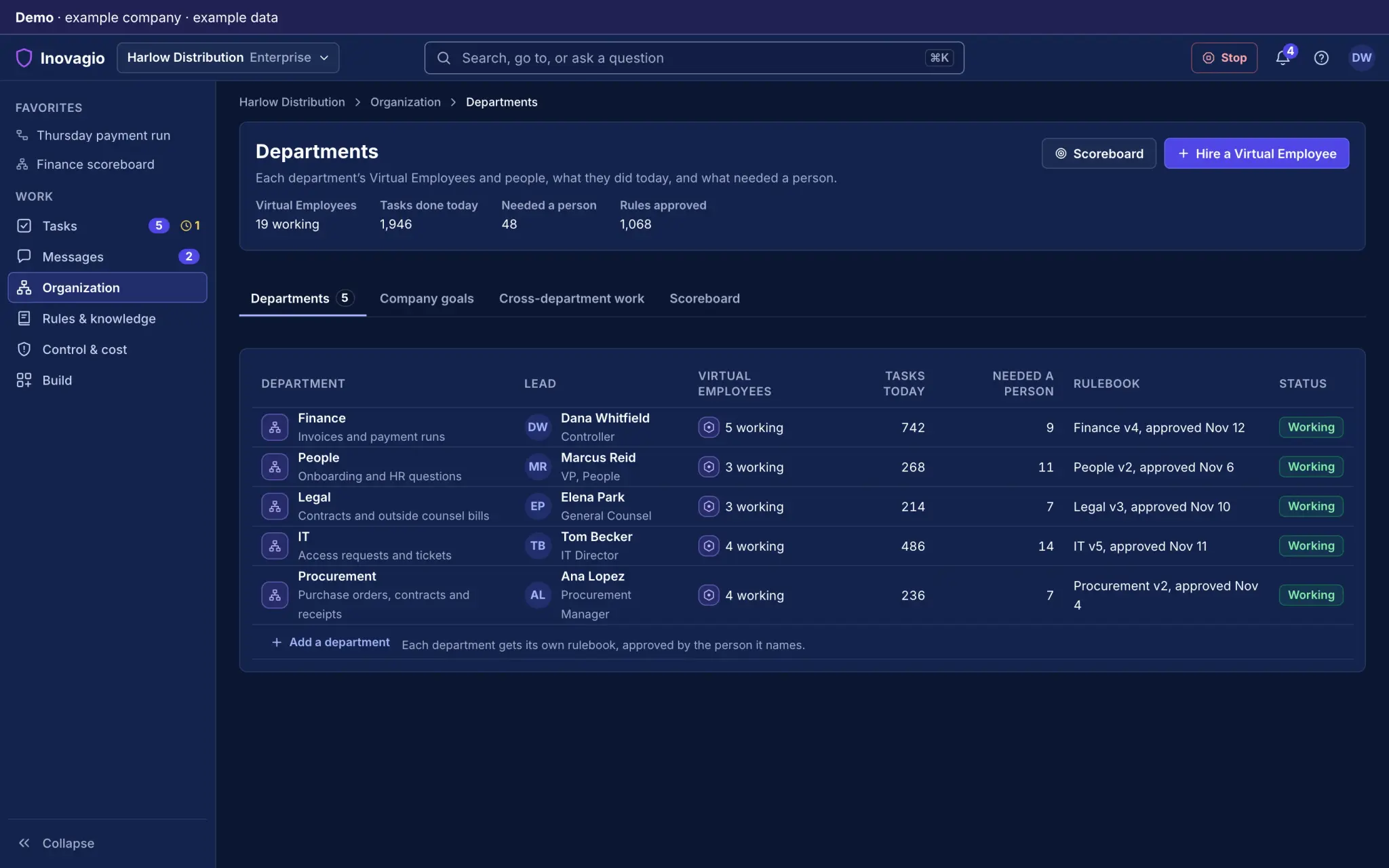
Hire Virtual Employees. Build a workforce you control.
In regulated work, AI has to follow your team’s rules and show an auditor exactly what it did. Until it can do both, it stays in testing and never becomes part of the daily work. Inovagio’s Virtual Employees learn the job from your people and prove themselves on your own past cases before they handle real ones.
For the people asked to bring AI into their department.
We’ll spend 30 minutes with you on one of your workflows, and you don’t need to share any data.

Own it.
Your data, your rules and the record of every task stay yours, wherever Inovagio runs.
Open your account where you chooseControl it.
You approve every permission, and any Virtual Employee stops when you tell it to.
Set up sign-in and accessSee the cost.
Every task shows what it cost next to what the same work costs you today, so you’re comparing like with like.
Set the target and the cost capVerify the work.
Before a Virtual Employee takes on real cases, we test it on your past cases, your sponsor signs it off, and it runs beside your team.
Test it and try to break it
What every Virtual Employee brings to your team.
A Virtual Employee works a queue like a member of your team. It has its own account, which starts with no access, and it follows a rulebook your experts approved. It records every task and what it cost, and you can stop it at any time.
They know your business
Inovagio interviews your people and reads your records, then writes the rules down. Your experts approve each rule before any real work starts.
They do the work correctly
They check every task against your approved rules, before they act and again afterward. Anything they can’t confirm goes to a person. When your team fixes a mistake, the fix becomes a rule they follow from then on.
You’re in charge, and you see the cost
They stop when you say so, and every task shows what it cost.
Why AI stalls in a department
Here are four common reasons, and the step that removes each one.
It doesn’t know how your team works.
A Virtual Employee learns from your people. Every rule it follows is quoted from its source and approved by the person who owns it.
Step 5: learn from your peopleIt has no target, budget or owner.
Your sponsor signs a charter with a target, a cost cap and a way to stop.
Step 1: sign the charterThe data was never checked.
We map each data source to the person who owns it. Then we check and protect the source before any model reads it.
Steps 3 and 4: map and check the dataYou can’t show the auditor what it did.
Your experts sign off every rule before it’s used, and the platform records every step.
Steps 8 and 10: sign off, then go live
“Gartner predicts over 40% of agentic AI projects will be canceled by the end of 2027, due to escalating costs, unclear business value or inadequate risk controls.”
How a Virtual Employee learns the job.
Inovagio learns how your company works from your own people and writes down the rules for your experts to approve. Virtual Employees then do the routine work by those rules, check each result against your records, and send anything they can’t confirm to a person.
Chapter 1 of 5: Listen
Interview your people
Inovagio interviews your people at four levels, from the goals leadership sets to the steps the team actually takes. Each interview is split into parts of 15 minutes or less, and none of it is a performance review.
On the screen: An AP specialist’s part: three short interviews, and she confirms her words before anyone uses them
Step 5: learn from your people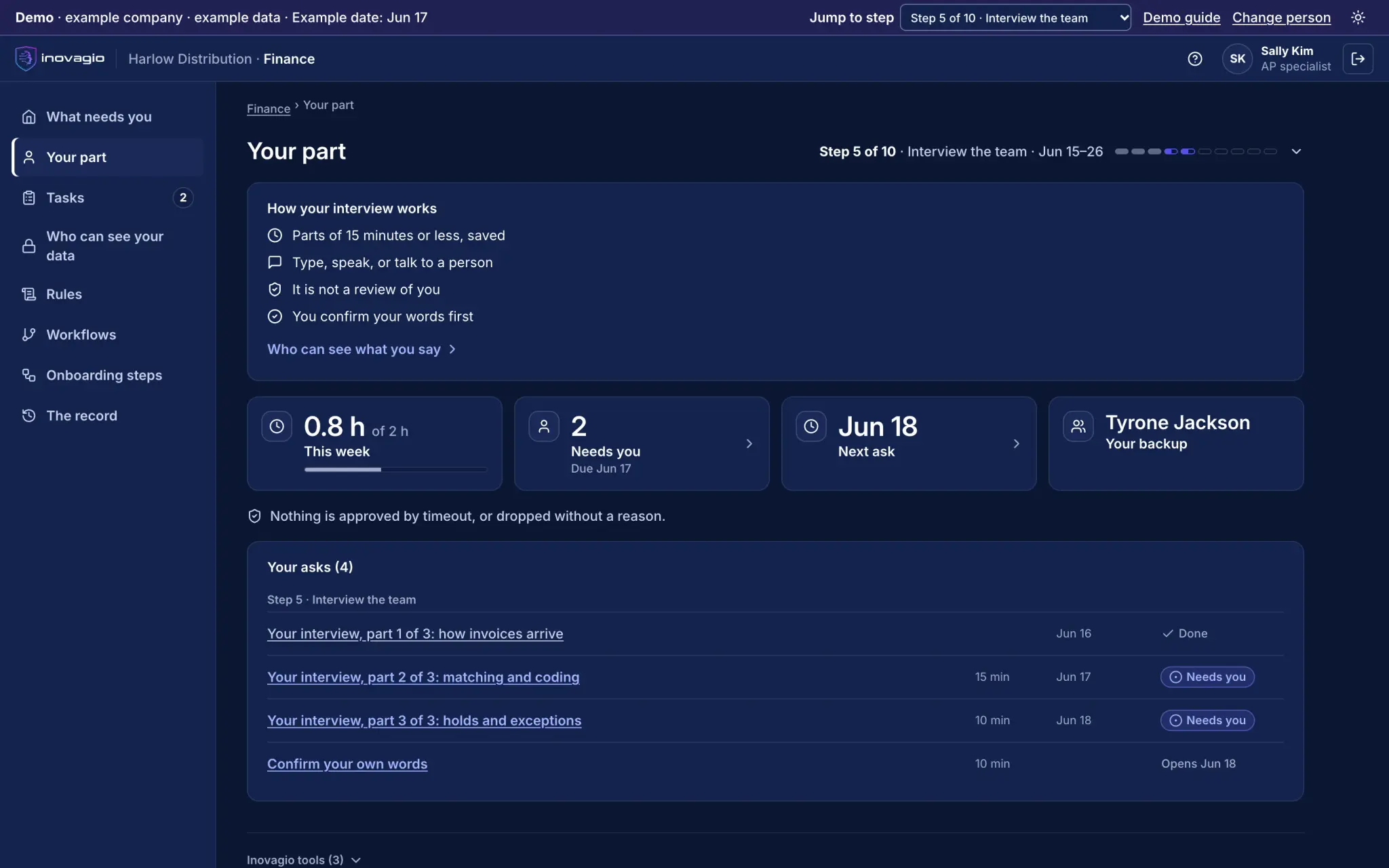
Chapter 2 of 5: Write it down
Draft your rulebook
Inovagio drafts your terms and rules from your documents, your records and what your people say. The right person approves each one, and nobody can approve their own change.
On the screen: 34 cards on vendor terms, each showing how much evidence supports it
Step 6: build the release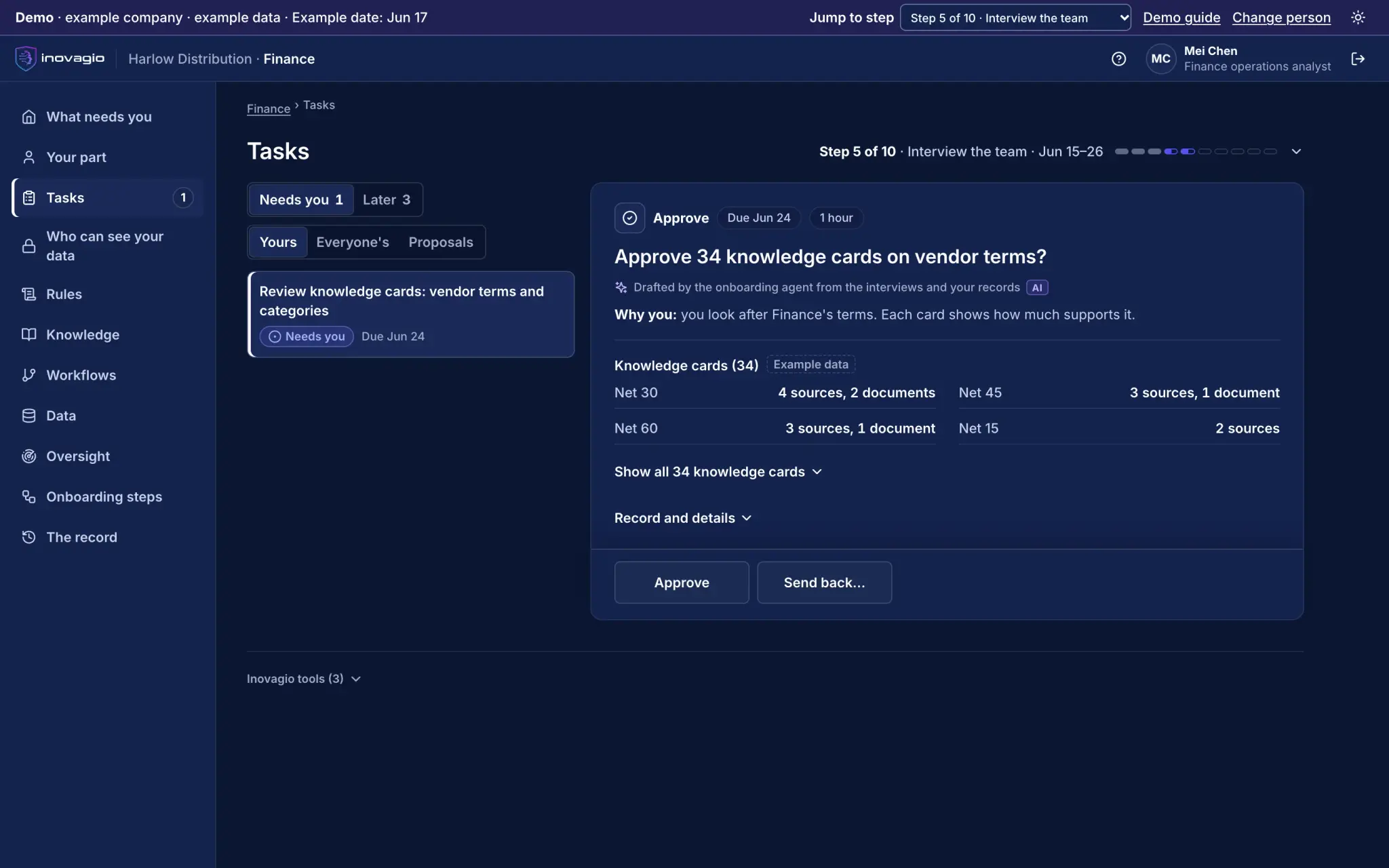
Chapter 3 of 5: Prove it
Test it before it takes on real cases
We test it on past cases that we set aside before building anything, and then we attack it on purpose. Someone who didn’t build it checks the release, and your sponsor signs the exact version that will run.
On the screen: Internal audit checks a release it did not build
Step 8: sign off and verify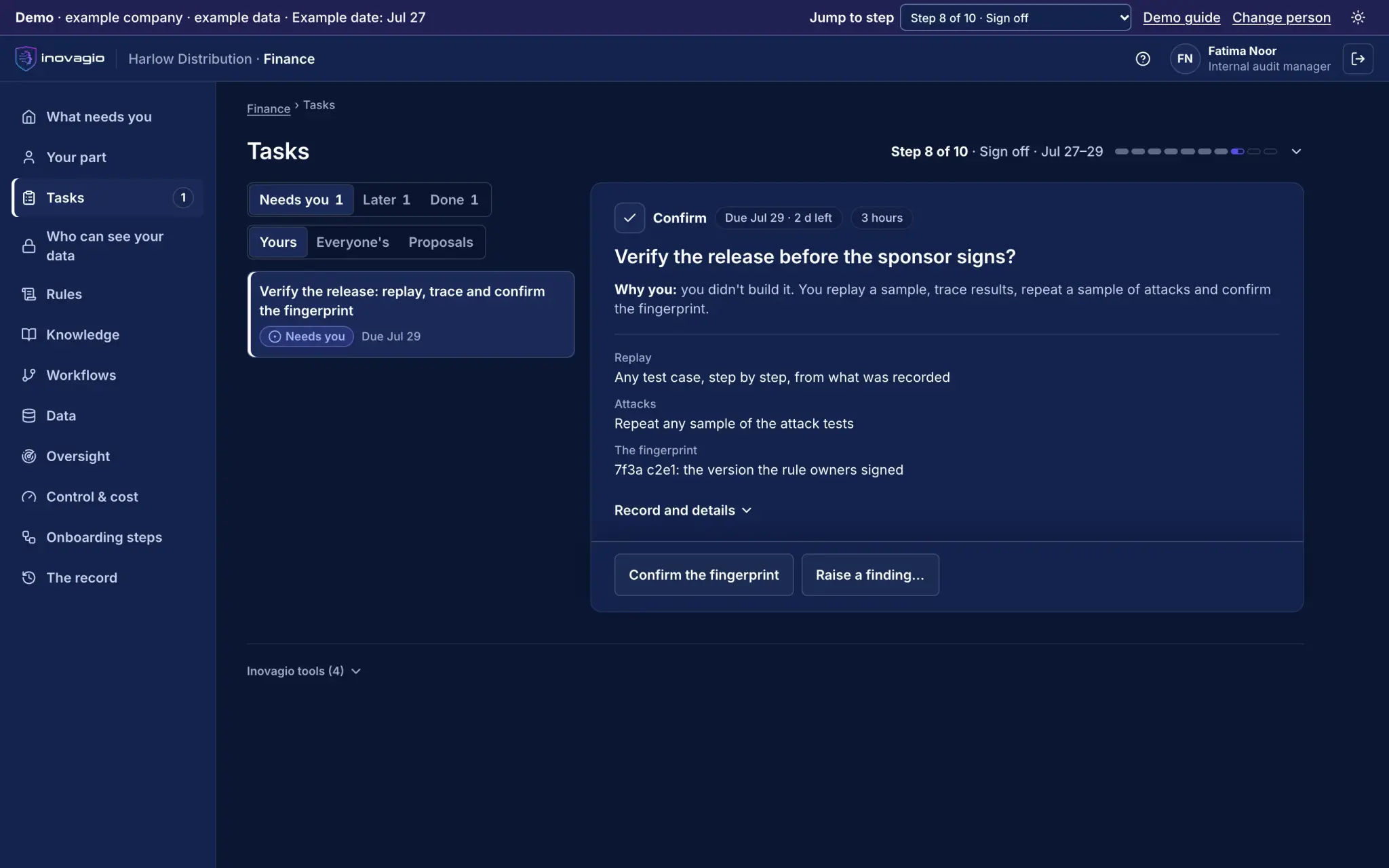
Chapter 4 of 5: Do the work
Only what the checks can’t confirm reaches a person
The Virtual Employee checks each result against your approved rules and records. Clean work goes through. Anything else goes to the person you named for it, with the reason it stopped.
On the screen: An invoice held for a person, with the rule that stopped it
Step 10: go live, one kind of case at a time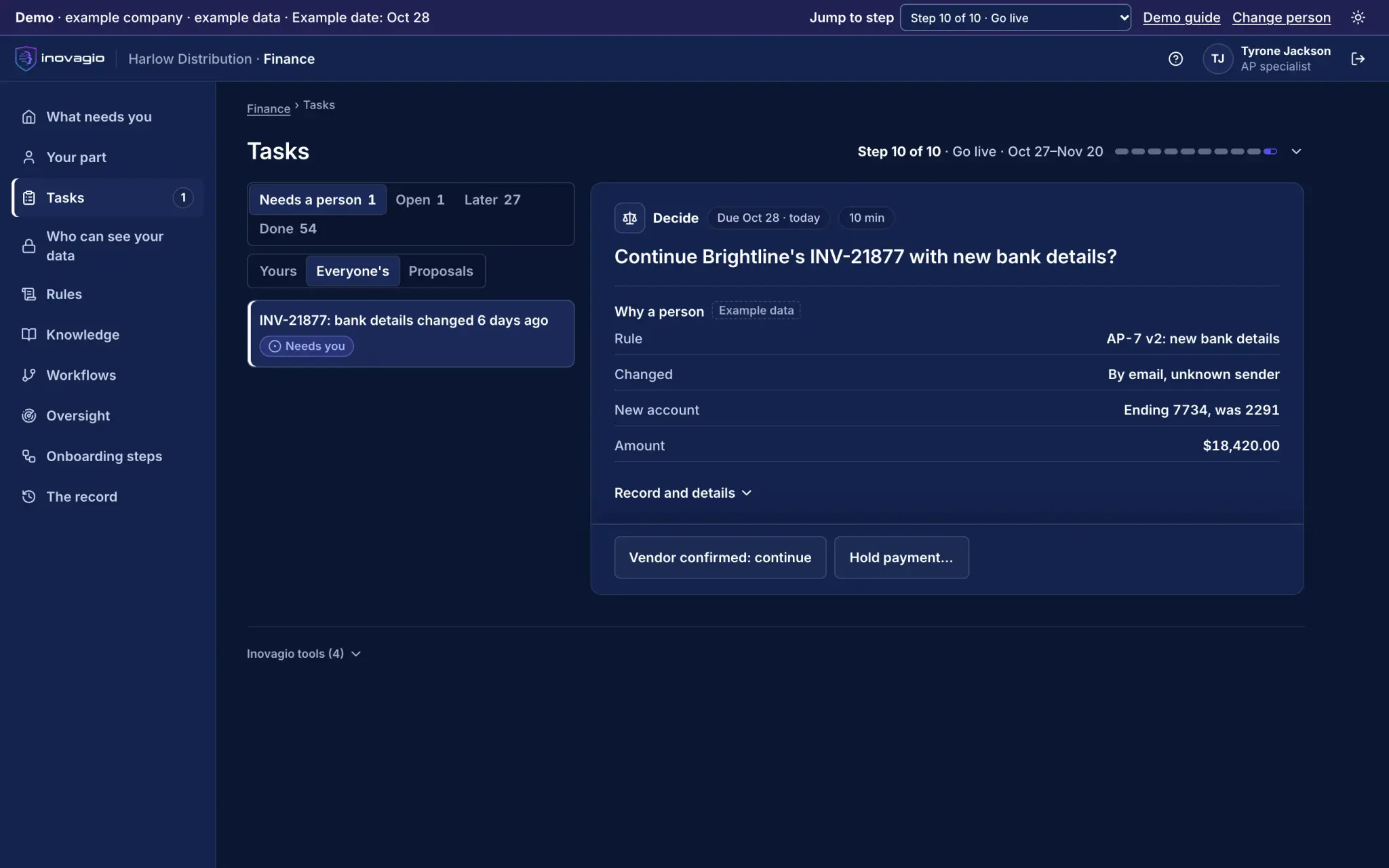
Chapter 5 of 5: Check and learn
Better with every correction
Each failure goes to the person who owns that part of your rules. Once they approve the new rule, it’s tested again before it’s used, and you can roll back any change.
On the screen: A missing rule the test found, in an AP specialist’s own words
Operate: watch, re-test, decide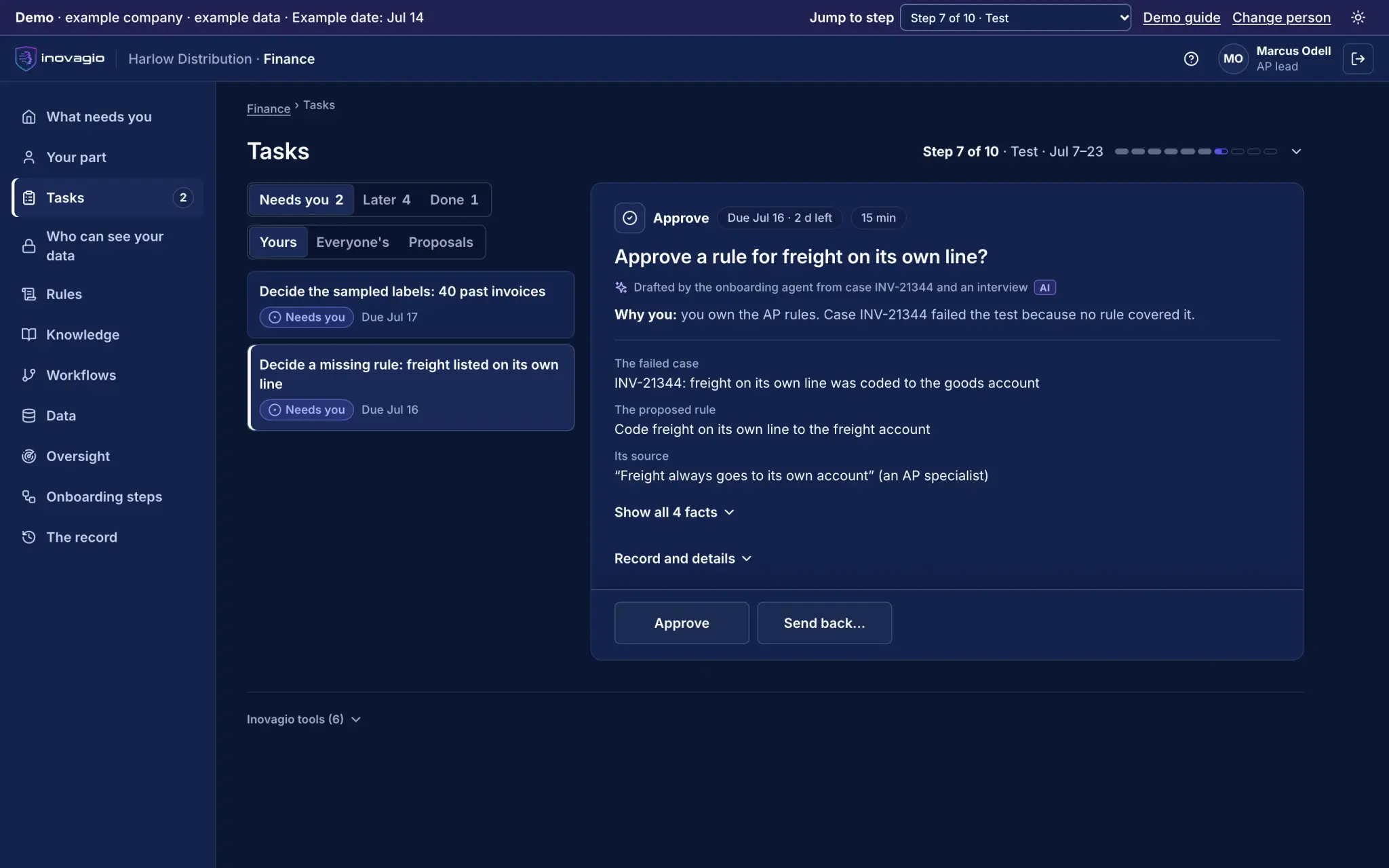


The Inovagio App, on Harlow Distribution’s vendor invoices. Demo · example company · example data.
Ten checked steps take one workflow from your first decision to the day it starts handling real cases.
The steps fall into five stages, named as they are in the App. Your sponsor can stop after any step.
Stage 1
Prepare
We open your account, your sponsor signs a charter with a target and a way to stop, and each Virtual Employee gets its own sign-in, with no access until you grant it.
- 0Account
- 1Charter
- 2Set up
Stage 2
Learn
We map your systems and connect to them read-only, check and protect your data, and write down your people’s know-how in their own words.
- 3Map
- 4Data
- 5Learn
Stage 3
Build
Every rule is written down with its source, its examples and its effect, and the whole set is saved as a single version.
- 6Build
Stage 4
Prove
We test the release on past cases set aside before the build. A reviewer who didn’t build it checks it, your sponsor signs it off, and then it runs in shadow mode beside your team.
- 7Test
- 8Sign off
- 9Shadow
Stage 5
Run
Each kind of case goes live when it clears your bar, and every change is tested again.
- 10Live
- Operate
Your people step in only where a rule calls for them. No Virtual Employee works on live cases until we’ve tested it, a reviewer has checked it, your sponsor has signed it off, and it has run beside your team.
See every step on How it worksWhere Virtual Employees take on the routine work.
Each team gets Virtual Employees for its own routine work, following rules the right person has approved. Your people handle the exceptions.
Finance
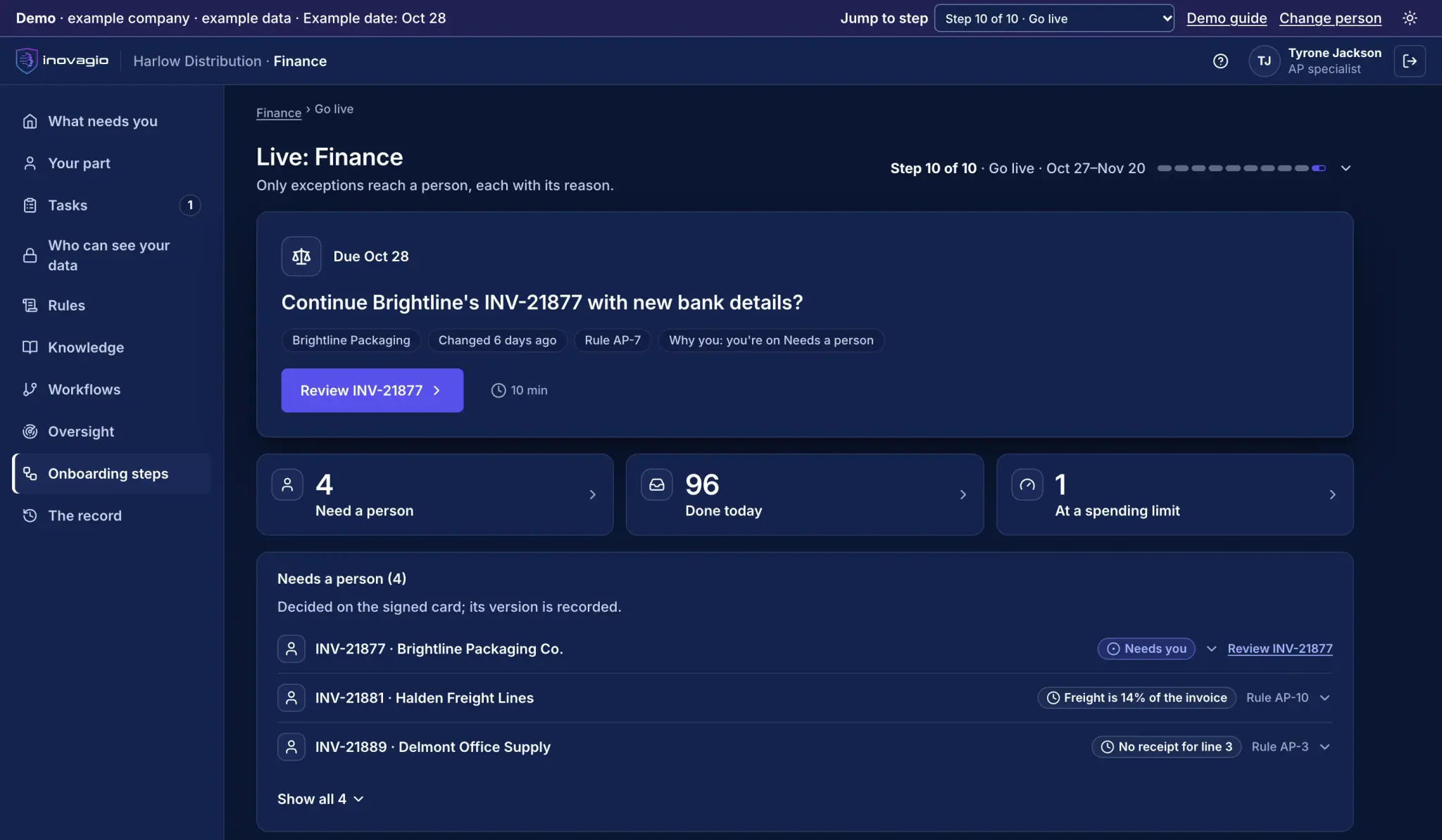
- Virtual Employees match each invoice to its order and receipt and code it by your rules. Any invoice that fails a check is held.
- Clean invoices join the payment run. Anything else goes to the person you named for it, with the reason it was held.
- When a vendor’s bank details change by email, the payment waits until a person confirms the change with the vendor.
Moving money always needs a person.

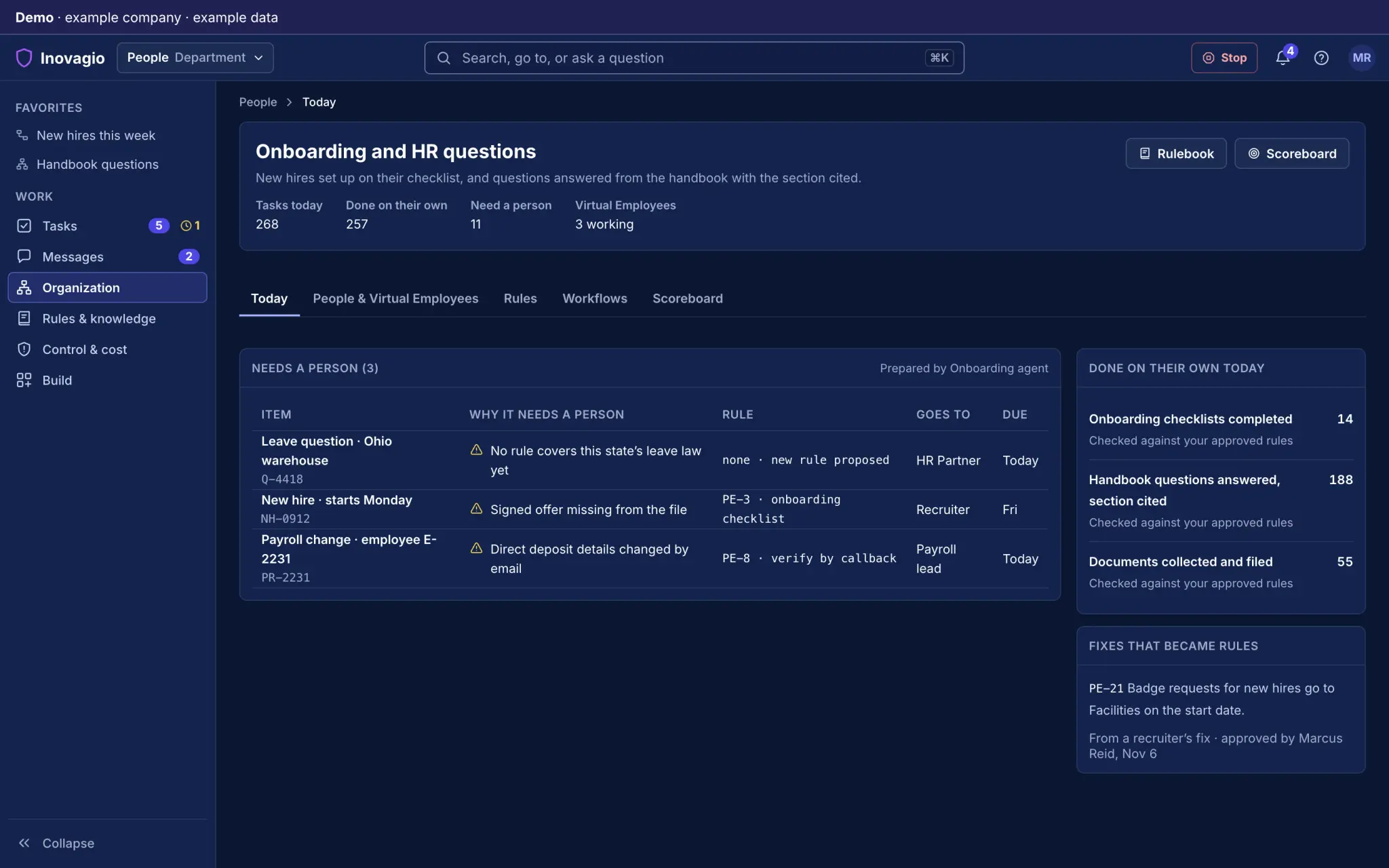
HR
- They set up new hires from your onboarding checklist and send anything missing back to the right person.
- They answer questions from your handbook and cite the section. Anything the handbook doesn’t cover goes to your HR team.
- Payroll changes that arrive by email wait until someone calls to verify them.
Decisions about people stay with people.

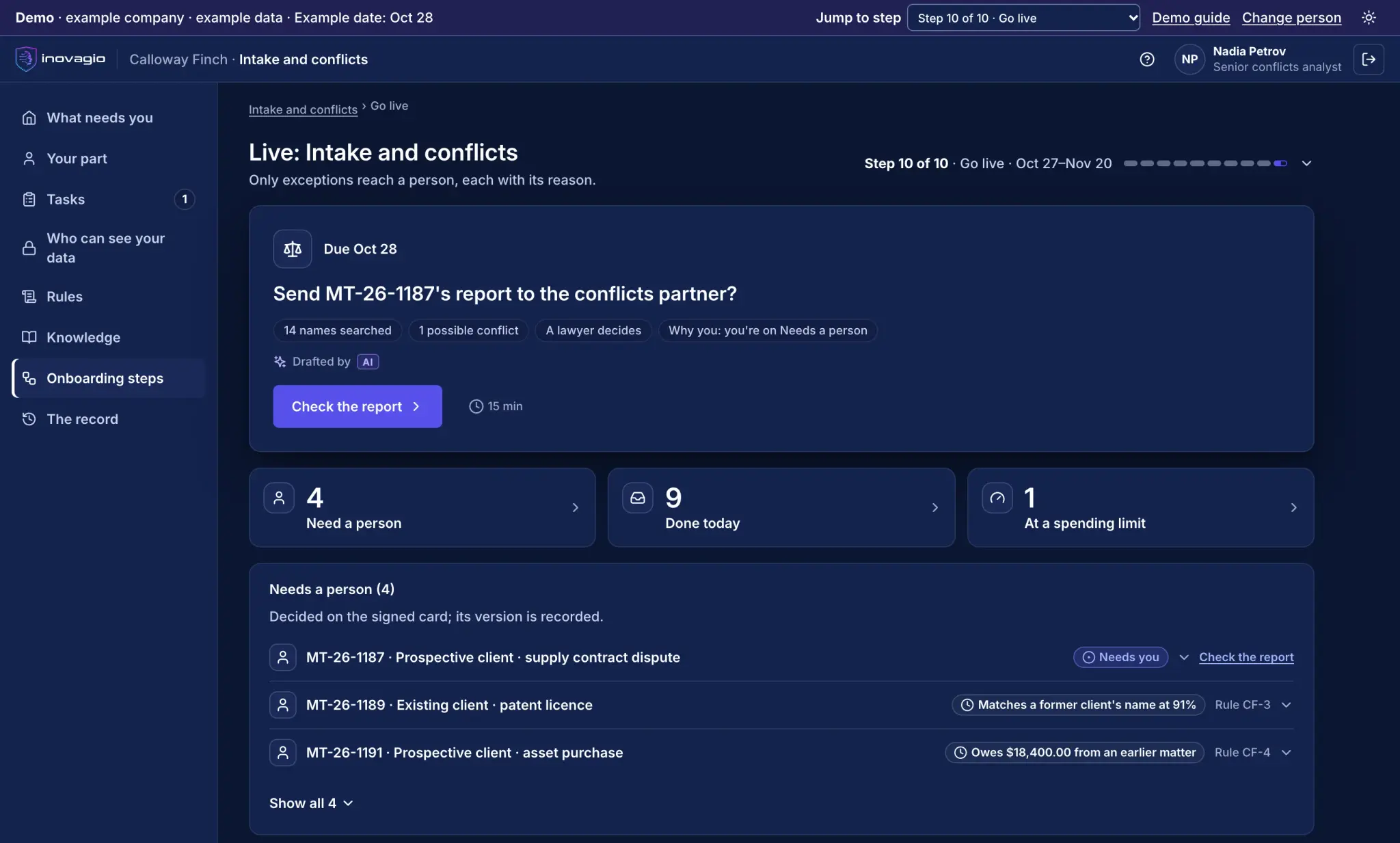
Legal
- They search each new matter’s parties against your client records and draft the conflicts report. A possible conflict goes to a conflicts analyst, and a lawyer decides.
- They compare each contract with your playbook, mark the clauses that fall outside it and rank them by risk. They suggest your fallback position, and a lawyer confirms it.
- They read dates from filings and orders and check them against your docketing rules before anything goes on the calendar.
Your lawyers make every call.

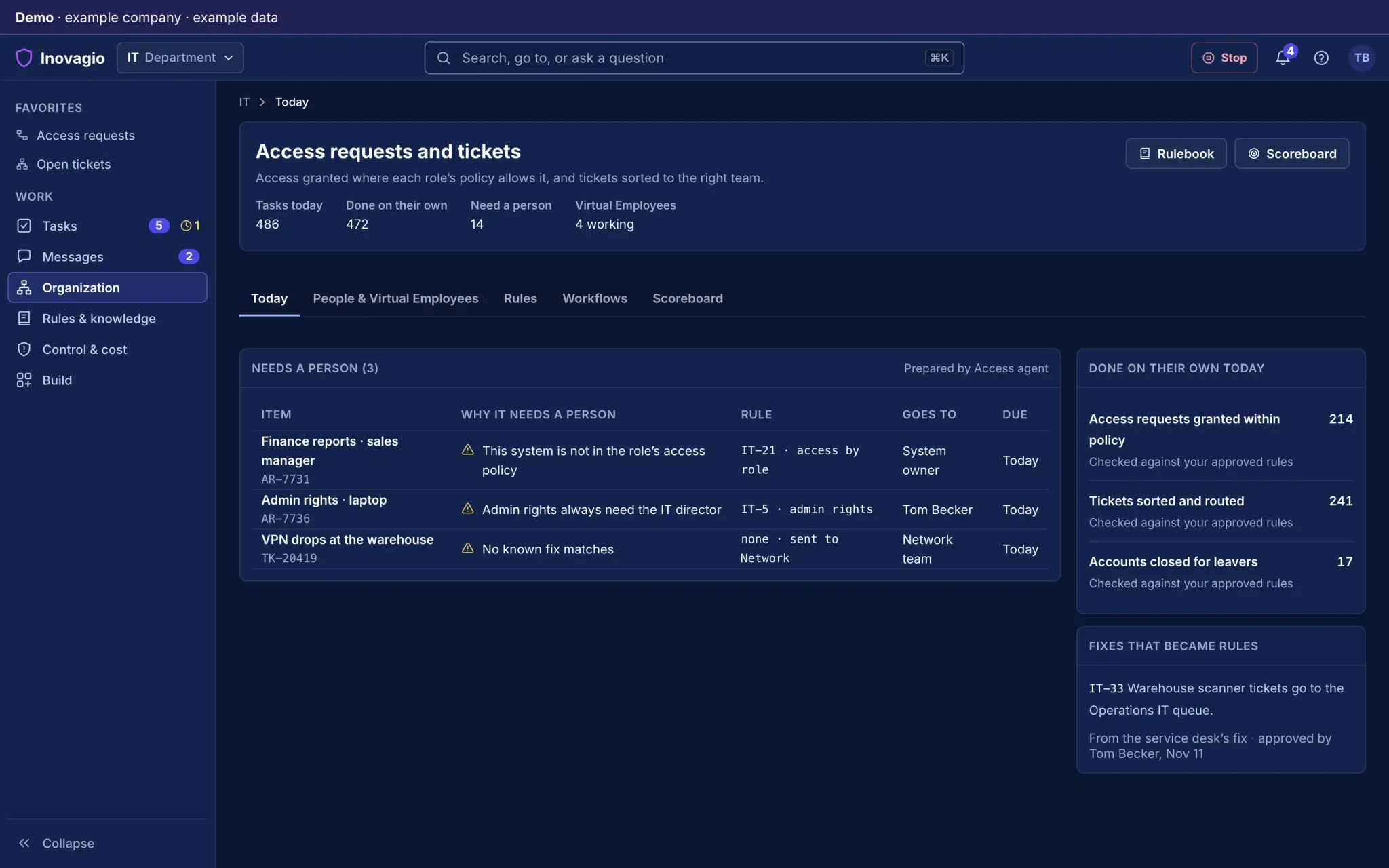
IT
- They check each access request against the role’s access policy and send any that fall outside it to the system owner.
- They read and sort tickets and route each one to the right team.
- When someone leaves, they close that person’s accounts the same day.

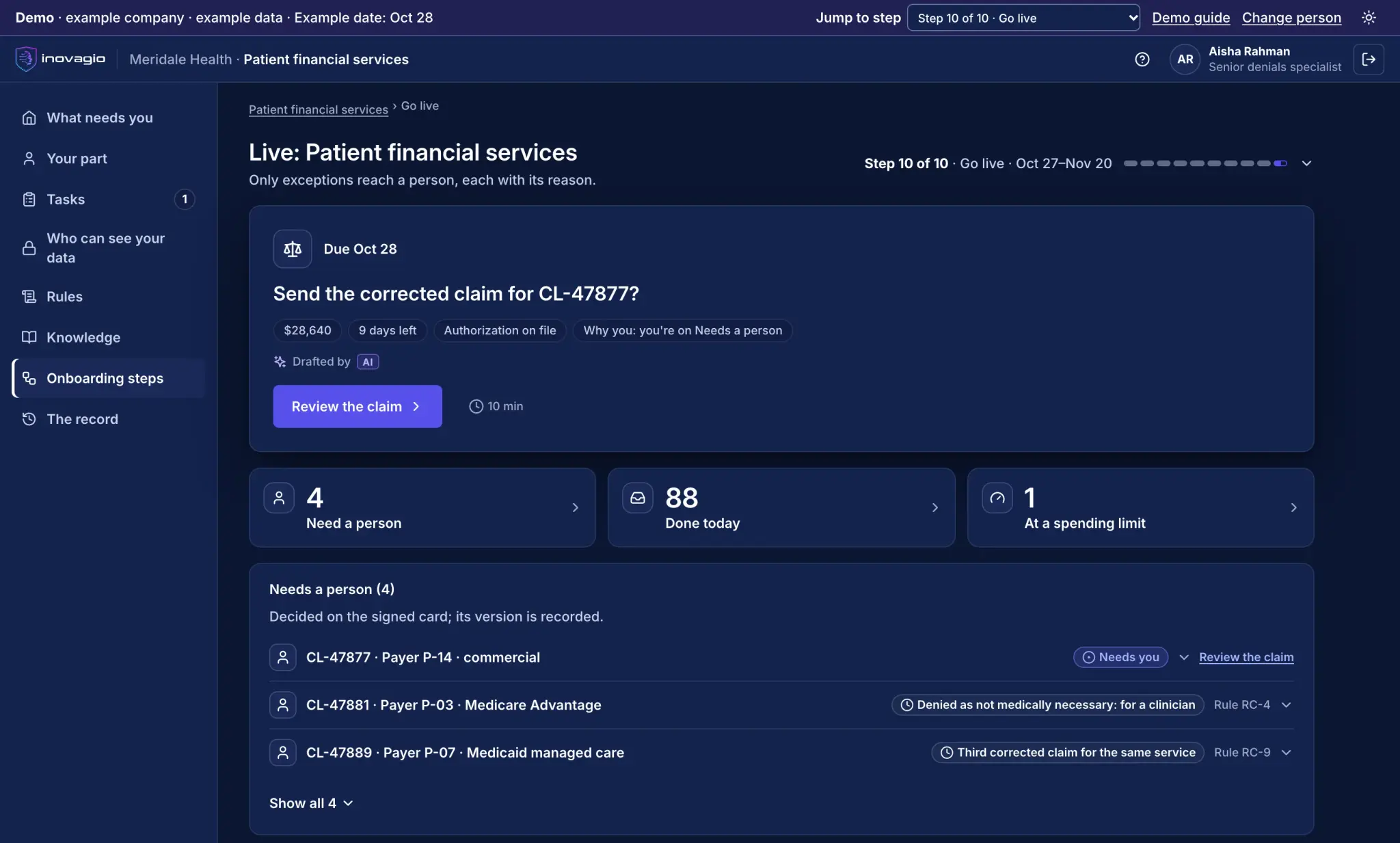
Healthcare
- They read each denied claim against the payer’s rules and draft the corrected claim or appeal for a person to send. A denial over medical necessity goes to a clinician.
- They read each referral, check it for anything missing and route it to the right clinic. Any gaps go back to the sender.
- They check provider files against your credentialing checklist and flag items that are about to expire.
Clinicians make every care decision.

Government
- They check applications against your code and checklists and draft a note of what’s missing for staff to send to the applicant.
- They log records requests, gather the records and propose redactions for a person to approve, all within the deadline your law sets.
- They check spending and reports against the grant terms and flag exceptions before the deadline.
Staff make every decision.
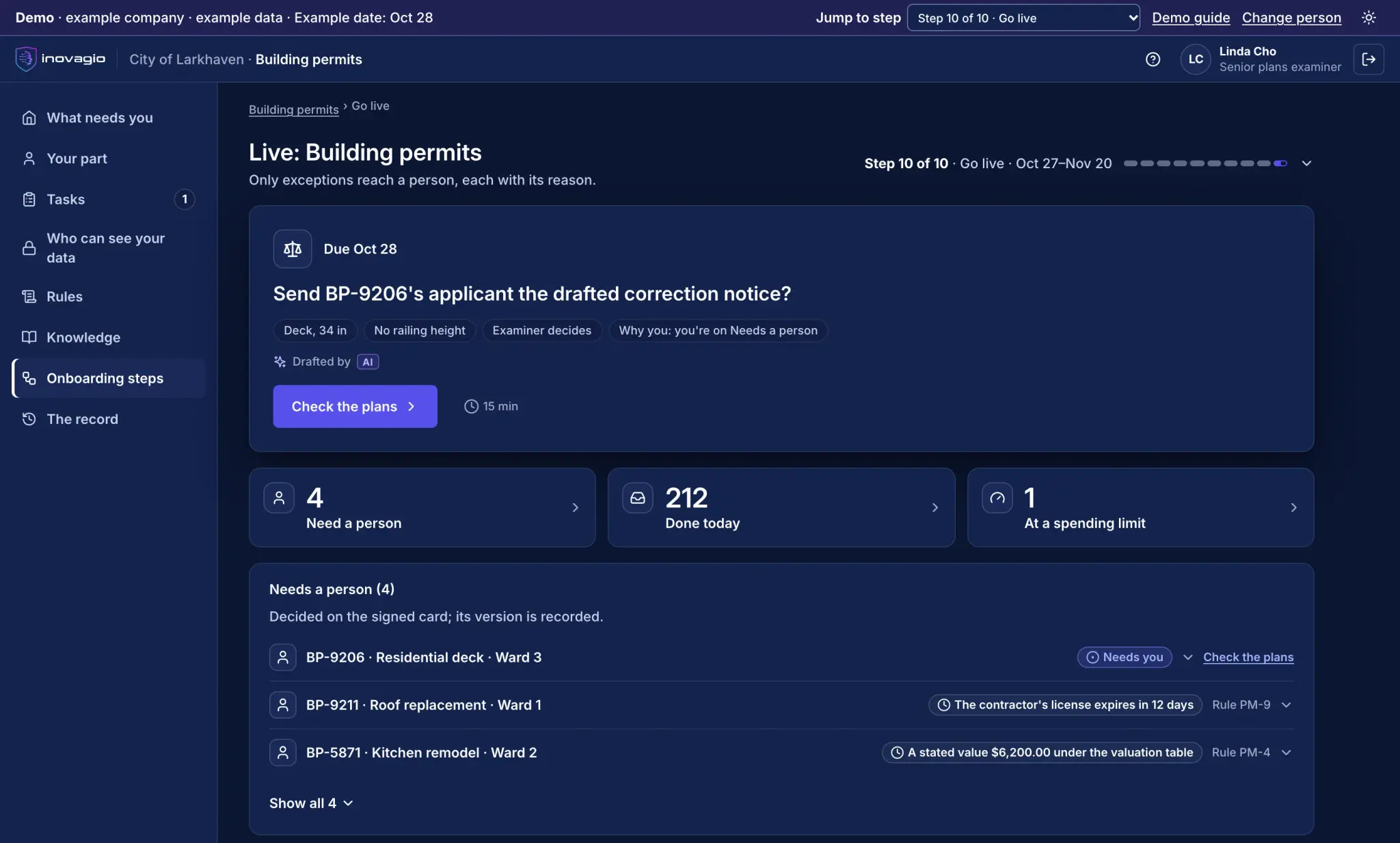

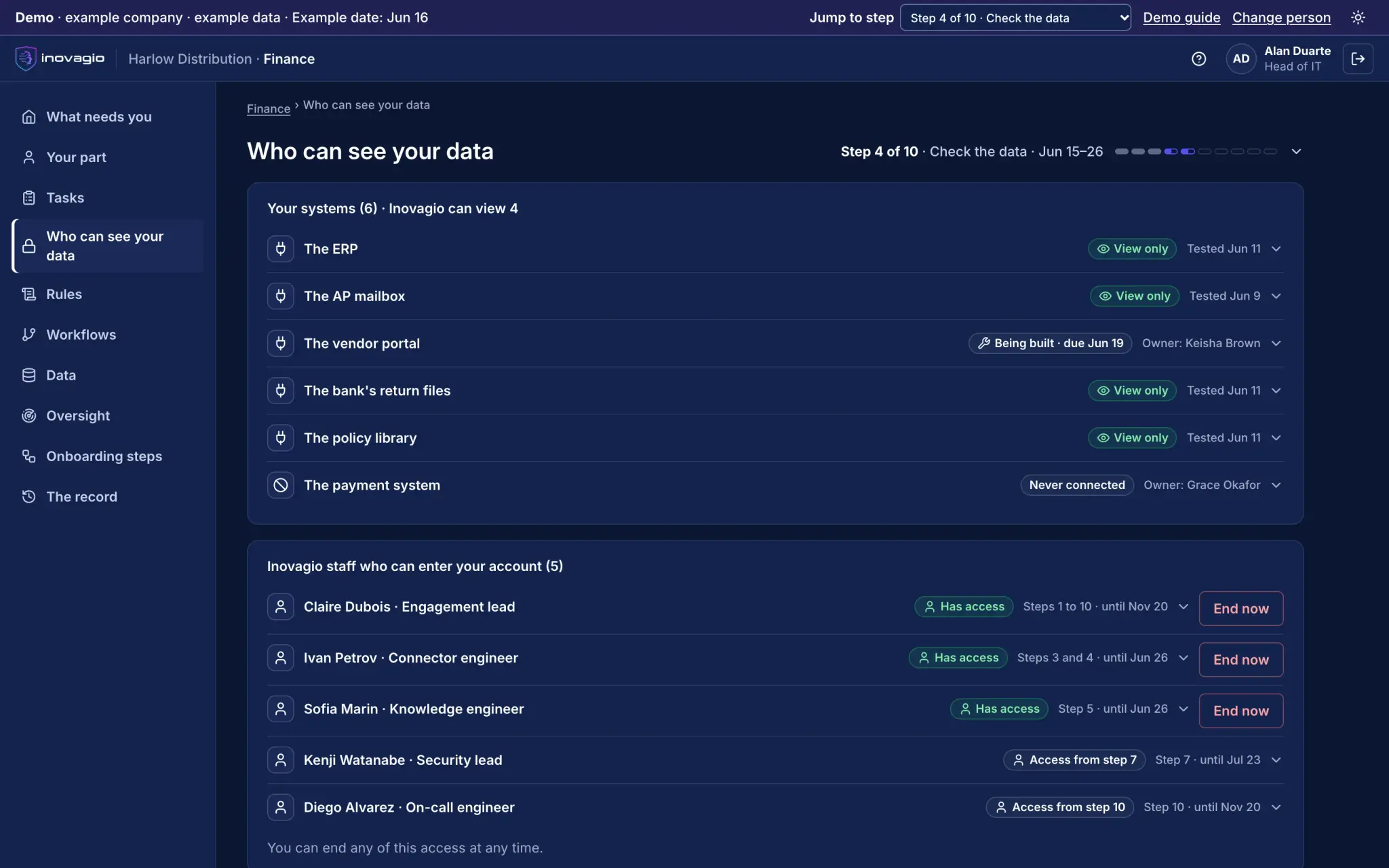
Own your AI, end to end.
Your data, knowledge and models stay yours, wherever Inovagio runs. You can see every connection and every Inovagio person who can see your data, with the date each person’s access ends. You can end any of our people’s access at any time.
Where your data lives, and who can see itRuns where you choose
Run it in your data center, in your cloud, on a network with no internet connection, or let us host it.
Stops from one screen
Stop one kind of case, one Virtual Employee, one department or everything at once.
Accountable for every action
Each Virtual Employee has its own account, which starts with no access. You approve every permission, and it keeps a record of everything it does.
Your data trains no one else’s model
Your data never trains a model another customer uses. Outside models stay off unless your administrator turns one on.

What makes Inovagio different.
Three things are built into the platform, and you can check each one.
One platform with one set of controls
Every Virtual Employee uses the same sign-in and permissions, the same policy check, the same approval flow, and the same tamper-evident record and cost ledger. That gives your security team one system to review.
See how it is built as one systemOne engine for everything your Virtual Employees know
MNEMOS holds your records and documents, how your business is organized, the work queues and every decision, and it works alongside the systems you already run. Ask one question and you get one answer, with the source of every fact.
What MNEMOS holdsYour rulebook goes with you, wherever Inovagio runs
Outside models stay off until you turn them on, and you can export your rulebook in open formats at no charge.
Why Inovagio
The platform has four parts that work together.
Inovagio makes its own data engine, model engine and controls, so you can run all of it wherever you choose and keep it under your control.
KnowledgeMNEMOS
Learns how your business works, from records, rules and past decisions.
One engine holds every kind of business data and encrypts it, wherever you run it.
- Holds your records, documents and every decision (MNEMOS)
- Turns interviews into approved rules (Synesis)
- Turns documents, scans and email into knowledge that cites its sources (Perception)
Where it works: Steps 0, 4 and 5
Every Knowledge productWorkers
Does the work inside your rules and shows each step on screen.
Virtual Employees check every step before and after they take it. Exceptions go to your people, and each fix becomes an approved rule.
- Each one has its own queue, rulebook, record and stop button (Virtual Employees)
- Designs, tests and rolls back the workflow (Ergon)
- Runs each step with approvals and tool permissions (Agent Harness)
- The cards your people use to make decisions and corrections (Opsis)
Where it works: Steps 1 and 6 to 10
Every Workers productIntelligence
Scores, trains and runs the AI models your work needs, from a list you approve.
We tune open models on your data. You don’t need your own AI lab, and outside models are optional.
- Lists the models you may use and scores them per task (Origin)
- Runs open models on hardware you control (Inference Server)
- Trains your own models (Forge)
Where it works: Steps 1 and 7
Every Intelligence productControl
Puts you in charge of every Virtual Employee and its cost.
Stop any Virtual Employee at once and cap what it spends. A tamper-evident record shows what each task cost.
- Connects your systems, read-only first (Connect)
- Checks every prompt and tool call (Guard)
- Stops a Virtual Employee, a department or everything at once (Archon)
- Records every log, trace, cost and decision (Panoptes)
Where it works: Every step, 0 to Operate
Every Control product
How it worksEvery product, by groupAll products for developers
For teams that apply rules to documents and money all day.
Find your team. Each page shows the work Virtual Employees take on and how your people stay in charge.
Finance operations
Finance teams in any industryAP invoices matched and coded · duplicate and fraud checks · month-end accrualsInsurance servicing and reconciliation
Carriers and MGAsBordereaux reconciliation line by line · premium cash and agency statements · endorsementsInsurance claims files
Carriers and MGAsClaim files audited against your standards · deadline letters drafted for the adjuster · adjusters decide every claimBanking and lending
Community banks and credit unionsRenewal files assembled · credit memos drafted · your credit team decides every loanHealthcare providers
Health systems and physician groupsDenials matched and appeals drafted · remittances checked against contracts · staff and clinicians make every decisionHealth plans
Medicare Advantage, Medicaid and commercial plansEnrollment and premium files reconciled · directory entries verified · a physician decides every medical appealLegal
Law firms and legal teamsConflict checks across parties and aliases · new matters opened with conflicts cleared · intake documents chasedGovernment
Cities and agenciesPermit plans reviewed against code, with the section cited · applicants told what’s missingDefense suppliers
Manufacturers and integratorsExport reviews prepared · release packages checked · every approval recordedYour team
Any high-volume, rules-heavy workTell us about your workflow. We’ll measure today’s cost with you, then take it through the ten steps.
Sally stops keying invoices. Now she decides the hard ones.
Virtual Employees match and code every invoice for Sally, an accounts payable specialist. She decides only the exceptions, with the rule and evidence in front of her. The charts show published industry benchmarks.
Invoices needing a personlower is better
Typical 19.9%, best in class 11.8%.Cost per invoicelower is better
Typical $9.90, best in class $2.67.Invoices per AP person each yearhigher is better
Typical 9,483, best in class 24,284.
We measure your numbers on your own work and count them the same way as today’s, so the comparison is fair.
Show the benchmarks as a table
| Measure | Typical AP team | Best in class | With Virtual Employees |
|---|---|---|---|
| Invoices needing a person | 19.9% | 11.8% | Your rate, measured on your own work |
| Cost per invoice | $9.90 | $2.67 | Your cost per correct task, measured on your own work |
| Invoices per AP person each year | 9,483 | 24,284 | Your volume, measured on your own work |
Sources: Ardent Partners, Accounts Payable Metrics that Matter in 2026 (summary by Medius); APQC accounts payable benchmarks, in Procurify's whitepaper, August 2024. Inovagio’s figures come only from your own invoices, measured on your own work.
Check our work before you talk to us.
One published formula
We publish how cost per correct task is counted, with your people’s time priced at your rates. Your finance team can check our math.How to read a task record
Each task’s record holds the rule and its version, the checks that ran, who decided and what it cost.The NAIC AI Bulletin checklist
How each control maps to what the NAIC AI Model Bulletin asks of insurers.Who does what, and when
What each person contributes, when, and where you can stop.Pricing
How the platform is priced, and how a task is counted.
Find what you need for your role.
Pick your role to see your questions and their answers.
- CEO and boardWhat is it, and what is the risk to the company?
- CFO and COOWhat will it cost to set up and run, and how do we stop it?
- CIO and ITIs it really one system, and what will IT have to maintain?
- CISOIs an AI with a login a new way in?
- PrivacyCan your people see our data, and will it train anyone’s model?
- ComplianceCan we show the examiner what it did, case by case?
- Internal auditWho checks the release, and how?
- RiskIs it a model under our model-risk policy?
- Vendor riskCan I get every document in one place?
- LegalWho owns what, and does delete mean delete?
- ProcurementWhat is billed, and can we leave?
- Department headWould it fit our work, and what will it ask of my team?
Guides
New guides for bringing AI into a department.



Find out how Inovagio can help your team.
Every project starts with one workflow your people know well. We measure it against what that work costs you today.
What you get
We take one workflow through the ten steps on your own cases. Your experts approve your rules, and a named project lead stays with you from kickoff to go-live.
What your team brings
A sponsor, a department head, short interviews with the people who know the work, an owner for each system and rule, and a reviewer who had no part in building the Virtual Employee.
Our commitments
Everything runs inside your account, where you choose to run it. Your data trains no one else’s model, and your sponsor can stop after any step.
- BriefingWe’ll spend 30 minutes with you on one of your workflows. You don’t need to share any data.
- Your accountWe open it where you choose to run it, once we’ve agreed how your data is handled.
- CharterYour sponsor signs a charter with a target, a cost cap and a way to stop.
- The ten stepsWe test the Virtual Employee, a reviewer checks it, your sponsor signs it off, and it runs beside your team before each kind of case goes live.
Companies that want to help shape the platform can apply to be a design partner.
We agree on scope, timing and terms in the charter.